| ID |
Date |
Author |
Subject |
|
133
|
Sat Dec 12 03:30:50 2015 |
Alfred, Chris, Phong | change configuration of NNAIDA modules in setup |
We want to reduce the configuration of the setup to 4 FEE cards (8 NNAIDA modules), so we only have to isolate 4 of them from the cooling crate for a noise test. Following instructions in April2015 test logbook.
Copied directory /MIDAS@aidas to /MIDAS@aidas.121215
In /MIDAS@aidas/config/TclHttpd/aidas1@8015 edit file:
-rw-rw-r--. 1 npg npgstaff 2281 May 3 2015 startup.tcl
Now scripts does 'lappend ACQSERVERS nnaida$i' from i=1 to 8
|
|
18
|
Fri Oct 24 16:02:26 2014 |
Alfredo Estrade | bench tests with pulser |
Performed pulser measurements with test setup at Daresbury lab, with main purpose of remembering how to operate the system! The status is similar to what Chris observed in Elog entry #14. Confirmed ASIC settings as in entry#4 of elog.
The pulser spectra shows FWHM of ~ 13.5 ch for all FEE64 cards with no DSSD connected to the system (i.e. Kapton cables unplugged). Some channels in a few FEE64 cards show two peaks on the pulse spectra, but still narrow and only slightly wider distribution for the two peak combined (~ 15 ch, see Figure 1).
With the DSSD connected, the pulser spectra shows a double peak structure with FWHM ~ 250 ch for each peak (Figure 2).
However, for NNAIDA#11 and #12 a few ASICs had high level of noise, and were therefore used in the 1GeV range to become quiet (ASIC3 for nnaida#11, ASIC1 and 2 for nnaida#12). Figure 3 and 4 show sample of these noisy channels.
A good question brought up by Patrick is if the true noise level with a biased DSSD corresponds to these 'noisy' ASICs, or to the ones that are much more quiet (maybe some signal path disconnected for these?). Measurements with a radioactive source could clarify this.
Figure 1: pulser, no DSSD connected
Figure 2: double peak structure for pulser spectra for NNAIDA13 (similar spectra seen in the other FEE64 cards)
Figure 3: spectra for NNAIDA#11 with biased DSSD connected, and no pulser signal going into the system (only noise)
Figure 4: spectra for NNAIDA#12 with biased DSSD connected, and no pulser signal going into the system (only noise)
|
|
908
|
Thu Oct 12 16:40:21 2023 |
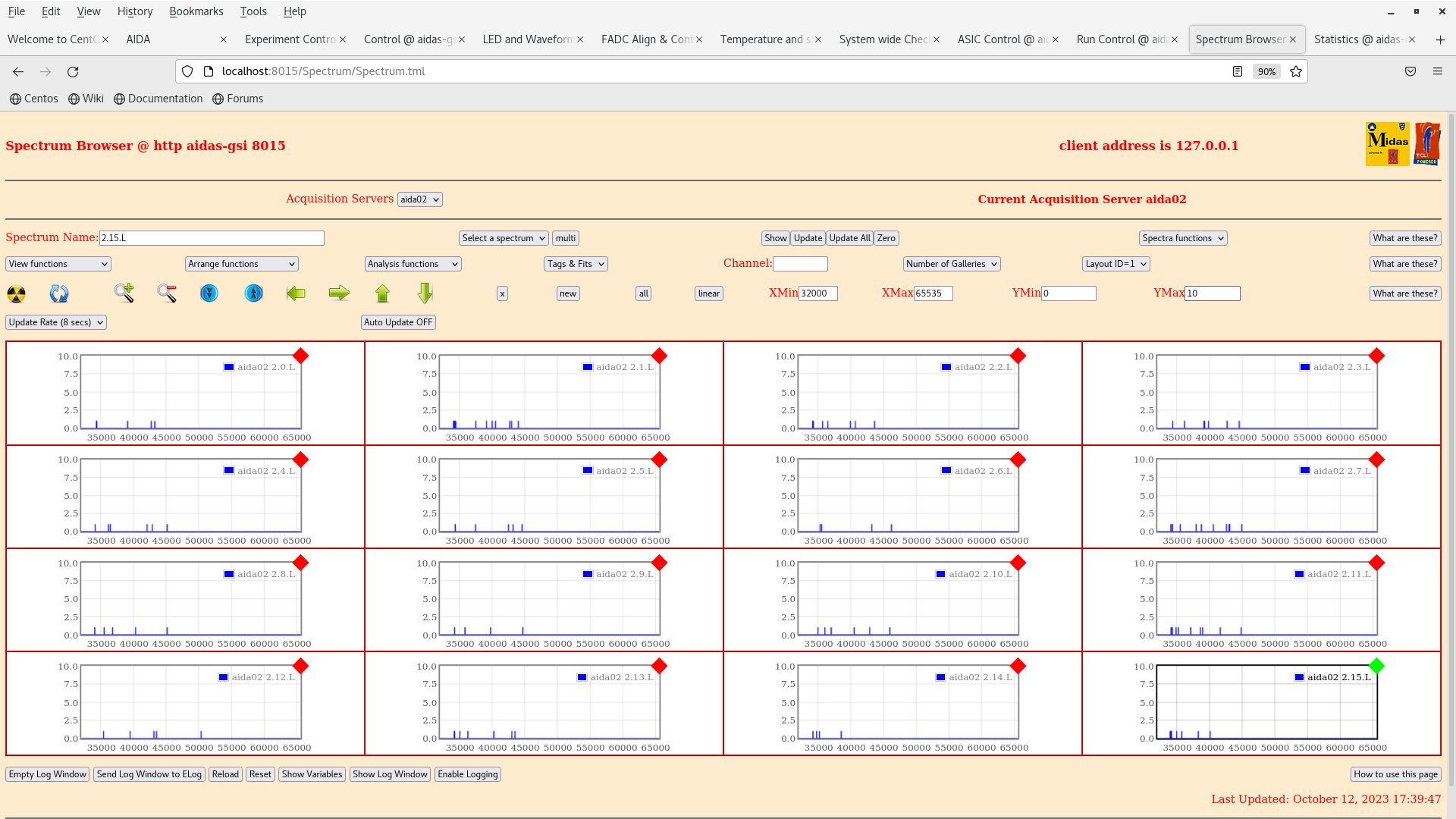
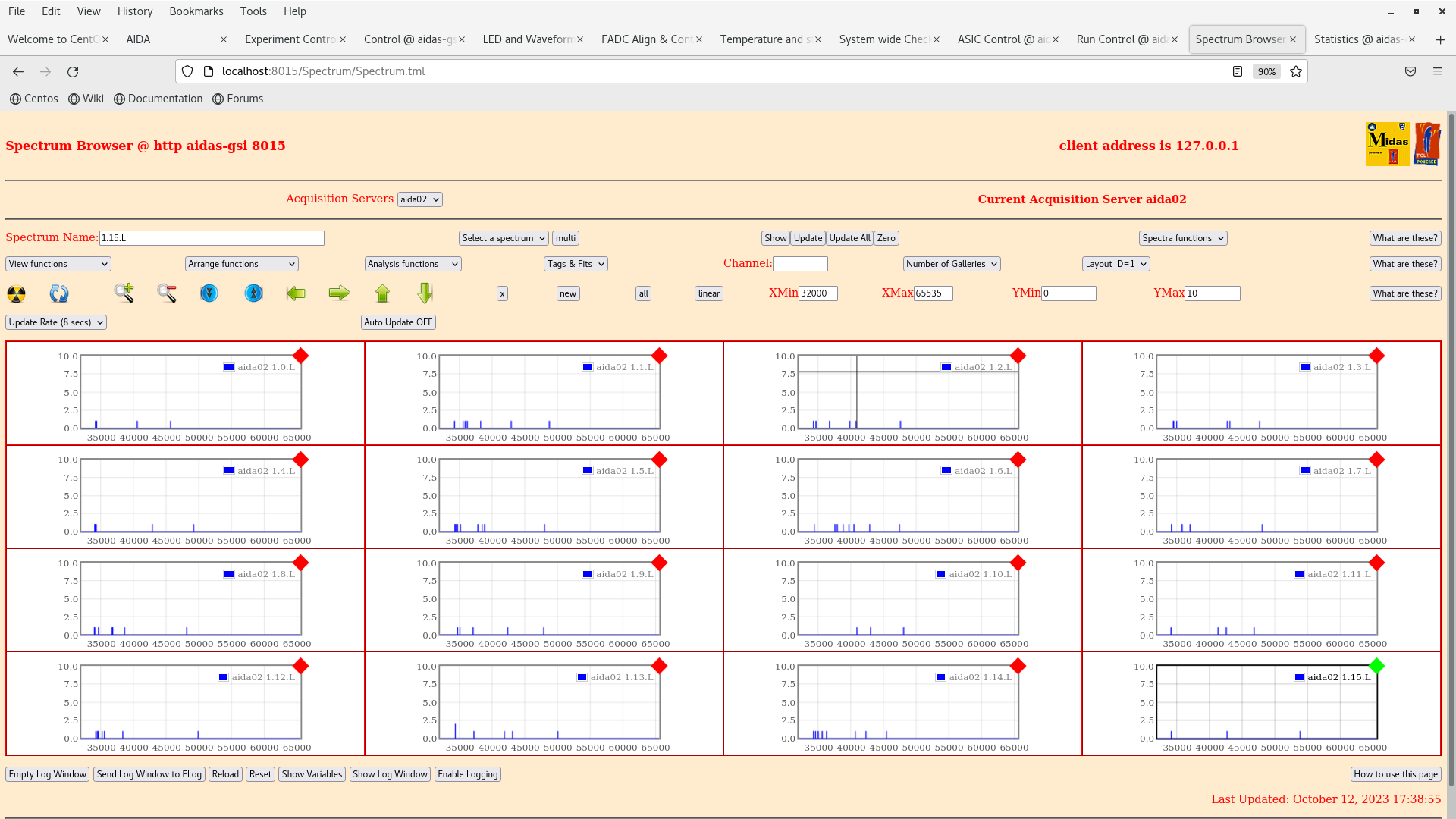
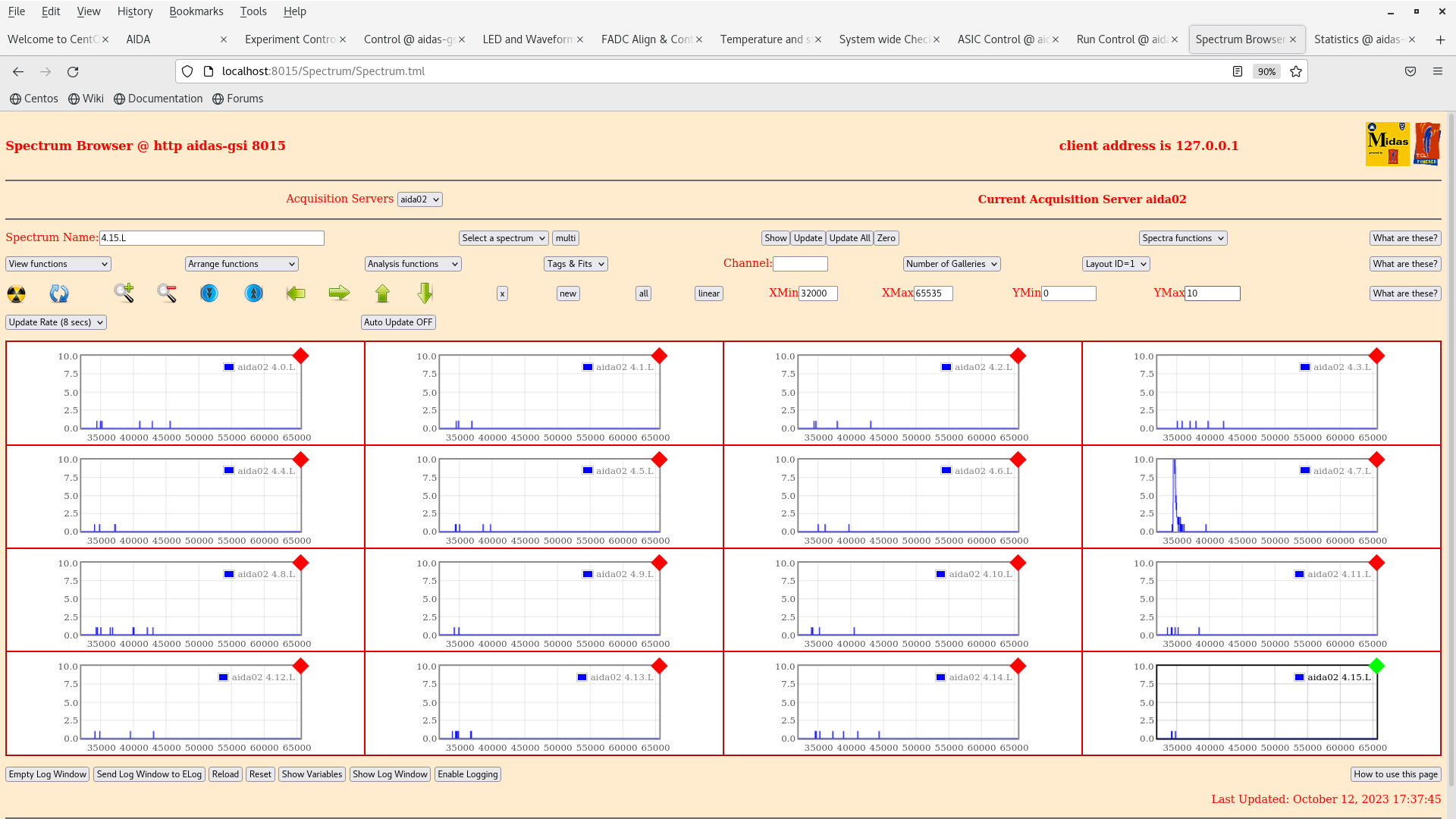
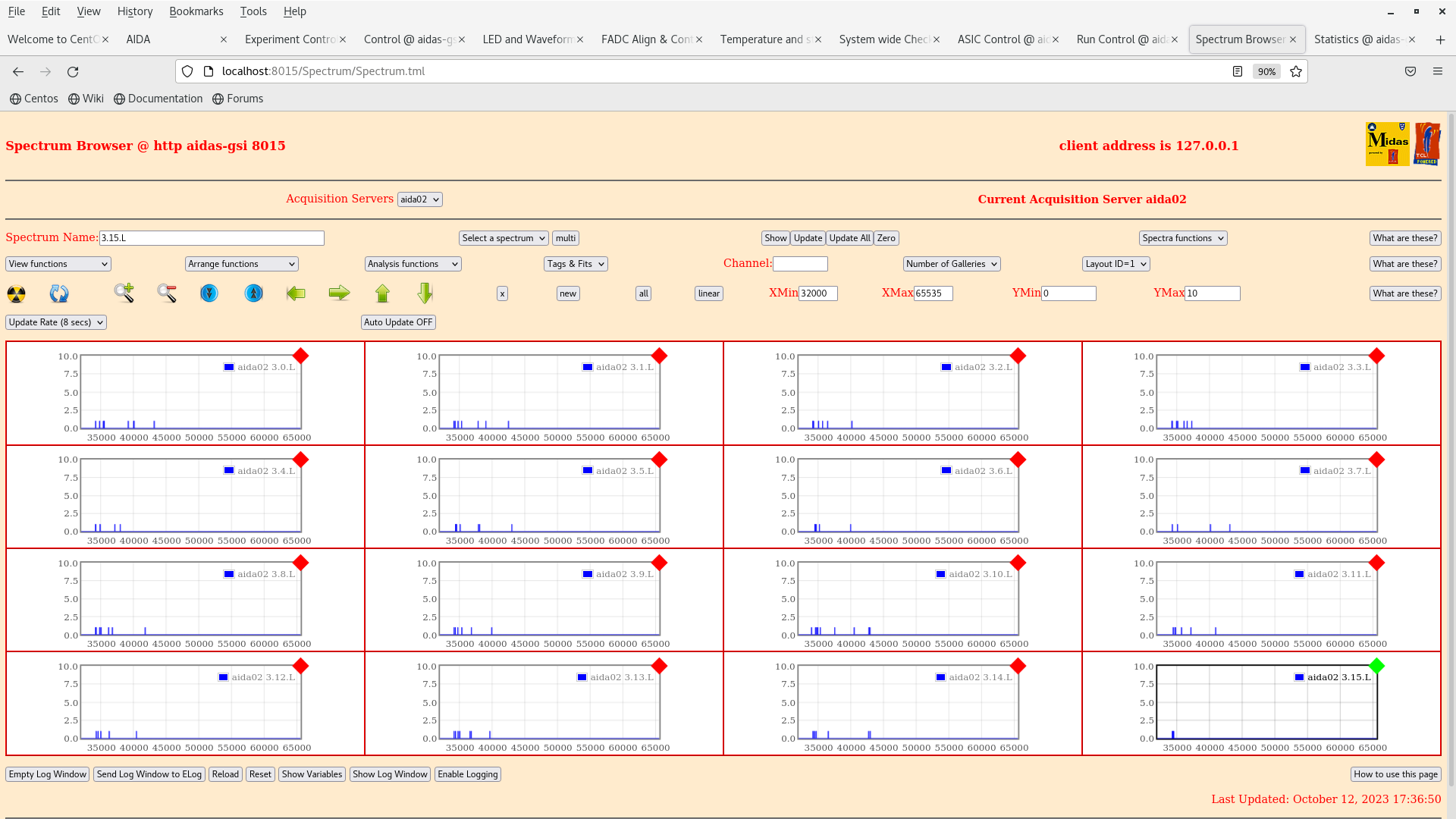
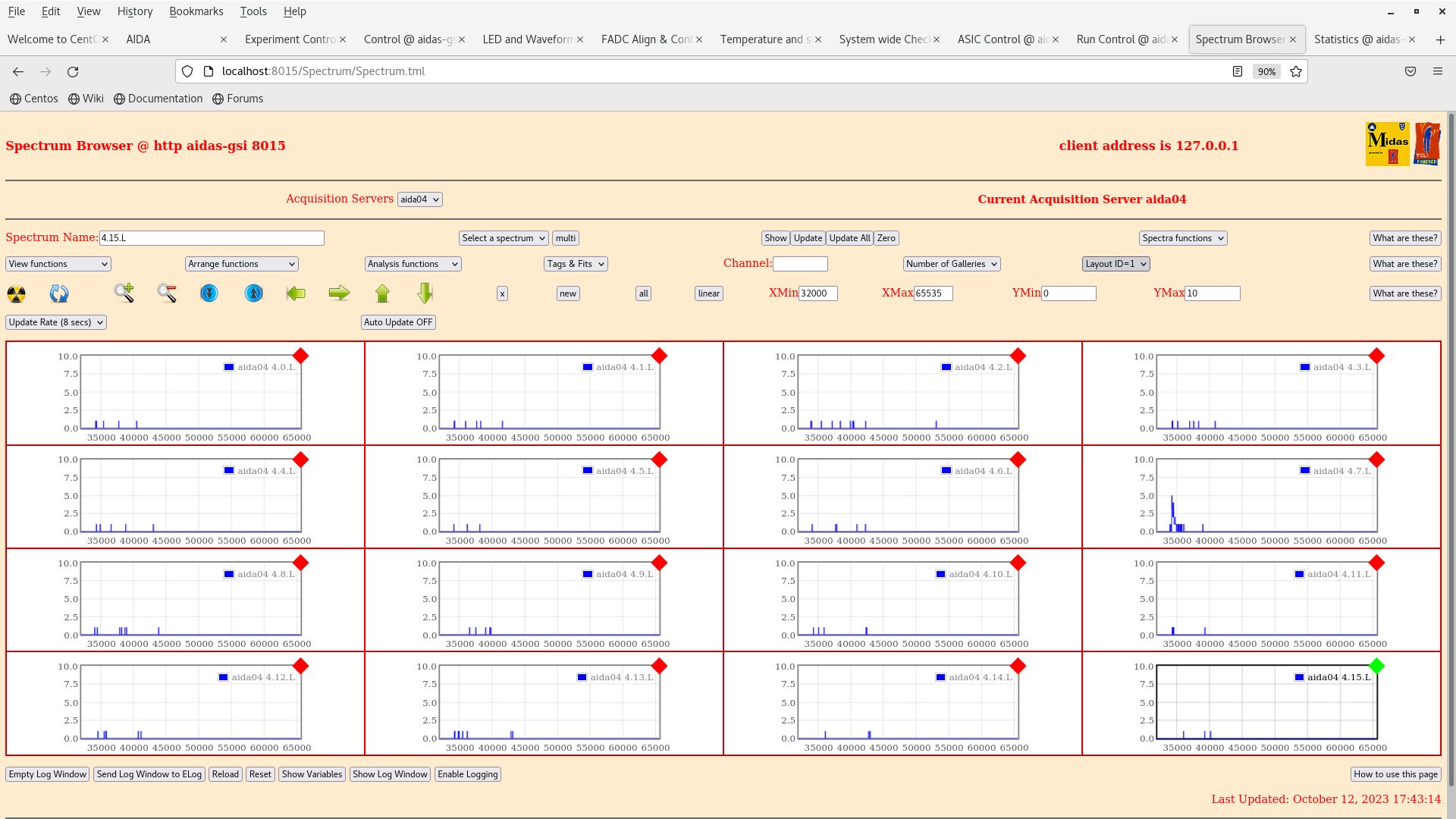
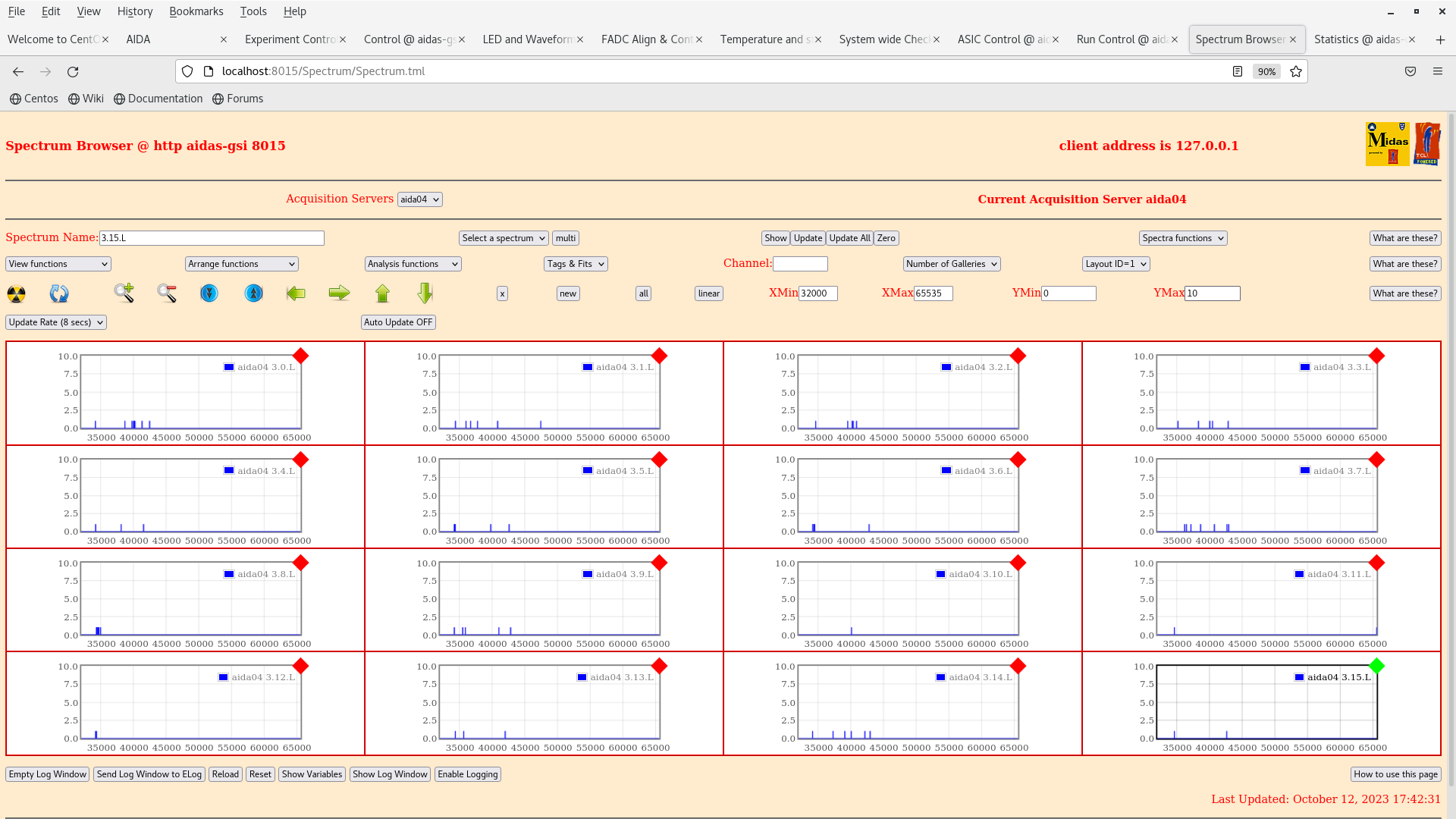
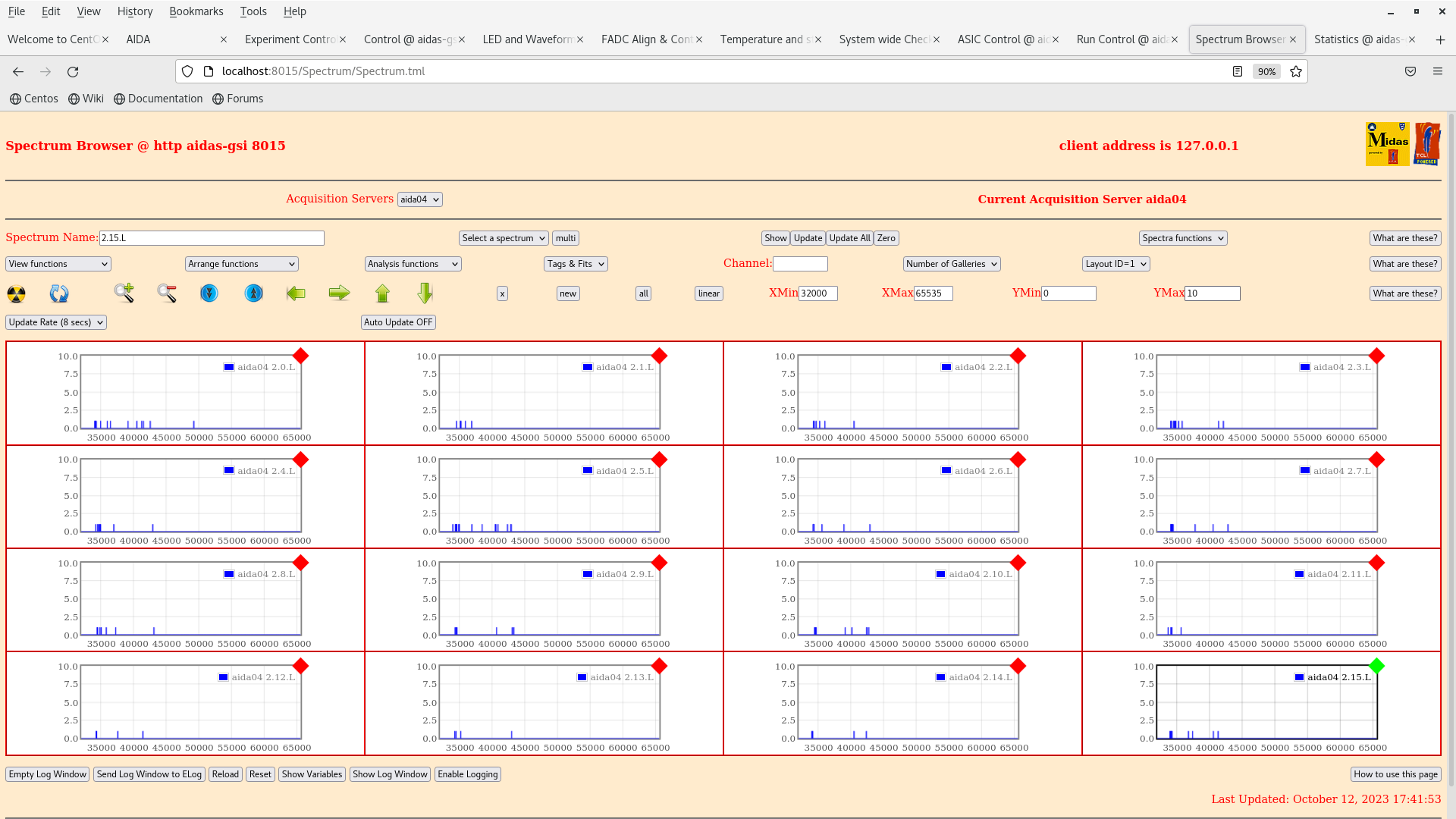
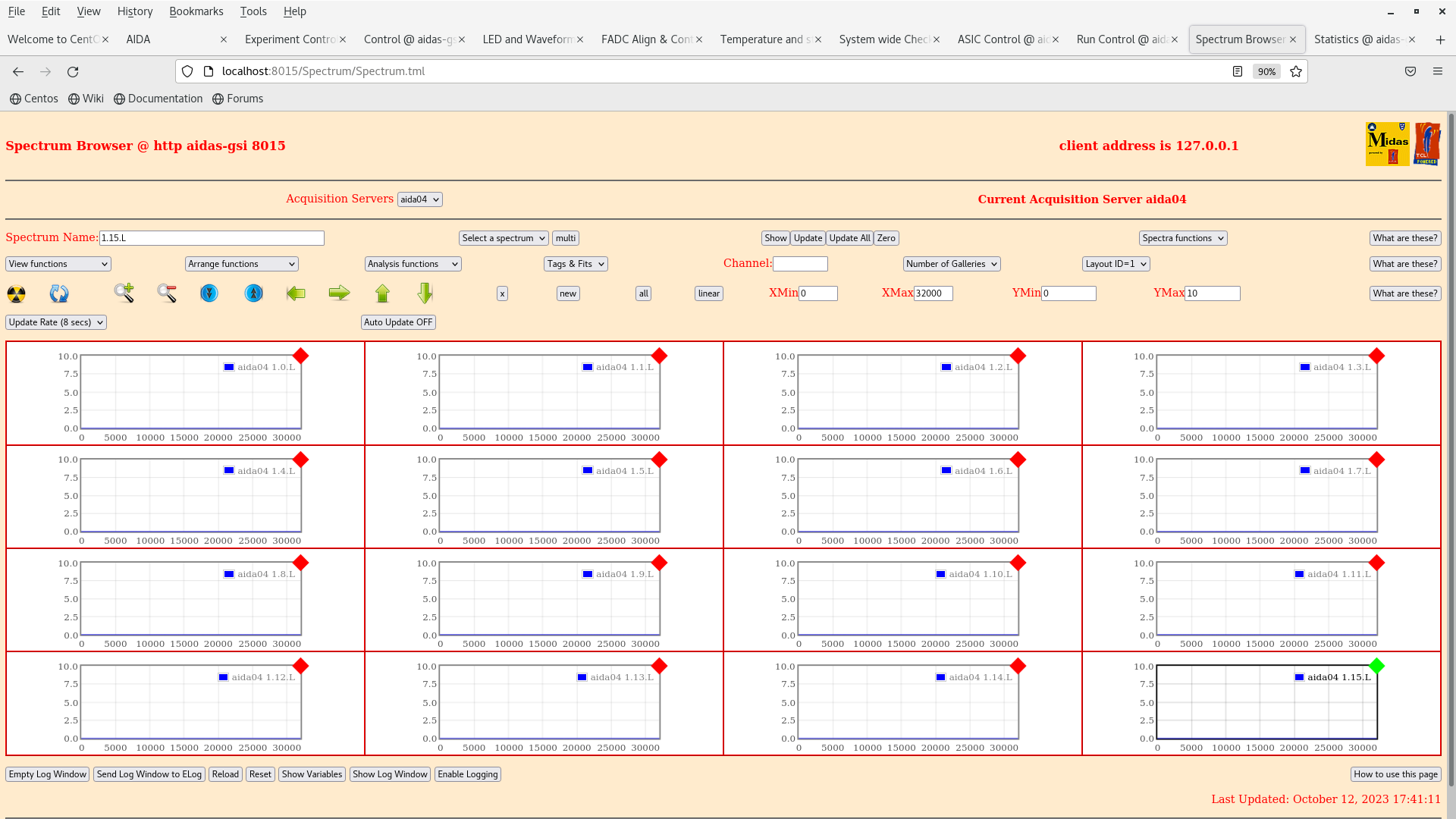
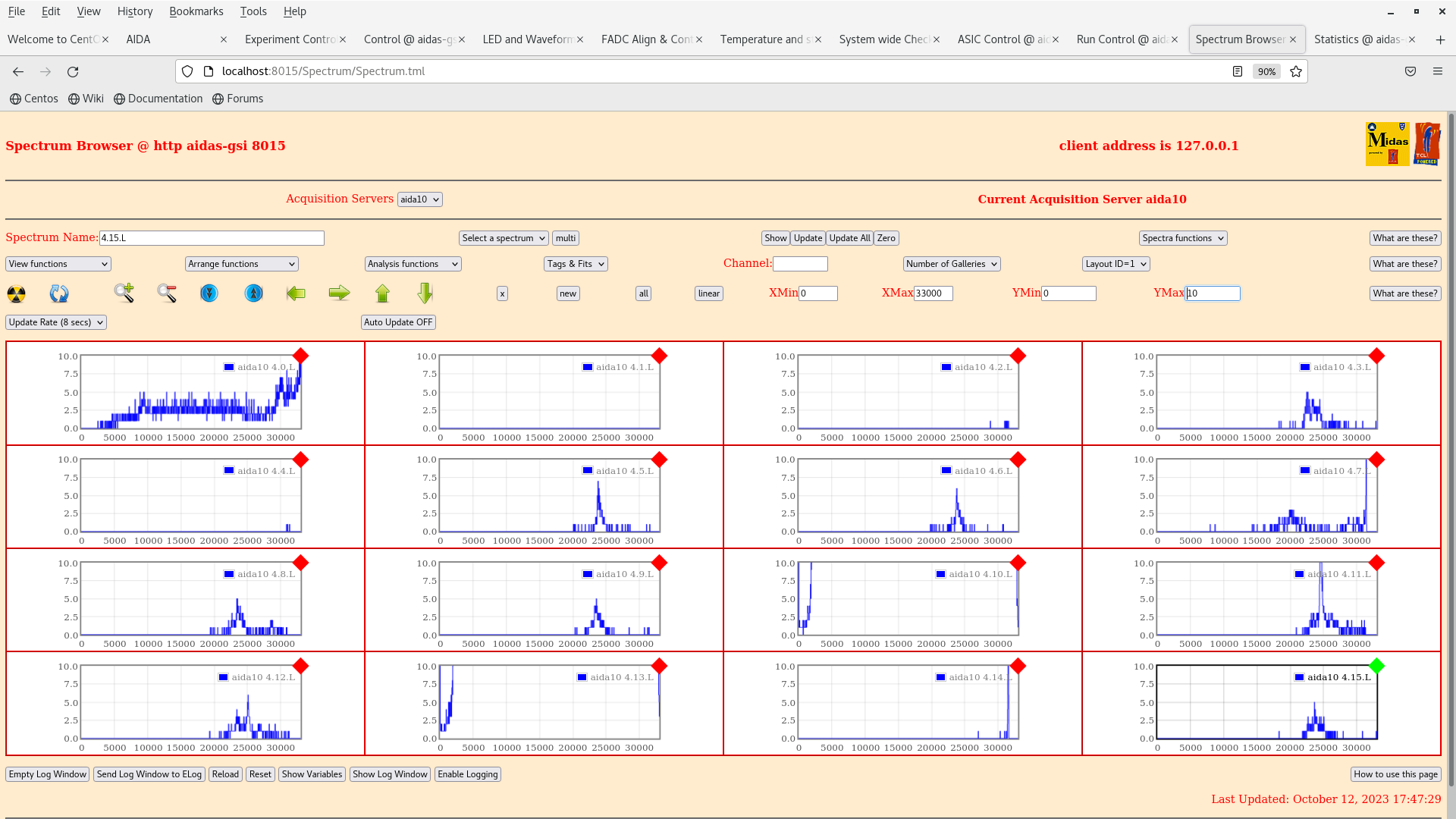
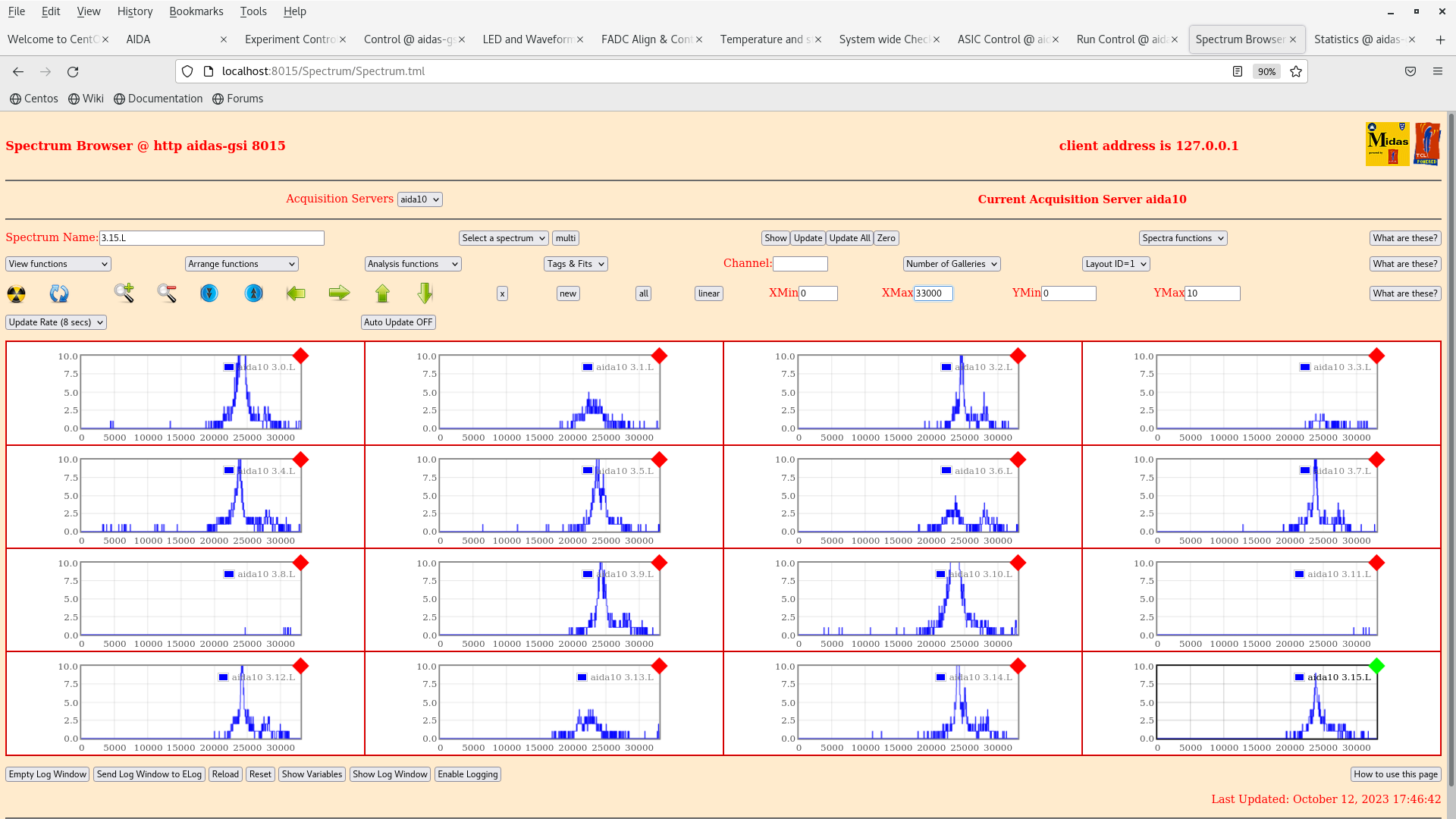
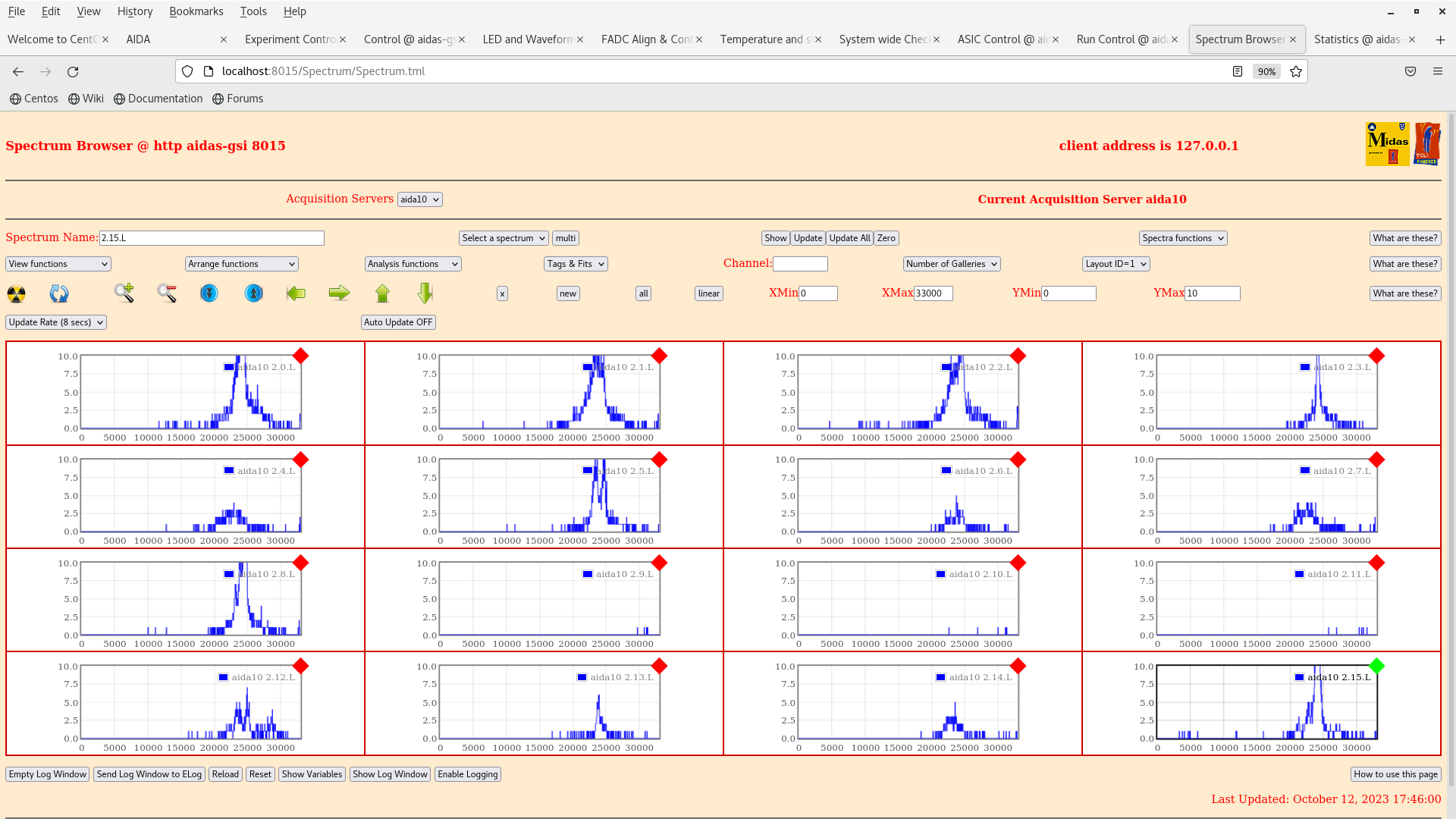
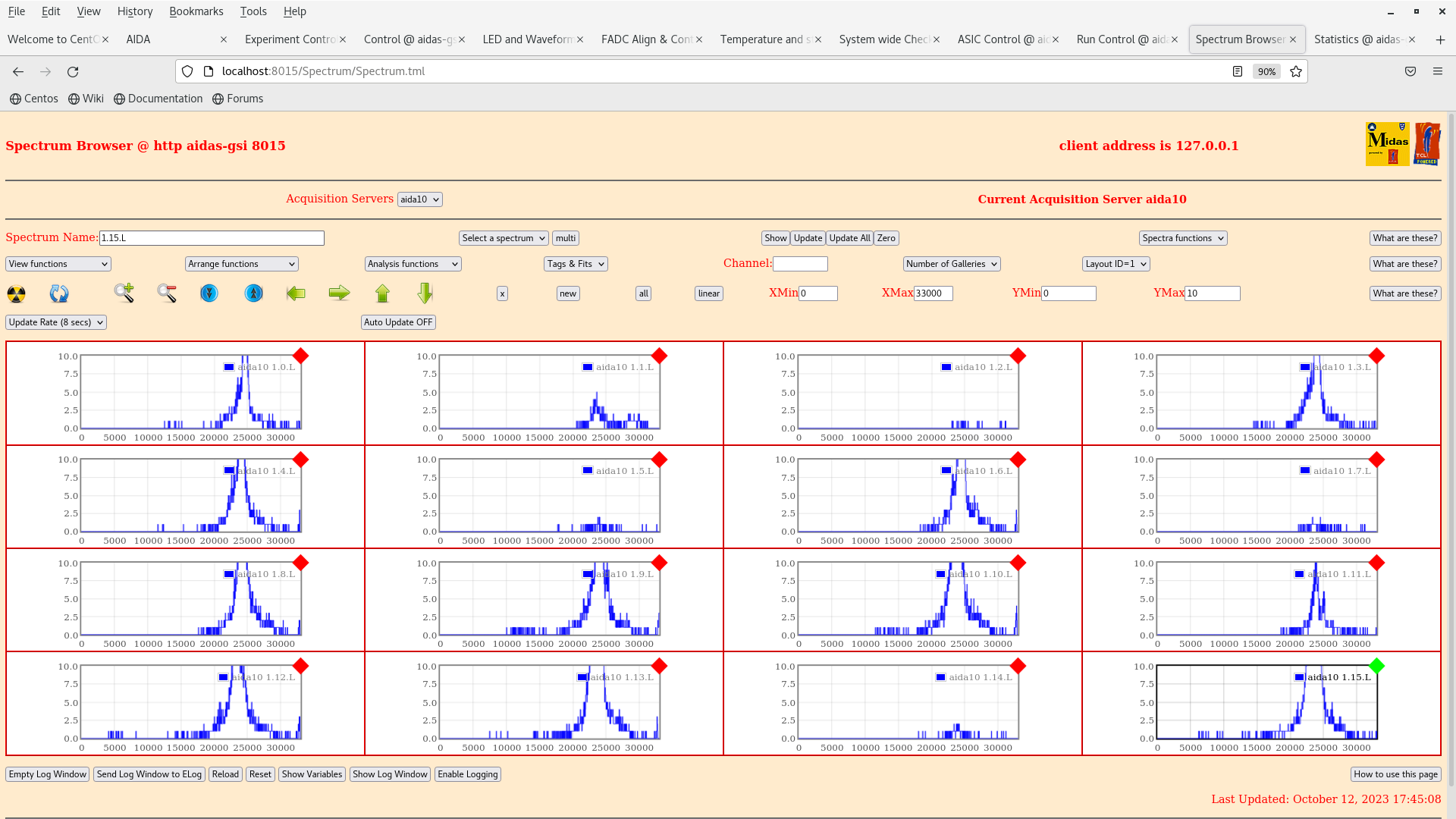
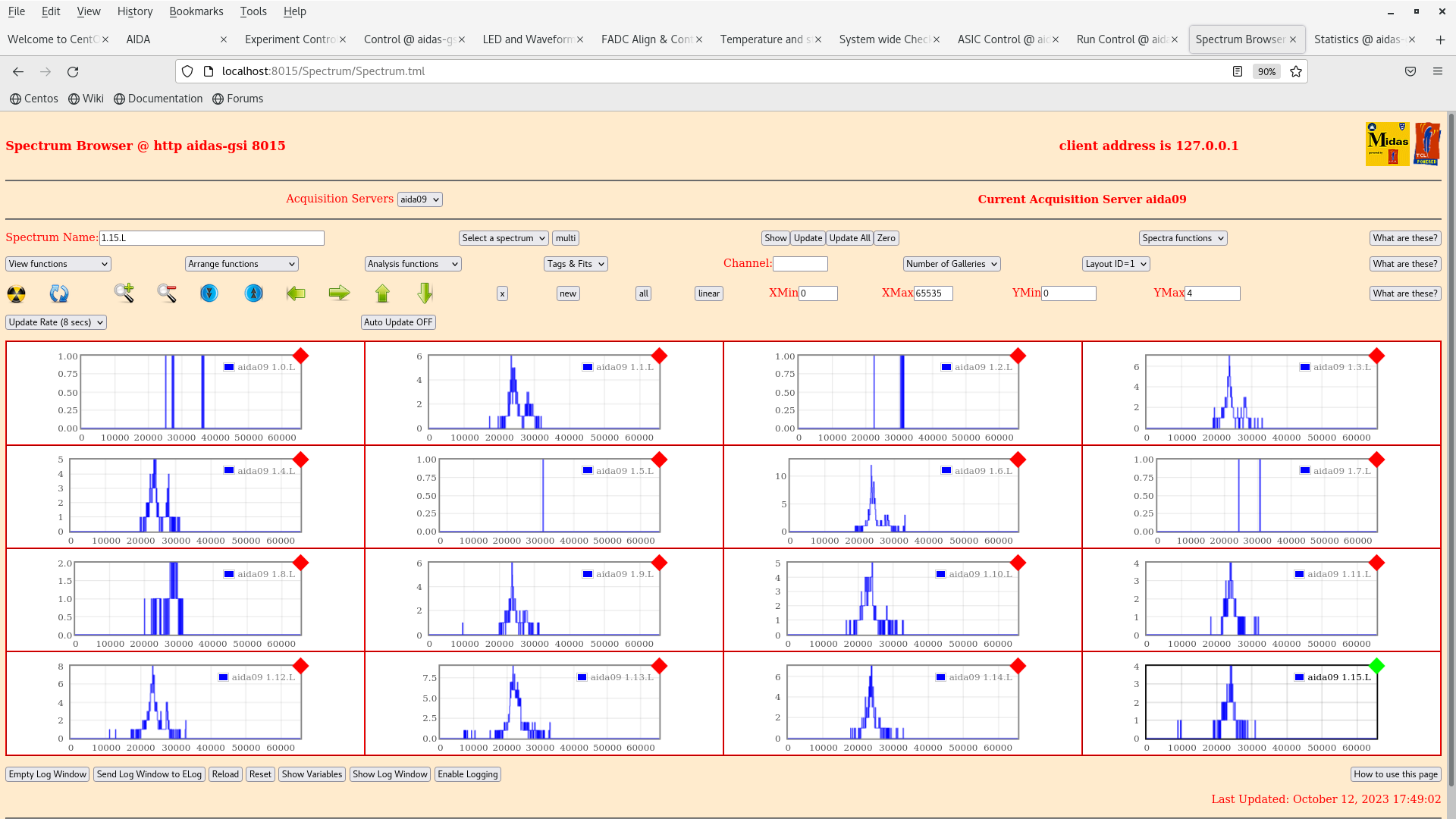
TD | background alpha |
start 14.55 |
| Attachment 1: Screenshot_from_2023-10-12_17-39-51.png
|
|
| Attachment 2: Screenshot_from_2023-10-12_17-38-58.png
|
|
| Attachment 3: Screenshot_from_2023-10-12_17-37-49.png
|
|
| Attachment 4: Screenshot_from_2023-10-12_17-36-55.png
|
|
| Attachment 5: Screenshot_from_2023-10-12_17-43-19.png
|
|
| Attachment 6: Screenshot_from_2023-10-12_17-42-34.png
|
|
| Attachment 7: Screenshot_from_2023-10-12_17-41-55.png
|
|
| Attachment 8: Screenshot_from_2023-10-12_17-41-20.png
|
|
| Attachment 9: Screenshot_from_2023-10-12_17-47-35.png
|
|
| Attachment 10: Screenshot_from_2023-10-12_17-46-51.png
|
|
| Attachment 11: Screenshot_from_2023-10-12_17-46-02.png
|
|
| Attachment 12: Screenshot_from_2023-10-12_17-45-15.png
|
|
| Attachment 13: Screenshot_from_2023-10-12_17-49-54.png
|
|
|
186
|
Tue Apr 26 06:13:00 2016 |
TD | aidas1: updated /etc/fstab file |
The aidas1 /etc/fstab file contained commented out entries for 2 (of 3) WD 3Tb disks
(slot # 3, 4 & 5). The entries are also incorrect - /dev/sdg1 does not exist and
/dev/sdc1 is already used by the OS. This file was most recently changed 8 June 2015.

*** Added note ***
The device list (/dev/sda etc) changes at each boot - at a subsequent reboot the
WD 3Tb disks moved from /dev/sdb, e & f to /dev/sdc, f & g.


cat /etc/fstab.ORIG

#
# /etc/fstab
# Created by anaconda on Tue Jan  7 13:48:12 2014
#
# Accessible filesystems, by reference, are maintained under '/dev/disk'
# See man pages fstab(5), findfs(8), mount(8) and/or blkid(8) for more info
#
/dev/mapper/vg_aidas1-lv_root /                       ext4    defaults        1 1
UUID=23874852-9e28-4e64-8857-2fb66e38e877 /boot                   ext4    defaults        1 2
/dev/mapper/vg_aidas1-lv_home /home                   ext4    defaults        1 2
/dev/mapper/VolGroup00-LogVol01 swap                    swap    defaults        0 0
/dev/mapper/vg_aidas1-lv_swap swap                    swap    defaults        0 0
tmpfs                   /dev/shm                tmpfs   defaults        0 0
devpts                  /dev/pts                devpts  gid=5,mode=620  0 0
sysfs                   /sys                    sysfs   defaults        0 0
proc                    /proc                   proc    defaults        0 0
/dev/Data1/data10		/data10		ext3	defaults	1 2
/dev/sdf1          /data20   ext4    defaults  1 3
#/dev/sdg1          /data30   ext4    defaults  1 4

#/dev/sdc1          /data40   ext4    defaults  1 5


The new /etc/fstab file enables all 3 (of 3) WD 3Tb disks


aidas1> cat /etc/fstab

#
# /etc/fstab
# Created by anaconda on Tue Jan  7 13:48:12 2014
#
# Accessible filesystems, by reference, are maintained under '/dev/disk'
# See man pages fstab(5), findfs(8), mount(8) and/or blkid(8) for more info
#
/dev/mapper/vg_aidas1-lv_root /                       ext4    defaults        1 1
UUID=23874852-9e28-4e64-8857-2fb66e38e877 /boot                   ext4    defaults        1 2
/dev/mapper/vg_aidas1-lv_home /home                   ext4    defaults        1 2
/dev/mapper/VolGroup00-LogVol01 swap                    swap    defaults        0 0
/dev/mapper/vg_aidas1-lv_swap swap                    swap    defaults        0 0
tmpfs                   /dev/shm                tmpfs   defaults        0 0
devpts                  /dev/pts                devpts  gid=5,mode=620  0 0
sysfs                   /sys                    sysfs   defaults        0 0
proc                    /proc                   proc    defaults        0 0
/dev/Data1/data10	/data10		ext3	defaults	1 2
/dev/sdf1		/data20		ext4	defaults	1 3
/dev/sdb1		/data30		ext4	defaults	1 4
/dev/sde1		/data40		ext4	defaults	1 5

aidas1> df -h
Filesystem            Size  Used Avail Use% Mounted on
/dev/mapper/vg_aidas1-lv_root
                       50G   27G   20G  58% /
tmpfs                 3.9G  136K  3.9G   1% /dev/shm
/dev/sda1             477M   77M  376M  17% /boot
/dev/mapper/vg_aidas1-lv_home
                      860G  106M  816G   1% /home
/dev/mapper/Data1-data10
                      1.8T  1.6T  128G  93% /data10
/dev/sdf1             2.0T   32G  1.9T   2% /data20
/dev/sdb1             2.0T   71M  1.9T   1% /data30
/dev/sde1             2.0T  1.8T  140G  93% /data40


aidas1> ls /data10/TapeData
AIDA1    expt101  Feb2015  NULL    R202_0  TAPE1
expt100  expt201  May2015  R200_0  R6      test1
aidas1> ls /data20/TapeData
Dec2015  Mar2016
aidas1> ls /data30/TapeData
ls: cannot access /data30/TapeData: No such file or directory
aidas1> ls /data40/TapeData
May2015 |
|
295
|
Wed Jun 8 04:24:04 2016 |
TD | aidas1 disk statistics (without data compression) |
aidas1> iostat -xn
Linux 2.6.32-504.8.1.el6.x86_64 (aidas1) 	06/08/2016 	_x86_64_	(16 CPU)

Device:         rrqm/s   wrqm/s     r/s     w/s   rsec/s   wsec/s avgrq-sz avgqu-sz   await  svctm  %util
sda               0.03     0.00    0.01    0.00     0.10     0.00     8.53     0.00    1.37   0.96   0.00
sdc               0.01     0.00    0.01    1.46     0.04     0.00     0.03     0.00    0.38   0.31   0.05
sdg               0.02     0.00    1.16    1.46   280.02     0.01   106.79     0.00    1.05   0.74   0.20
sdf               0.23   496.52    6.59    7.52  1630.98  4020.60   400.58     0.72   50.70   3.81   5.38
sdd               0.20     3.48    0.05    0.09     1.50    28.52   217.54     0.00    6.63   3.64   0.05
sdb               1.39    35.64    2.06    3.35   171.52   310.29    89.17     0.13   24.09   2.59   1.40
sde               0.01     3.89    3.13    4.56    56.50    56.00    14.63     0.27   35.22   3.91   3.01
dm-0              0.00     0.00    3.45   38.79   171.28   310.29    11.40    11.07  261.99   0.33   1.40
dm-1              0.00     0.00    0.01    0.00     0.05     0.00     8.00     0.00    3.24   1.03   0.00
dm-2              0.00     0.00    0.17    3.57     1.39    28.52     8.00     0.04   11.44   0.13   0.05
dm-3              0.00     0.00    0.00    0.00     0.01     0.00     8.00     0.00    1.05   1.05   0.00
dm-4              0.00     0.00   11.11  510.60  1967.40  4076.62    11.59    60.80  116.54   0.16   8.35
dm-5              0.00     0.00    0.01    0.00     0.07     0.00     7.96     0.00    3.64   0.68   0.00

Filesystem:              rBlk_nor/s   wBlk_nor/s   rBlk_dir/s   wBlk_dir/s   rBlk_svr/s   wBlk_svr/s     ops/s
  rops/s    wops/s

aidas1> iostat -x
Linux 2.6.32-504.8.1.el6.x86_64 (aidas1) 	06/08/2016 	_x86_64_	(16 CPU)

avg-cpu:  %user   %nice %system %iowait  %steal   %idle
          17.42    3.35    1.10    0.72    0.00   77.41

Device:         rrqm/s   wrqm/s     r/s     w/s   rsec/s   wsec/s avgrq-sz avgqu-sz   await  svctm  %util
sda               0.03     0.00    0.01    0.00     0.10     0.00     8.53     0.00    1.37   0.96   0.00
sdc               0.01     0.00    0.01    1.46     0.04     0.00     0.03     0.00    0.38   0.31   0.05
sdg               0.02     0.00    1.16    1.46   279.98     0.01   106.78     0.00    1.05   0.74   0.20
sdf               0.23   496.63    6.62    7.52  1636.72  4021.54   400.39     0.72   50.64   3.81   5.39
sdd               0.20     3.48    0.05    0.09     1.50    28.52   217.54     0.00    6.63   3.64   0.05
sdb               1.39    35.64    2.06    3.35   171.49   310.28    89.16     0.13   24.09   2.59   1.40
sde               0.01     3.89    3.13    4.56    56.49    56.00    14.63     0.27   35.22   3.91   3.01
dm-0              0.00     0.00    3.45   38.78   171.26   310.28    11.40    11.06  261.97   0.33   1.40
dm-1              0.00     0.00    0.01    0.00     0.05     0.00     8.00     0.00    3.24   1.03   0.00
dm-2              0.00     0.00    0.17    3.56     1.39    28.52     8.00     0.04   11.44   0.13   0.05
dm-3              0.00     0.00    0.00    0.00     0.01     0.00     8.00     0.00    1.05   1.05   0.00
dm-4              0.00     0.00   11.13  510.72  1973.09  4077.56    11.59    60.83  116.57   0.16   8.36
dm-5 0.00 0.00 0.01 0.00 0.07 0.00 7.96 0.00 3.64 0.68 0.00 |
|
292
|
Wed Jun 8 02:31:20 2016 |
TD | aidas1 disk statistics |
DAQ running to disk at relatively low rate (merger ~600k item/s, tapeserver ~4700kb/s)

Do these disk statistics look OK

aidas1> iostat -x
Linux 2.6.32-504.8.1.el6.x86_64 (aidas1) 	06/08/2016 	_x86_64_	(16 CPU)

avg-cpu:  %user   %nice %system %iowait  %steal   %idle
          19.56    3.00    1.15    0.74    0.00   75.55

Device:         rrqm/s   wrqm/s     r/s     w/s   rsec/s   wsec/s avgrq-sz avgqu-sz   await  svctm  %util
sda               0.04     0.00    0.01    0.00     0.11     0.00     8.53     0.00    1.37   0.96   0.00
sdc               0.01     0.00    0.01    1.58     0.05     0.00     0.03     0.00    0.38   0.31   0.05
sdg               0.02     0.00    0.18    1.58    42.62     0.01    24.21     0.00    0.59   0.41   0.07
sdf               0.05   507.94    2.16    7.81   516.00  4113.00   464.34     0.69   69.54   4.77   4.76
sdd               0.19     3.95    0.05    0.10     1.36    32.36   225.17     0.00    6.63   3.57   0.05
sdb               1.40    38.38    2.17    3.35   185.34   332.20    93.75     0.14   26.19   2.60   1.44
sde               0.01     4.25    3.54    4.94    64.06    60.96    14.74     0.30   35.48   3.90   3.30
dm-0              0.00     0.00    3.56   41.53   185.07   332.20    11.47    12.54  278.00   0.32   1.44
dm-1              0.00     0.00    0.01    0.00     0.05     0.00     8.00     0.00    3.24   1.03   0.00
dm-2              0.00     0.00    0.15    4.05     1.23    32.36     8.00     0.05   11.49   0.12   0.05
dm-3              0.00     0.00    0.00    0.00     0.02     0.00     8.00     0.00    1.05   1.05   0.00
dm-4              0.00     0.00    5.92  522.90   622.57  4174.35     9.07    59.55  112.60   0.15   7.94
dm-5              0.00     0.00    0.01    0.00     0.07     0.00     7.95     0.00    3.11   0.69   0.00

aidas1> iostat
Linux 2.6.32-504.8.1.el6.x86_64 (aidas1) 	06/08/2016 	_x86_64_	(16 CPU)

avg-cpu:  %user   %nice %system %iowait  %steal   %idle
          19.55    3.00    1.15    0.74    0.00   75.57

Device:            tps   Blk_read/s   Blk_wrtn/s   Blk_read   Blk_wrtn
sda               0.01         0.11         0.00       5682          0
sdc               1.58         0.05         0.00       2312        112
sdg               1.76        42.56         0.01    2170822        648
sdf               9.98       519.68      4114.55   26505990  209861264
sdd               0.15         1.38        32.32      70150    1648496
sdb               5.52       185.27       331.95    9449724   16931146
sde               8.47        63.97        60.90    3263022    3106264
dm-0             45.06       185.01       331.95    9436314   16931104
dm-1              0.01         0.05         0.00       2696          0
dm-2              4.20         1.24        32.32      63432    1648496
dm-3              0.00         0.02         0.00        864          0
dm-4            528.96       626.10      4175.46   31934274  212968288
dm-5 0.01 0.07 0.00 3778 24 |
|
194
|
Mon May 2 07:27:26 2016 |
TD | aidas1 /etc/dhcp/dhcpd.conf updated |
aidas1 /etc/dhcp/dhcpd.conf update

to install two scratch FEE modules assembled by PJCS April 2016

Previous version of configuration file saved to /etc/dhcp/dhcpd.conf.BAK-2May2016

#
# DHCP Server Configuration file.
#   see /usr/share/doc/dhcp*/dhcpd.conf.sample
#

authoritative;

ddns-update-style none; ddns-updates off;

max-lease-time 691200;

option domain-search code 119 = string;

subnet 10.1.1.0 netmask 255.255.255.0 {
   option subnet-mask 255.255.255.0;
   option broadcast-address 10.1.1.255;
   option routers 10.1.1.250;
   pool {
      range 10.1.1.100 10.1.1.249;
   }
}

subnet 10.1.2.0 netmask 255.255.255.0 {
   option subnet-mask 255.255.255.0;
   option broadcast-address 10.1.2.255;
   option routers 10.1.2.250;
   pool {
      range 10.1.2.100 10.1.2.249;
   }
}

subnet 10.1.3.0 netmask 255.255.255.0 {
   option subnet-mask 255.255.255.0;
   option broadcast-address 10.1.3.255;
   option routers 10.1.3.250;
   pool {
      range 10.1.3.100 10.1.3.249;
   }
}

subnet 10.1.4.0 netmask 255.255.255.0 {
   option subnet-mask 255.255.255.0;
   option broadcast-address 10.1.4.255;
   option routers 10.1.4.250;
   pool {
      range 10.1.4.100 10.1.4.249;
   }
}

subnet 10.1.5.0 netmask 255.255.255.0 {
   option subnet-mask 255.255.255.0;
   option broadcast-address 10.1.5.255;
   option routers 10.1.5.250;
   pool {
      range 10.1.5.100 10.1.5.249;
   }
}

group {
   use-host-decl-names true;
   default-lease-time 3600;
   max-lease-time 14400;

   server-name "10.1.1.250";
   next-server 10.1.1.250;

   host nnrpi1 {
     hardware ethernet b8:27:eb:78:ee:44;
     fixed-address 10.1.1.251;
   }
   host nnaida1 {
     hardware ethernet 00:04:a3:2a:d0:1b;
     fixed-address 10.1.1.1;
     option root-path "/MIDAS@aidas/XilinxLinux/ppc_4xx/rfs/nnaida1,tcp";
   }
   host nnaida2 {
     hardware ethernet 00:04:a3:2a:d9:e1;
     fixed-address 10.1.1.2;
     option root-path "/MIDAS@aidas/XilinxLinux/ppc_4xx/rfs/nnaida2,tcp";
   }
   host nnaida5 {
     hardware ethernet 00:04:a3:2a:d0:10;
     fixed-address 10.1.1.5;
     option root-path "/MIDAS@aidas/XilinxLinux/ppc_4xx/rfs/nnaida5,tcp";
   }
   host nnaida6 {
     hardware ethernet 00:04:a3:2a:d4:b7;
     fixed-address 10.1.1.6;
     option root-path "/MIDAS@aidas/XilinxLinux/ppc_4xx/rfs/nnaida6,tcp";
   }
   host nnaida9 {
     hardware ethernet 00:04:a3:2a:d9:ad;
     fixed-address 10.1.1.9;
     option root-path "/MIDAS@aidas/XilinxLinux/ppc_4xx/rfs/nnaida9,tcp";
   }
   host nnaida10 {
     hardware ethernet 00:04:a3:2a:f7:07;
     fixed-address 10.1.1.10;
     option root-path "/MIDAS@aidas/XilinxLinux/ppc_4xx/rfs/nnaida10,tcp";
   }
   host nnaida13 {
     hardware ethernet 00:04:a3:2b:11:b9;
     fixed-address 10.1.1.13;
     option root-path "/MIDAS@aidas/XilinxLinux/ppc_4xx/rfs/nnaida13,tcp";
   }
   host nnaida14 {
     hardware ethernet 00:04:a3:2b:11:b8;
     fixed-address 10.1.1.14;
     option root-path "/MIDAS@aidas/XilinxLinux/ppc_4xx/rfs/nnaida14,tcp";
   }
   host nnaida17 {
     hardware ethernet 00:04:a3:2a:d9:cc;
     fixed-address 10.1.1.17;
     option root-path "/MIDAS@aidas/XilinxLinux/ppc_4xx/rfs/nnaida17,tcp";
   }
   host nnaida18 {
     hardware ethernet 00:04:a3:2a:b2:b2;
     fixed-address 10.1.1.18;
     option root-path "/MIDAS@aidas/XilinxLinux/ppc_4xx/rfs/nnaida18,tcp";
   }
   host nnaida21 {
     hardware ethernet 00:04:a3:2b:27:23;
     fixed-address 10.1.1.21;
     option root-path "/MIDAS@aidas/XilinxLinux/ppc_4xx/rfs/nnaida21,tcp";
   }
   host nnaida22 {
     hardware ethernet 00:04:a3:2a:f6:e9;
     fixed-address 10.1.1.22;
     option root-path "/MIDAS@aidas/XilinxLinux/ppc_4xx/rfs/nnaida22,tcp";
   }
   host nnaida25 {
     hardware ethernet 00:04:a3:2a:d0:11;
     fixed-address 10.1.1.25;
     option root-path "/MIDAS@aidas/XilinxLinux/ppc_4xx/rfs/nnaida25,tcp";
   }
   host nnaida26 {
     hardware ethernet 00:04:a3:2b:27:54;
     fixed-address 10.1.1.26;
     option root-path "/MIDAS@aidas/XilinxLinux/ppc_4xx/rfs/nnaida26,tcp";
   }
   host nnaida29 {
     hardware ethernet 00:04:a3:2a:d0:06;
     fixed-address 10.1.1.29;
     option root-path "/MIDAS@aidas/XilinxLinux/ppc_4xx/rfs/nnaida29,tcp";
   }
   host nnaida30 {
     hardware ethernet 00:04:a3:2a:d9:b6;
     fixed-address 10.1.1.30;
     option root-path "/MIDAS@aidas/XilinxLinux/ppc_4xx/rfs/nnaida30,tcp";
   }


}


group {
   use-host-decl-names true;
   default-lease-time 3600;
   max-lease-time 14400;

   server-name "10.1.2.250";
   next-server 10.1.2.250;

   host nnaida3 {
     hardware ethernet 00:04:a3:2a:f7:06;
     fixed-address 10.1.2.3;
     option root-path "/MIDAS@aidas/XilinxLinux/ppc_4xx/rfs/nnaida3,tcp";
   }
   host nnaida4 {
     hardware ethernet 00:04:a3:2a:ed:b8;
     fixed-address 10.1.2.4;
     option root-path "/MIDAS@aidas/XilinxLinux/ppc_4xx/rfs/nnaida4,tcp";
   }
   host nnaida7 {
     hardware ethernet 00:04:a3:2a:b8:8d;
     fixed-address 10.1.2.7;
     option root-path "/MIDAS@aidas/XilinxLinux/ppc_4xx/rfs/nnaida7,tcp";
   }
   host nnaida8 {
     hardware ethernet 00:04:a3:2a:9c:07;
     fixed-address 10.1.2.8;
     option root-path "/MIDAS@aidas/XilinxLinux/ppc_4xx/rfs/nnaida8,tcp";
   }
   host nnaida11 {
     hardware ethernet 00:04:a3:2b:11:af;
     fixed-address 10.1.2.11;
     option root-path "/MIDAS@aidas/XilinxLinux/ppc_4xx/rfs/nnaida11,tcp";
   }
   host nnaida12 {
     hardware ethernet 00:04:a3:2a:d0:2f;
     fixed-address 10.1.2.12;
     option root-path "/MIDAS@aidas/XilinxLinux/ppc_4xx/rfs/nnaida12,tcp";
   }
   host nnaida15 {
     hardware ethernet 00:04:a3:2a:f3:ac;
     fixed-address 10.1.2.15;
     option root-path "/MIDAS@aidas/XilinxLinux/ppc_4xx/rfs/nnaida15,tcp";
   }
   host nnaida16 {
     hardware ethernet 00:04:a3:2a:9c:0e;
     fixed-address 10.1.2.16;
     option root-path "/MIDAS@aidas/XilinxLinux/ppc_4xx/rfs/nnaida16,tcp";
   }
# 1 of 2 scratch FEE modules assembled by PJCS April 2016
   host nnaida19 {
     hardware ethernet 00:04:a3:2b:09:e7;
     fixed-address 10.1.2.19;
     option root-path "/MIDAS@aidas/XilinxLinux/ppc_4xx/rfs/nnaida19,tcp";
   }
   host nnaida20 {
     hardware ethernet 00:04:a3:2b:22:55;
     fixed-address 10.1.2.20;
     option root-path "/MIDAS@aidas/XilinxLinux/ppc_4xx/rfs/nnaida20,tcp";
   }
   host nnaida23 {
     hardware ethernet 00:04:a3:2a:b8:90;
     fixed-address 10.1.2.23;
     option root-path "/MIDAS@aidas/XilinxLinux/ppc_4xx/rfs/nnaida23,tcp";
   }
   host nnaida24 {
     hardware ethernet 00:04:a3:2a:b6:45;
     fixed-address 10.1.2.24;
     option root-path "/MIDAS@aidas/XilinxLinux/ppc_4xx/rfs/nnaida24,tcp";
   }
# 2 of 2 scratch FEE modules assembled by PJCS April 2016
   host nnaida27 {
     hardware ethernet 00:04:a3:2a:ed:9a;
     fixed-address 10.1.2.27;
     option root-path "/MIDAS@aidas/XilinxLinux/ppc_4xx/rfs/nnaida27,tcp";
   }
   host nnaida28 {
     hardware ethernet 00:04:a3:2b:11:c5;
     fixed-address 10.1.2.28;
     option root-path "/MIDAS@aidas/XilinxLinux/ppc_4xx/rfs/nnaida28,tcp";
   }
   host nnaida31 {
     hardware ethernet 00:04:a3:2b:11:ae;
     fixed-address 10.1.2.31;
     option root-path "/MIDAS@aidas/XilinxLinux/ppc_4xx/rfs/nnaida31,tcp";
   }
   host nnaida32 {
     hardware ethernet 00:04:a3:2a:ed:b9;
     fixed-address 10.1.2.32;
     option root-path "/MIDAS@aidas/XilinxLinux/ppc_4xx/rfs/nnaida32,tcp";
   }
}


group {
# 8 days
   default-lease-time 691200;

#    option dhcp-client-identifier "\0foo";

   host nndhcp052 {
# Analysis server
     hardware ethernet 00:22:19:50:02:40;
     fixed-address 10.1.1.252;
   }

} |
|
876
|
Mon Jul 24 08:39:39 2023 |
TD | aida10 sys console output & aida10 options |
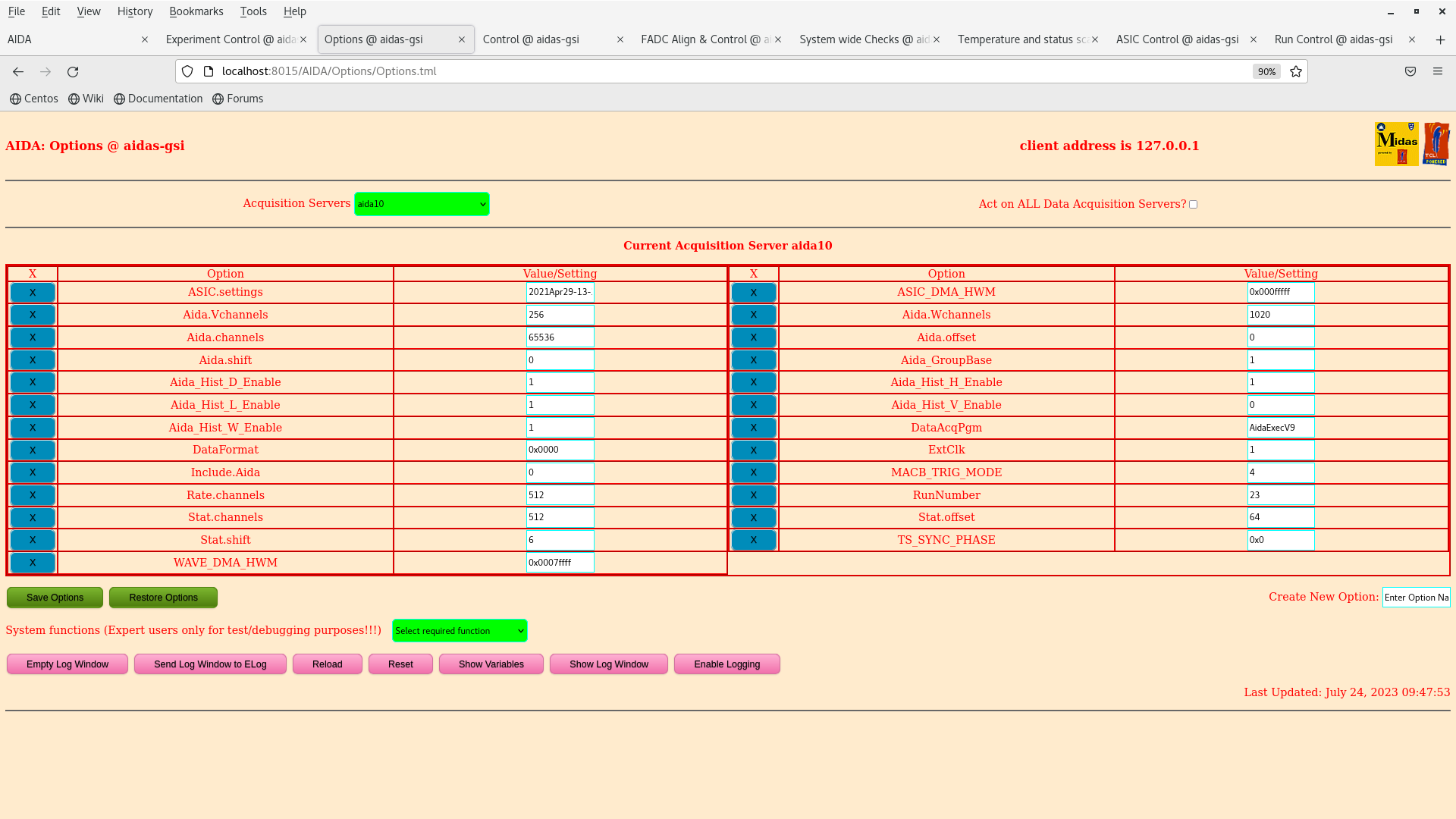
Options and system cosnole disagree about which version of the DataAcq program is in use? |
| Attachment 1: sys_console_aida10.txt
|
... 28844 more lines ...
|
| Attachment 2: Screenshot_from_2023-07-24_09-48-03.png
|
|
|
336
|
Wed Aug 17 14:44:52 2016 |
Patrick Coleman-Smith | [HowTo] start acquisition using the new "Start ASIC Readout" button |
Due to sometimes operating with very noisy systems, both at Daresbury and RIKEN, I have installed a change to the startup of the system.
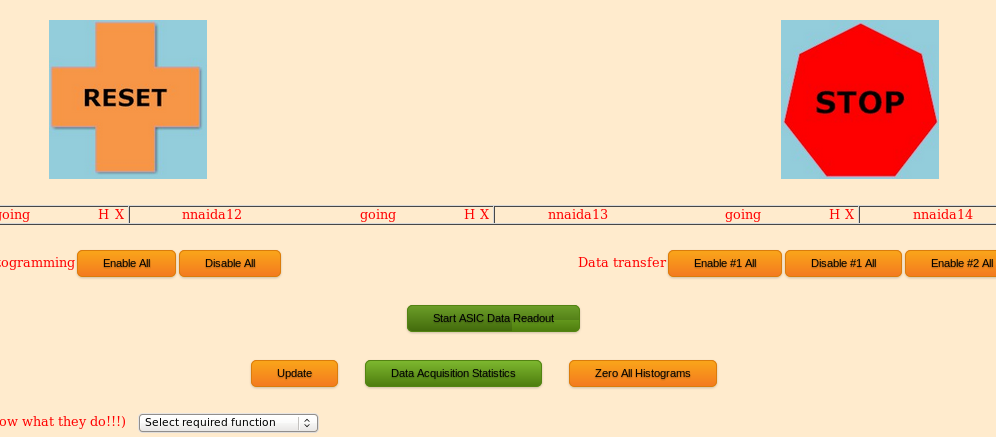
The Runcontrol GO button now only starts the output of SYNC pulses. A further button labelled "Start ASIC Readout" ( see attached photo ) needs to be pressed to start the ASIC ADC, Discriminator and Correlation readout.
After carrying out the normal operations to start the system and pressing the GO button the Merger can be checked to be certain it is merging the events. Since there are only SYNC pulses it should soon be apparent if this is not happening and appropriate actions can be taken. ( Kill/Reload the Link and Merger processes using the "Merger for AIDA" icon at the top of the screen is one way. )
Once it is certain the merging is in progress then the new button labelled "Start ASIC Readout" ( see attached photo ) needs to be pressed to start the ASIC ADC, Discriminator and Correlation readout.
This must be done after every GO. |
| Attachment 1: RunControl_portion.png
|
|
|
236
|
Wed May 25 18:51:54 2016 |
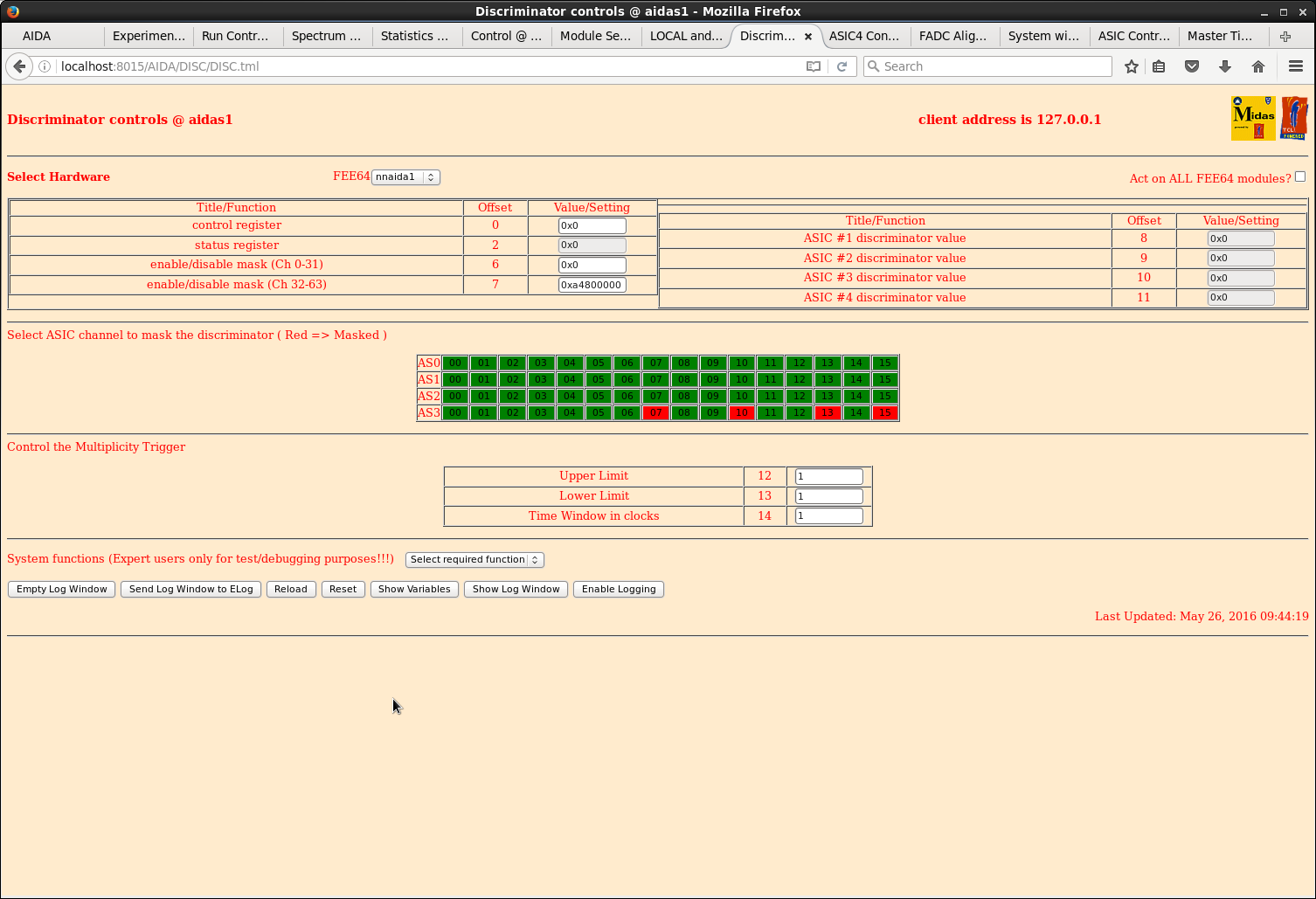
Patrick Coleman-Smith | [HowTo] Use the Multiplicity Trigger Firmware, V8.18, and update the files |
The attached firmware file, FEE_GF_Feb16_18.bin, should be saved to /MIDAS/Aida and the FlashPgm.csh file edited
to load "FEE_GF_Feb16_18.bin"

Use the Run Control Expert command to update the firmware on all the FEE64s.

Power cycle the FEE64s to load the new firmware.

Make a backup copy of the files in the directory /MIDAS/TclHttpd/Html/AIDA/DISC.

Unzip the files from DISC_25May16.zip and copy them into /MIDAS/TclHttpd/Html/AIDA/DISC to replace the existing
ones.

Make a backup copy of the file /MIDAS/TclHttpd/Html/AIDA/LOCAL.tml

Unzip the file from LOCAL_tml_25May16.zip and copy into /MIDAS/TclHttpd/Html/AIDA/LOCAL to replace the existing
file.

'RESET' and browser refresh the two updated control windows to load the new software.
-----------------------------------------------------

To use the Multiplicity Trigger:-
In the Local Controls select option 5 for the Trigger.

In the Discriminator window.

Set the 'Upper Limit'
Set the 'Lower Limit' ( always greater than 0 ..... or the Trigger will always be present )
Set the 'Time window'. The number of 10nS clocks. So 4 => 40nS. Register is 0 to 255.

-----------------------------------------------------

These registers are not in the Save/Restore set yet.

Tested on the T9 system using the pulser and setting/clearing Mask bits.

Please let me know how this works for you. |
| Attachment 1: FEE_GF_Feb16_18.bin
|
| Attachment 2: DISC_25May16.zip
|
| Attachment 3: LOCAL_tml_25May16.zip
|
|
237
|
Thu May 26 01:44:45 2016 |
Patrick Coleman-Smith | [HowTo] Use the Multiplicity Trigger Firmware, V8.18, and update the files |
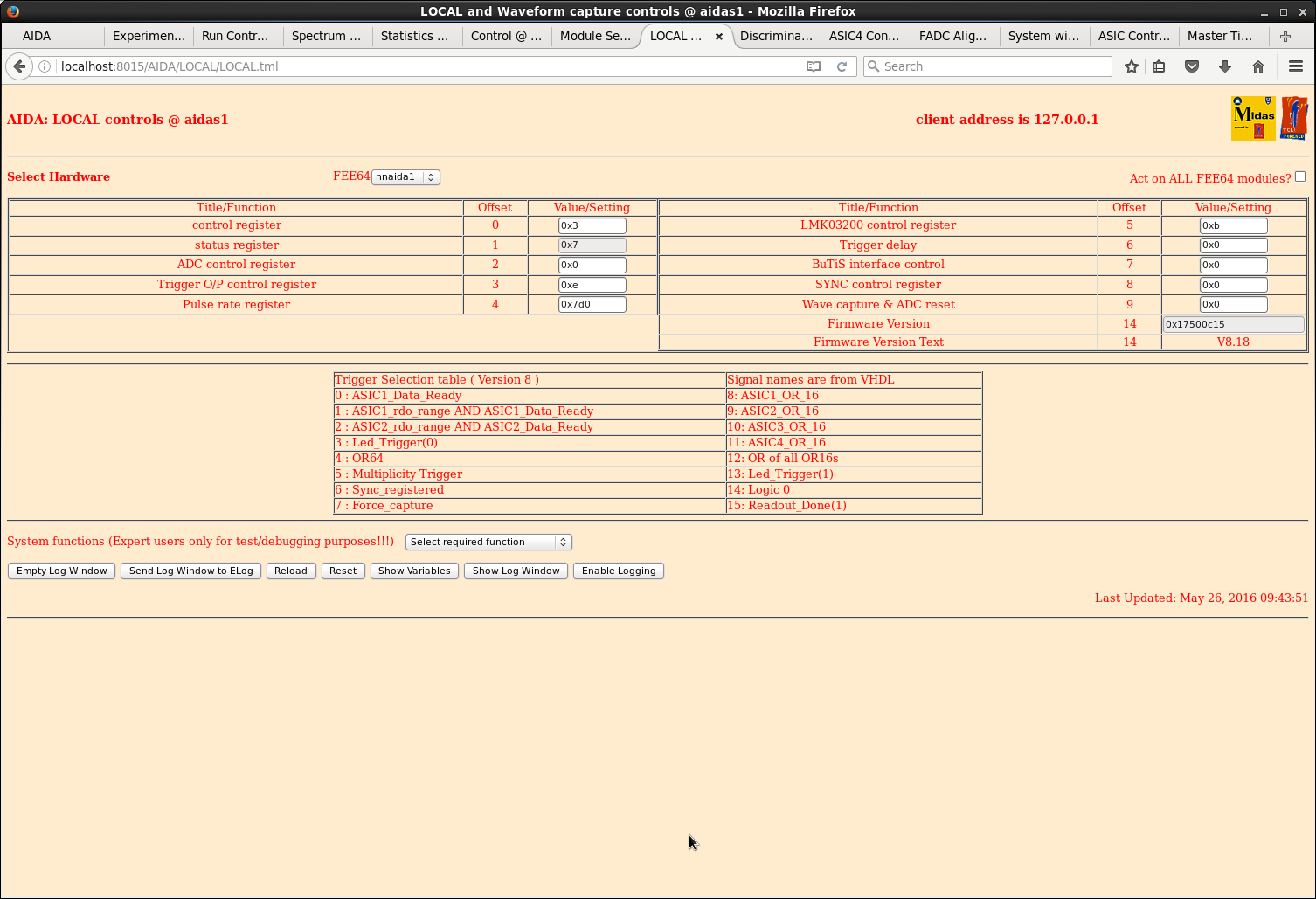
Done. Awaiting test. See attachments 1-2.

> The attached firmware file, FEE_GF_Feb16_18.bin, should be saved to /MIDAS/Aida and the FlashPgm.csh file edited
> to load "FEE_GF_Feb16_18.bin"
>
> Use the Run Control Expert command to update the firmware on all the FEE64s.
>
> Power cycle the FEE64s to load the new firmware.
>
> Make a backup copy of the files in the directory /MIDAS/TclHttpd/Html/AIDA/DISC.
>
> Unzip the files from DISC_25May16.zip and copy them into /MIDAS/TclHttpd/Html/AIDA/DISC to replace the existing
> ones.
>
> Make a backup copy of the file /MIDAS/TclHttpd/Html/AIDA/LOCAL.tml
>
> Unzip the file from LOCAL_tml_25May16.zip and copy into /MIDAS/TclHttpd/Html/AIDA/LOCAL to replace the existing
> file.
>
> 'RESET' and browser refresh the two updated control windows to load the new software.
> -----------------------------------------------------
>
> To use the Multiplicity Trigger:-
> In the Local Controls select option 5 for the Trigger.
>
> In the Discriminator window.
>
> Set the 'Upper Limit'
> Set the 'Lower Limit' ( always greater than 0 ..... or the Trigger will always be present )
> Set the 'Time window'. The number of 10nS clocks. So 4 => 40nS. Register is 0 to 255.
>
> -----------------------------------------------------
>
> These registers are not in the Save/Restore set yet.
>
> Tested on the T9 system using the pulser and setting/clearing Mask bits.
>
> Please let me know how this works for you. |
| Attachment 1: 70.png
|
|
| Attachment 2: 71.png
|
|
|
941
|
Tue Jan 30 14:18:16 2024 |
NH | [HowTo] Update MACB Firmware |
https://elog.ph.ed.ac.uk/CARME/482 |
| Attachment 1: MACB_GSI_Simple.jed
|
|
239
|
Thu May 26 10:03:11 2016 |
Patrick Coleman-Smith | [HowTo] Specification Document for MACB including suggested setup. |
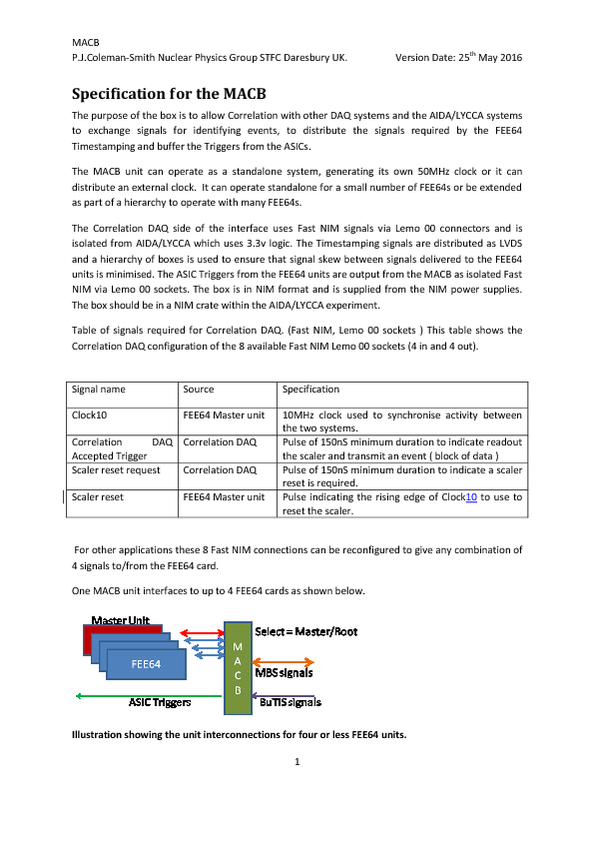
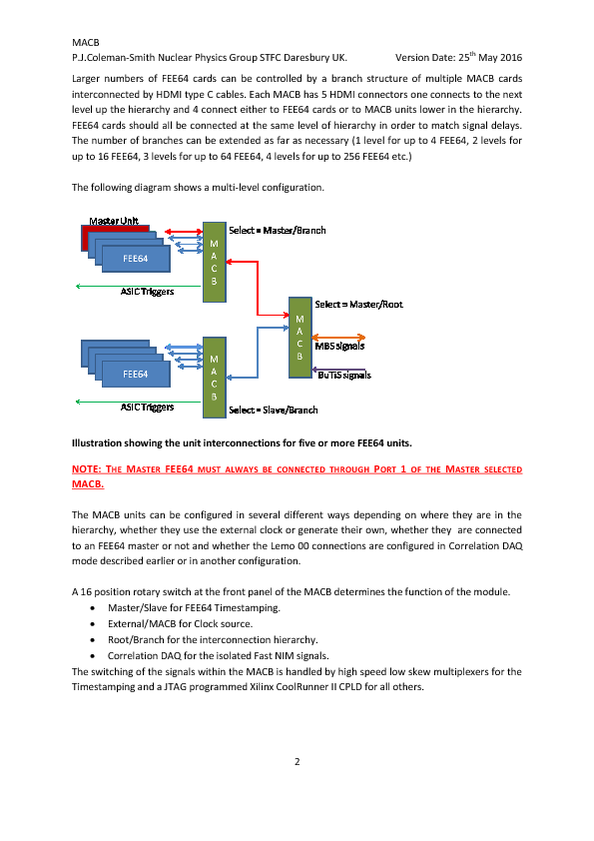
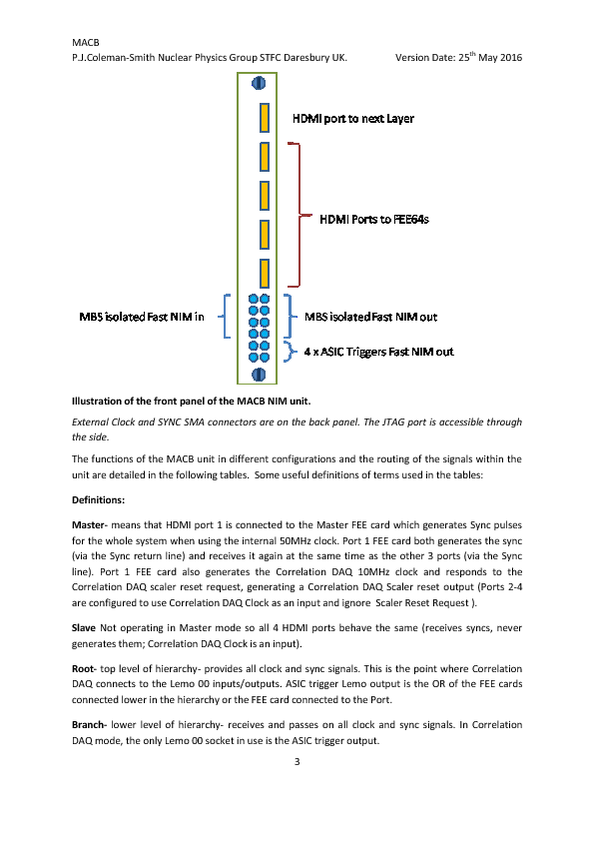
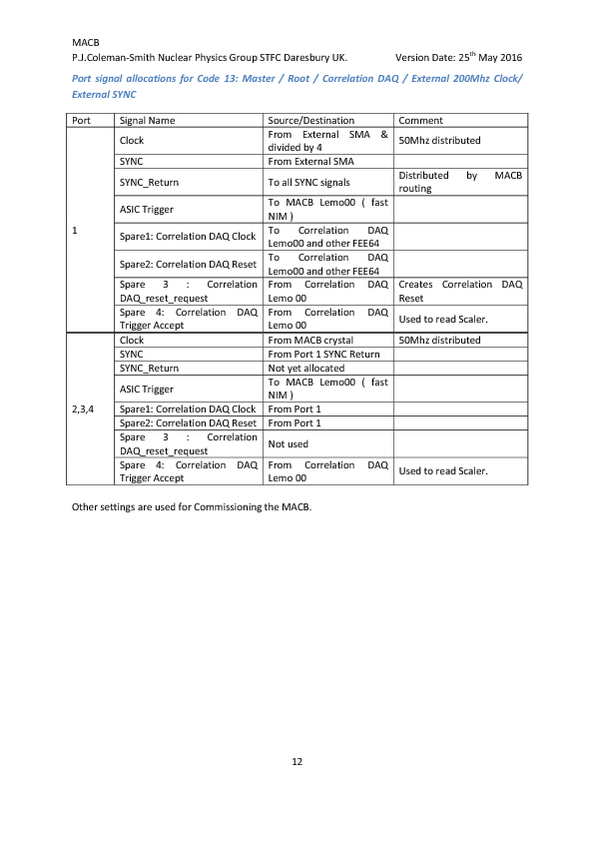
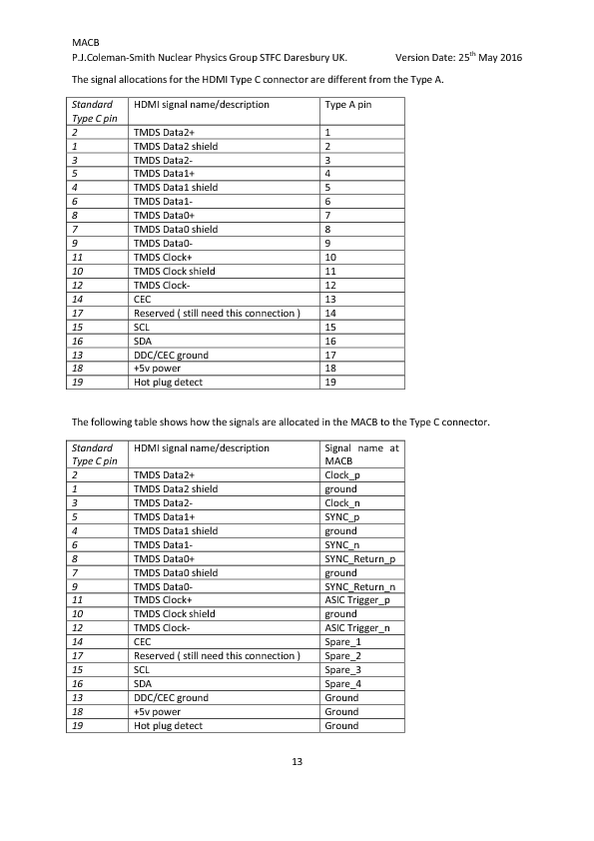
Attached is the specification for the MACB with the settings currently available. |
| Attachment 1: Specification_for_the_MACB_25May16.pdf
|
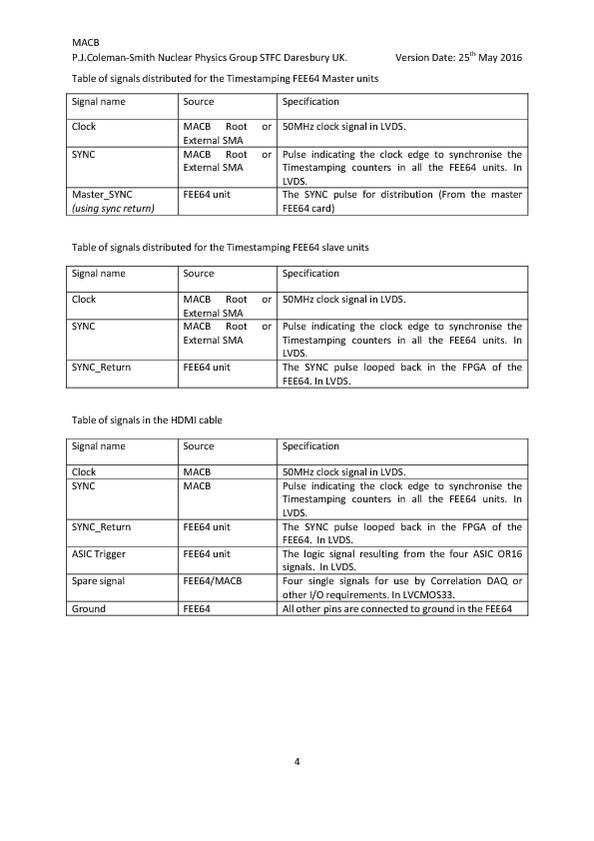
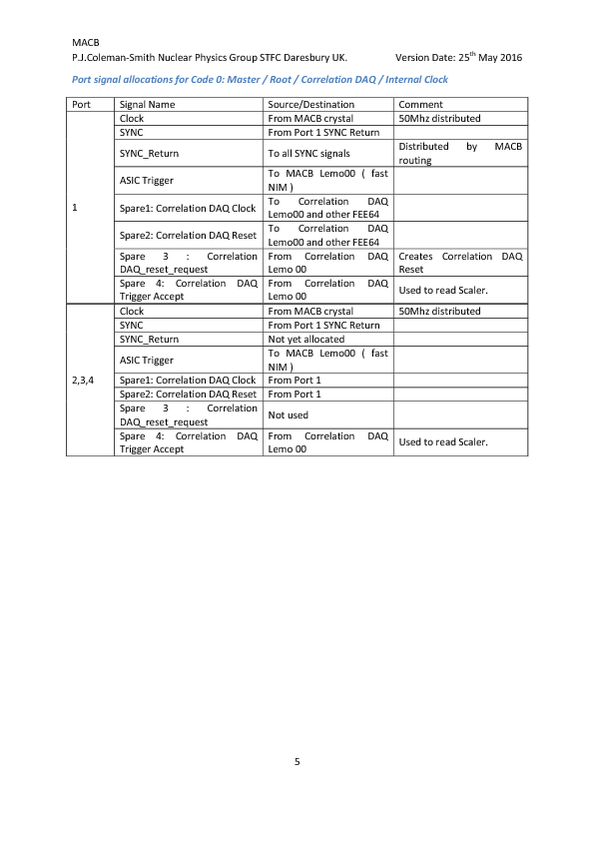
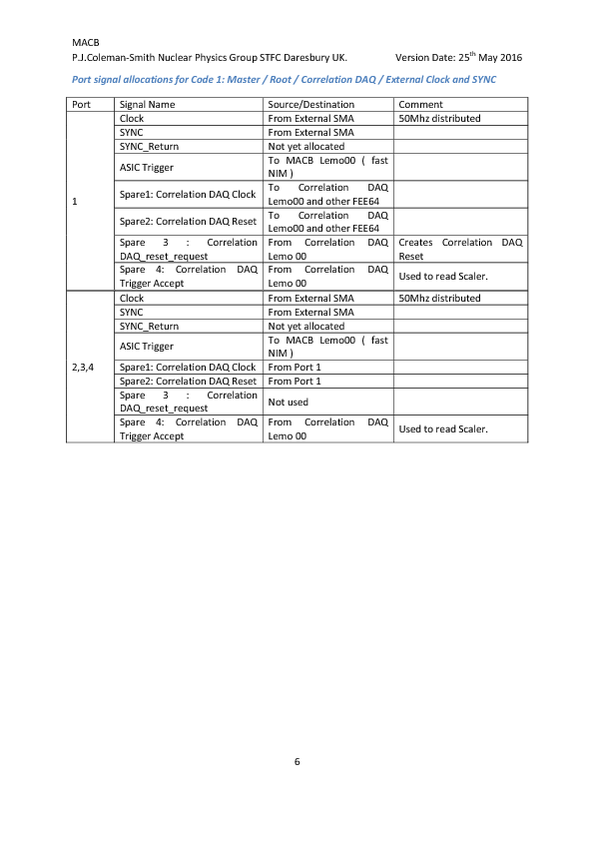
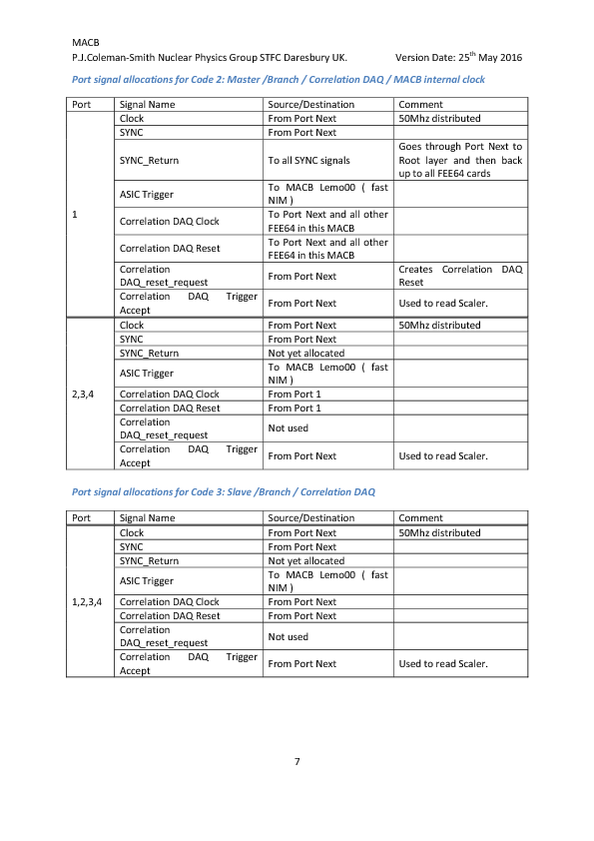
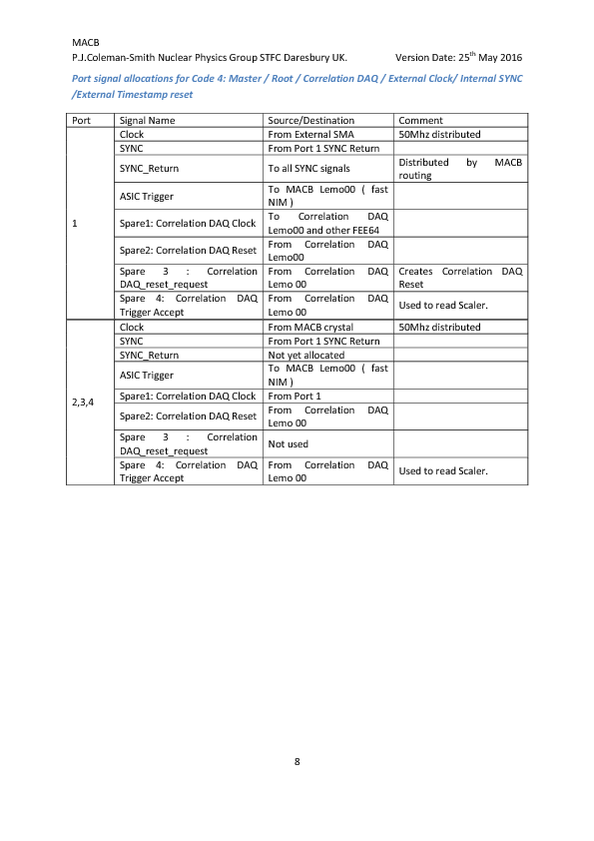
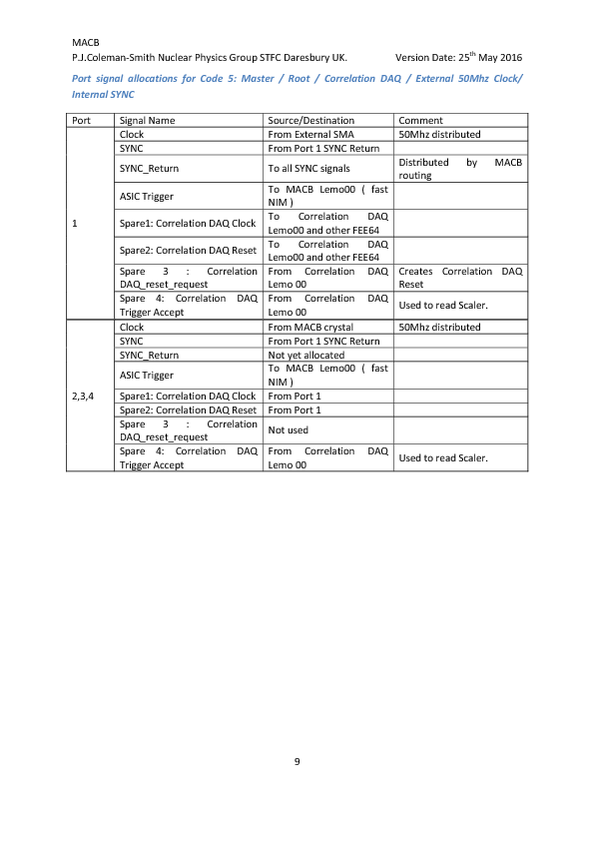
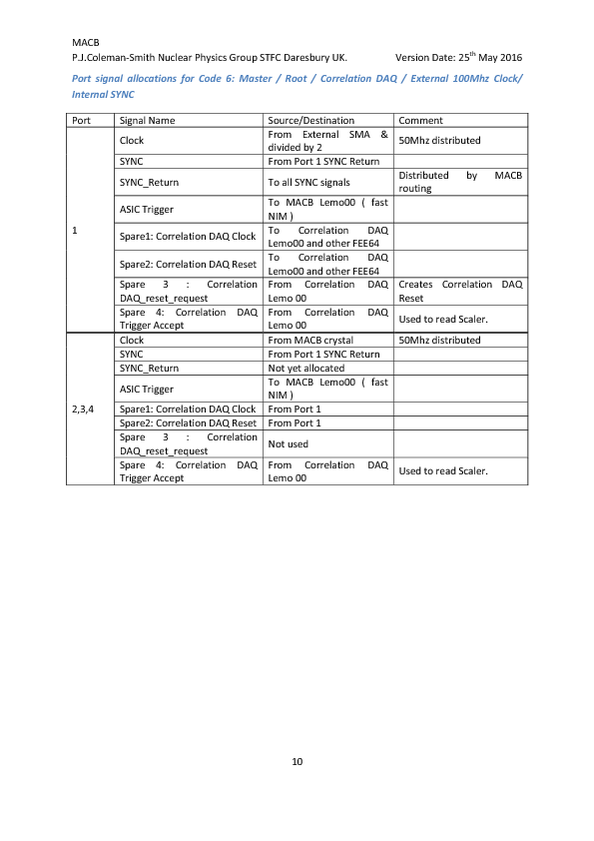
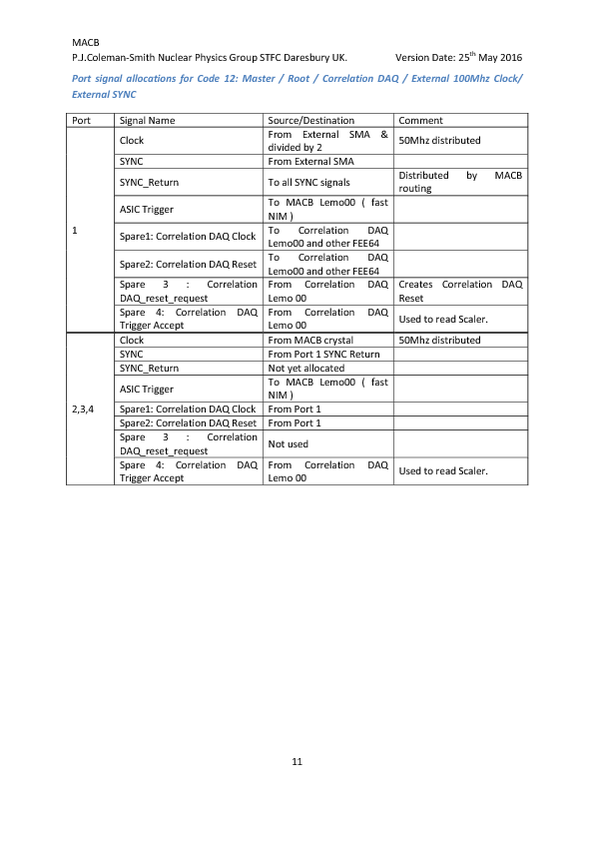
|
|
234
|
Tue May 24 08:28:28 2016 |
Patrick Coleman-Smith | [HowTo] Save power if not using the Waveforms and restart the Waveforms |
The USB controlled power Relays are near their AC fuse operating limit which has caused some Fuse failures.
To reduce the power consumption of each FEE64 it is possible to power down the Waveforms ADCs saving about 20W per FEE64.

To Powerdown the ADCs in a FEE64 use the 'Local Data' browser window from the 'Control' browser window. Change the setting of the ADC Control
Register at offset 2 from 0 to 0xFF. All the FEE64s can be thus controlled by using the 'Act on all' tick box.
Clearly, the System Check for ADC calibration will now fail for all those that are powered down.

To Power up the ADCs change the setting from 0xFF to 0. Then using the FADC Calibration browser window calibrate the FADCs.

The SYSTEM should be in the 'STOP' state during these procedures.

Should the SYSTEM be power cycled then the ADCs will be powered up.

Saving at the 16A AC fuse is estimated to be 3A as there are 16 FEE64 being powered through each. |
|
268
|
Wed Jun 1 12:14:08 2016 |
Patrick Coleman-Smith | [HowTo] React to "Check Clock Status => FEE64 Failure" |
If there are more than one failures then check how they map to the MACB HDMI connections.
 Are they all connected to the just one MACB ? => Check the HDMI cable at the MACB Layer Port.
 Are they all connected to several MACBs which have a common "Parent" ? => Check the HDMI cable at the "Parent"
MACB Layer Port.

If there is just one failure then open the Local Controls browser window for the failing FEE64.
If the "Status Register" @1 is not 0x7 then the Waveform ADCs will not operate correctly and ASIC readout will
be compromised.
To remedy try
A)    Enter 0x2B to "LMK03200 control register" @5
          then Reload the Page
          then Enter 0xB
          then Reload the Page and check the status, if 0x7 all ok.

B)     Enter 0xA to "LMK03200 control register" @5
          then Reload the Page
          then Enter 0xB
          then Reload the Page
          then enter 0x2B to "LMK03200 control register" @5
          then Reload the Page
          then Enter 0xB
then Reload the Page and check the status, if 0x7 all ok. |
|
559
|
Mon May 8 10:00:02 2017 |
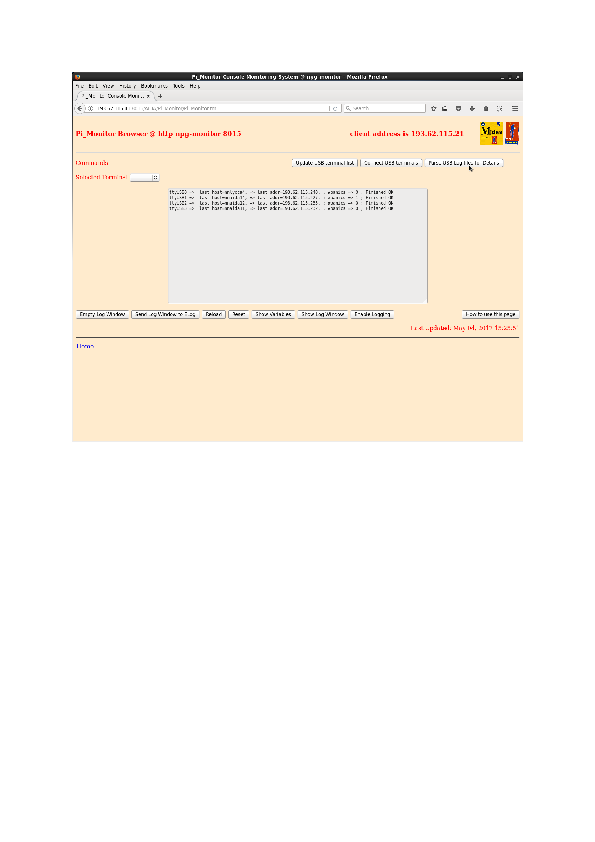
Patrick Coleman-Smith | [HowTo] Operating document for the Pi_Monitor FEE64 console logging equipment |
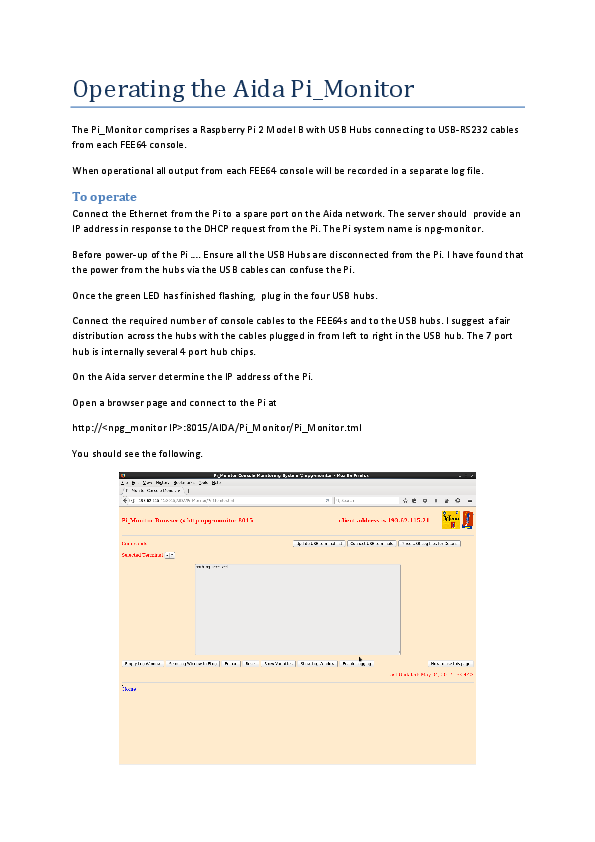
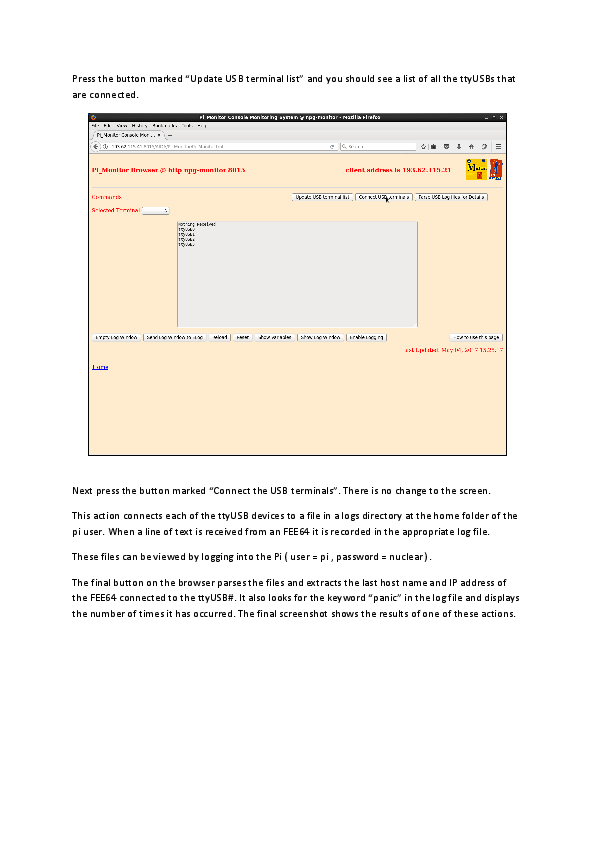
The operating proceedure for the Raspberry Pi FEE64 console monitor is attached.
Please let me know if more detail is required.
|
| Attachment 1: Operating_the_Aida_Pi_Monitor.pdf
|
|
|
575
|
Thu May 18 15:20:44 2017 |
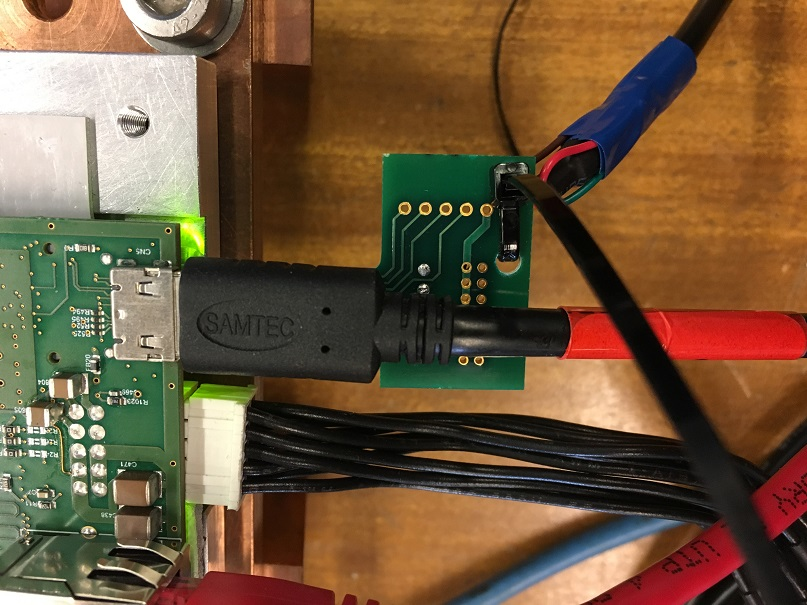
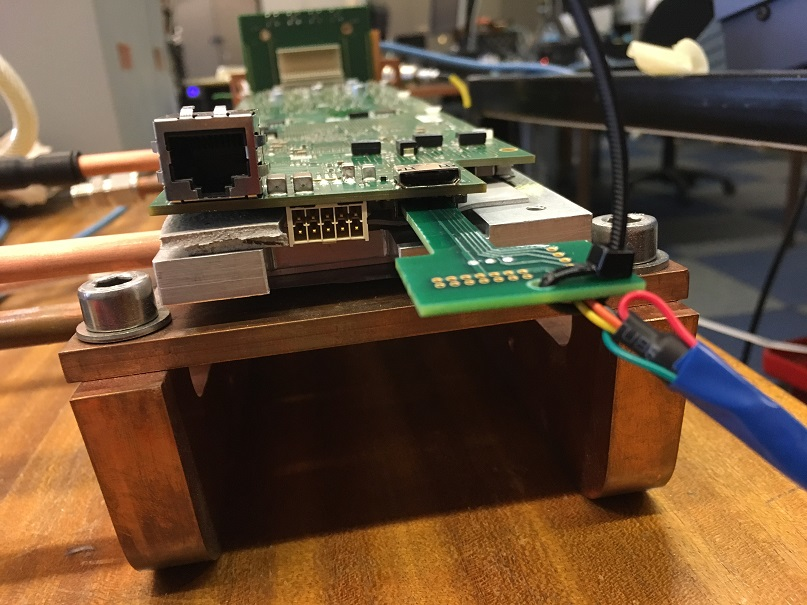
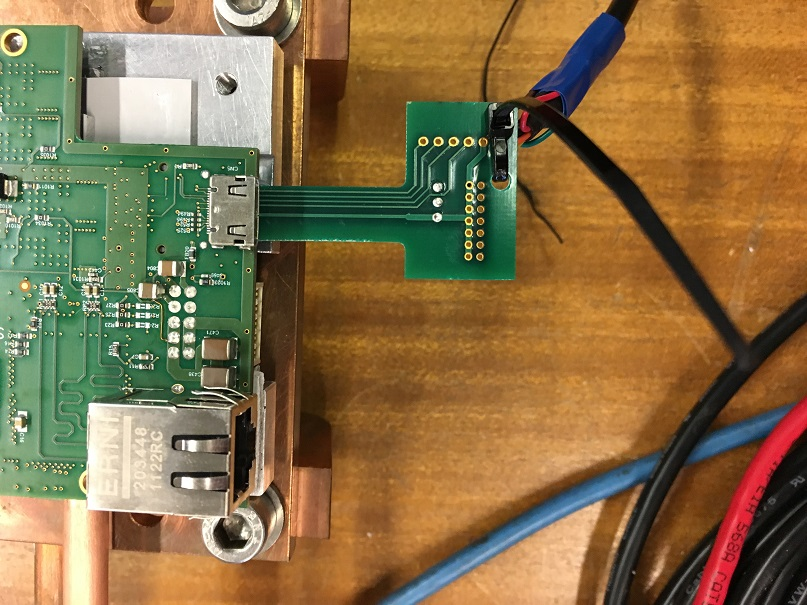
Patrick Coleman-Smith | [HowTo] Connecting a USB console interface to the FEE64 |
The three attachments show the orientation of the console cable pcb relative to the FEE64 connectors.
The first with the other cables and the other two with no cables for clarity of position. |
| Attachment 1: IMG_0107_resize.jpg
|
|
| Attachment 2: IMG_0108_resize.jpg
|
|
| Attachment 3: IMG_0109_resize.jpg
|
|
|
942
|
Wed Mar 13 14:50:04 2024 |
NH | [HowTo] Backup and Restore Raspberry Pi SD Cards |
Micro SD cards used by the raspberry pis are cheap but prone to failing

If the system won't boot and the SD card is read only it may have failed. Best way is to buy a new micro SD card (16 or 32GB) and restore a backup

I have uploaded an image of nnrpi2 (AIDA@GSI) to aida-3 (/home/npg/nnrpi2.img)

To backup an SD card

dd if=/dev/mmcblk0 of=nnrpi2.img status=progress

To restore a backup to a new SD card

dd if=nnrpi2.img of=/dev/mmcblk0 status=progress

(/dev/mmcblk0 name may differ on different machines, is for a laptop with built in SD card reader) |
|
331
|
Thu Jul 28 11:35:58 2016 |
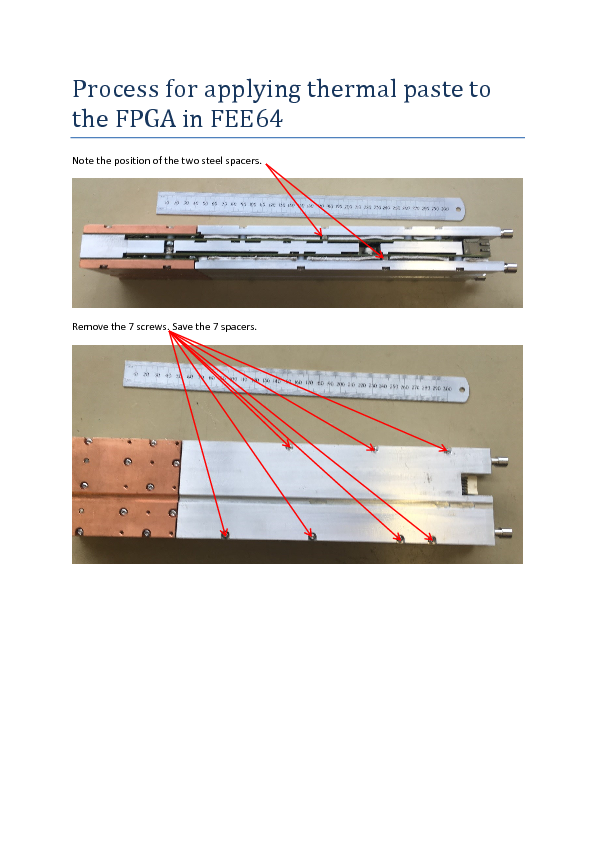
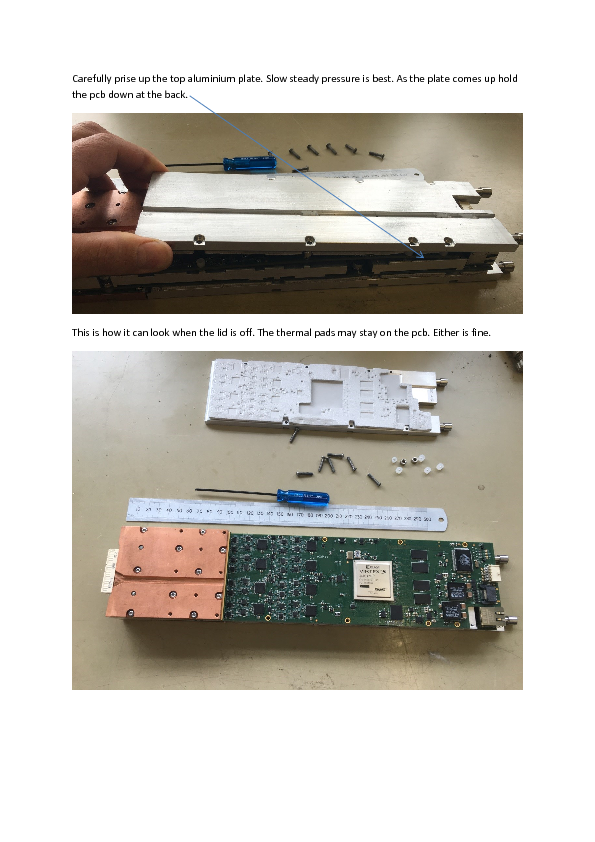
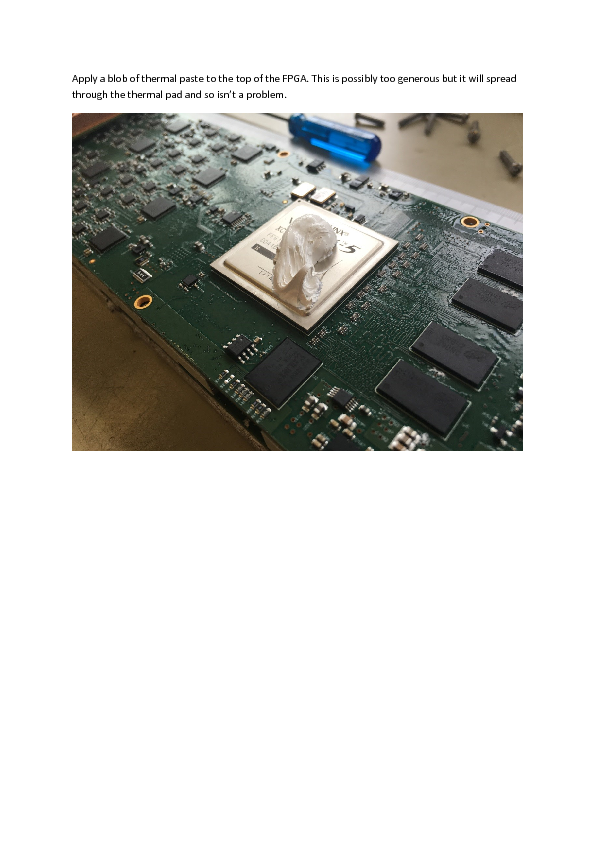
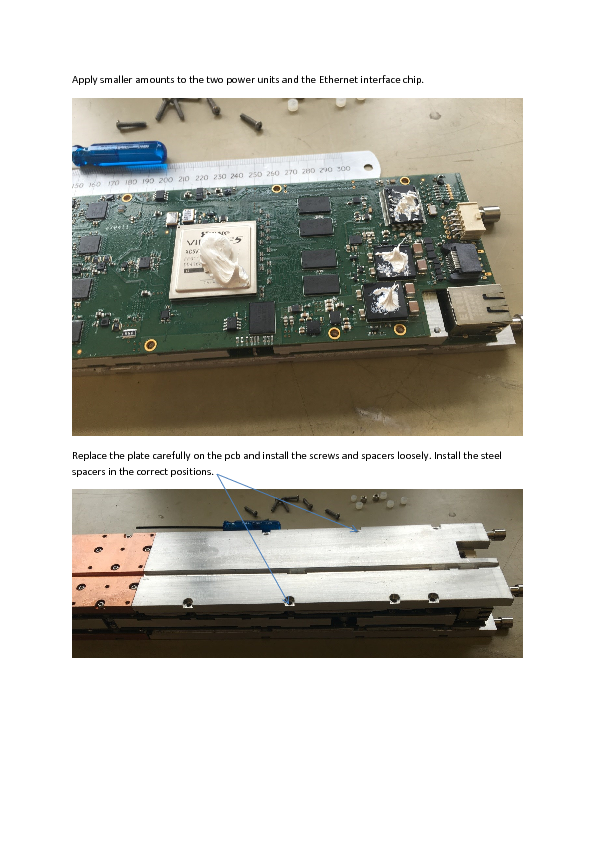
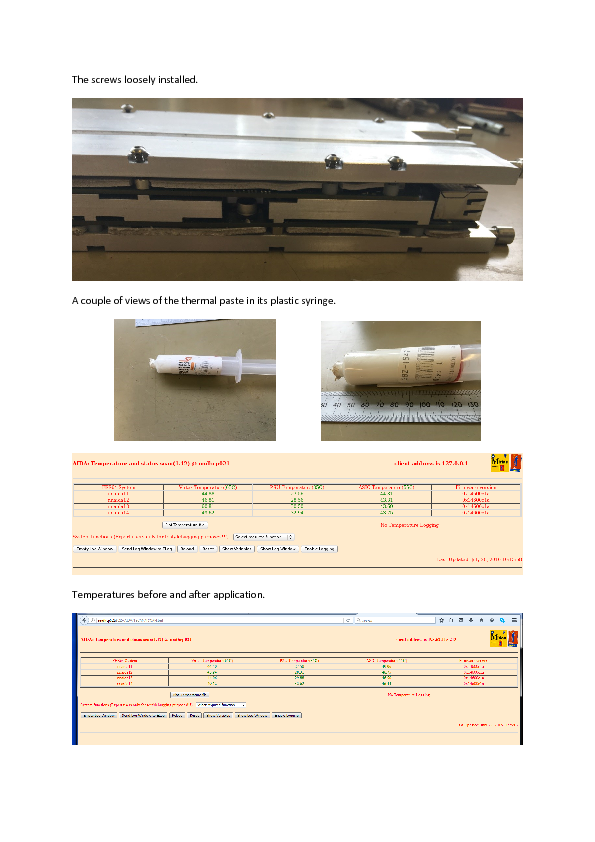
Patrick Coleman-Smith | [HowTo] Apply Thermal paste to FPGA |
|
| Attachment 1: Process_for_applying_thermal_paste_to_the_FPGA_in_FEE64.pdf
|
|
|
240
|
Thu May 26 14:19:13 2016 |
Patrick Coleman-Smith | [HowTo] Access AIDA documentation |
The latest version of the FEE64 software Interface document ( May 2016 ) is available as a .pdf from
http://npg.dl.ac.uk/documents/edoc000/#AIDA. EDOC955

The version available via the pink "documentation" button in the Control browser window is now out of date. This
will be updated at some future time.

Other documents that are of use are there also.
MACB specification.
GREAT Data Format. |