| ID |
Date |
Author |
Subject |
|
192
|
Fri Mar 12 10:09:19 2021 |
LS, CA | Friday 12th March 11.00- |
11.00(Germany) System wide checks okay except:

      FEE64 module aida09 global clocks failed, 6
      Clock status test result: Passed 11, Failed 1
      Understand status as follows
      Status bit 3 : firmware PLL that creates clocks from external clock not locked
      Status bit 2 : always logic '1'
      Status bit 1 : LMK3200(2) PLL and clock distribution chip not locked to external clock
      Status bit 0 : LMK3200(1) PLL and clock distribution chip not locked to external clock
      If all these bits are not set then the operation of the firmware is unreliable

      FEE64 module aida07 failed
      FEE64 module aida09 failed
      Calibration test result: Passed 10, Failed 2
      If any modules fail calibration , check the clock status and open the FADC Align and Control browser page to rerun
      calibration for that module

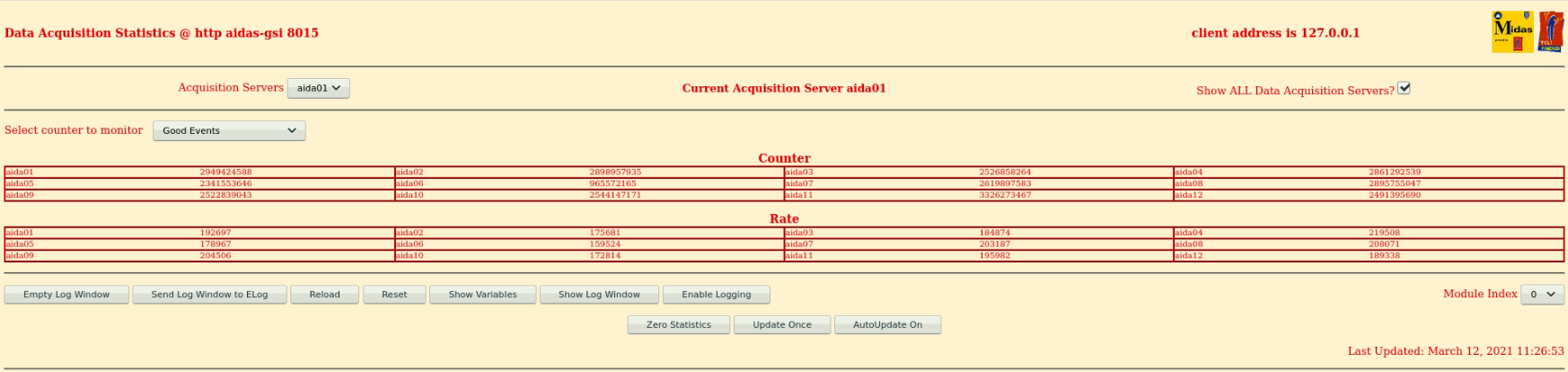
      Statistics (attachment1)
      Spectra rates (attachment2)
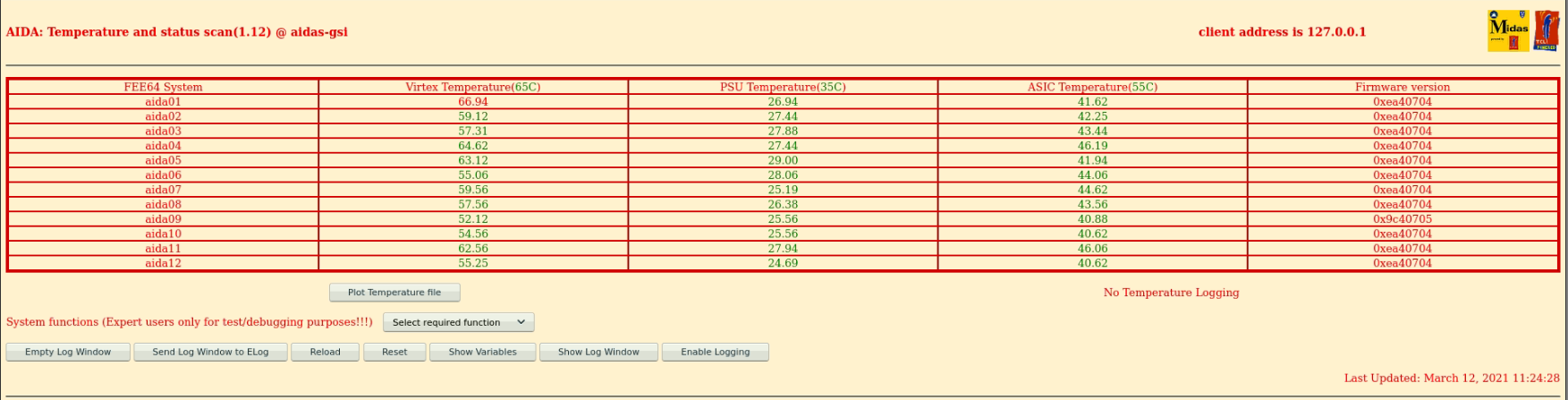
      FEE temps (attachment3)
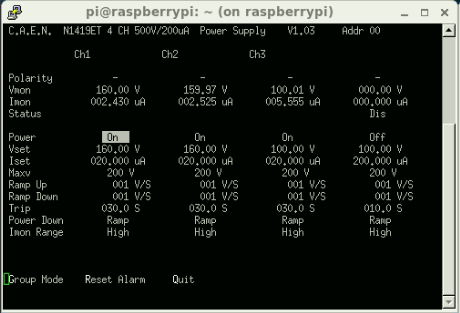
      Leakage currents, written to google sheet (attachment4)
      Merger~ 4.9M items/s
      Tapeserver ~17MB/s

      In MBS control terminal, connection has been closed intentionally since this morning (file S452f160),
      AIDA has been taken out of the timesorter due to the high data rate, buffers were full
      AIDA cannot be seen in ucesb or Go4.

13.00 System wide checks okay except:

      FEE64 module aida09 global clocks failed, 6
      Clock status test result: Passed 11, Failed 1
      Understand status as follows
      Status bit 3 : firmware PLL that creates clocks from external clock not locked
      Status bit 2 : always logic '1'
      Status bit 1 : LMK3200(2) PLL and clock distribution chip not locked to external clock
      Status bit 0 : LMK3200(1) PLL and clock distribution chip not locked to external clock
      If all these bits are not set then the operation of the firmware is unreliable

      FEE64 module aida07 failed
      FEE64 module aida09 failed
      Calibration test result: Passed 10, Failed 2
      If any modules fail calibration , check the clock status and open the FADC Align and Control browser page to rerun
      calibration for that module

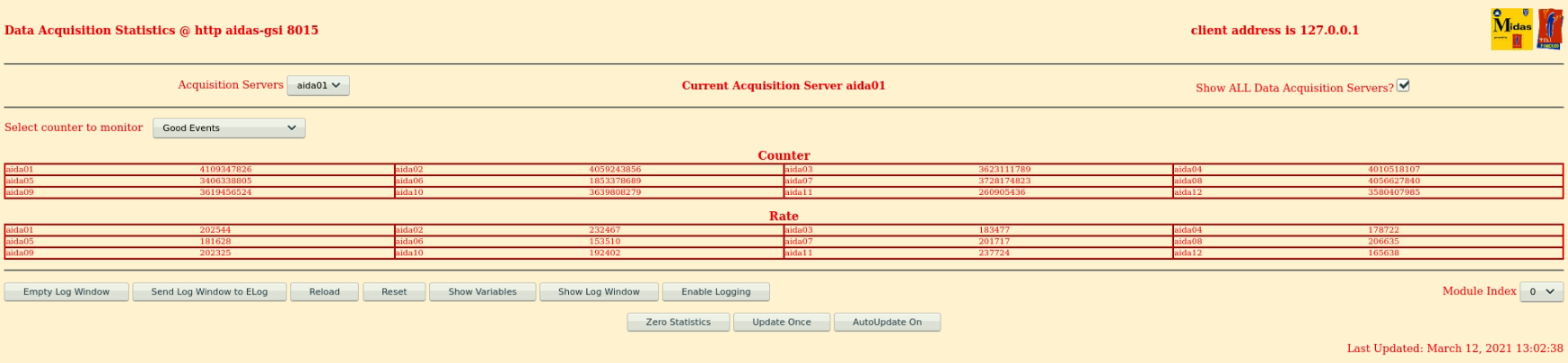
      Statistics (attachment5)
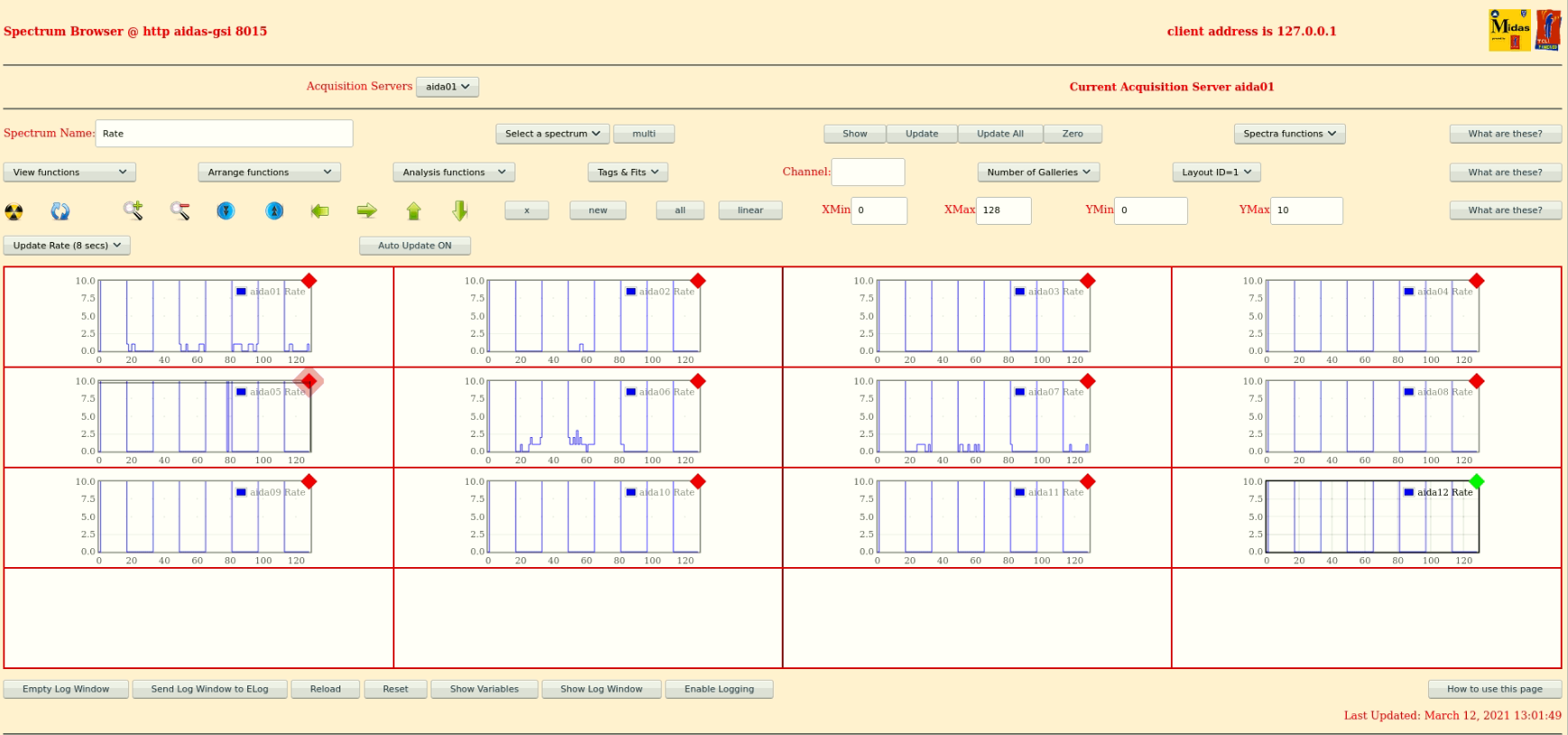
      Spectra rates (attachment6)
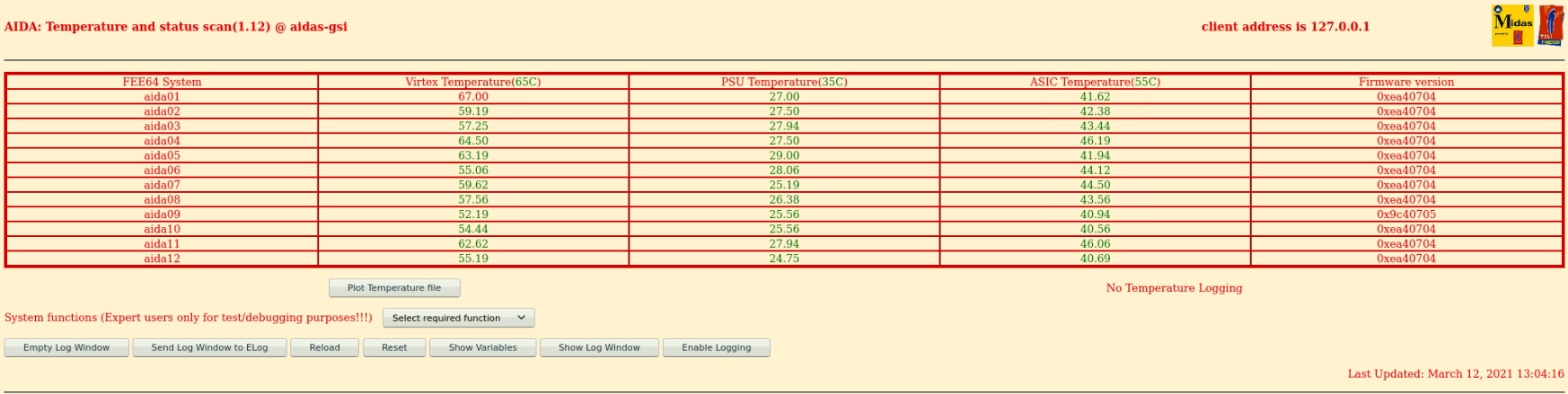
      FEE temps (attachment7)
      Leakage currents, written to google sheet (attachment8)
      Merger~ 5.1M items/s
      Tapeserver ~18MB/s

      No timestamp related errors this shift

13.37 AIDA MBS control restarted R33_388
      System wide checks same as previous time

13.54 beam stopped for access,  file R33_396

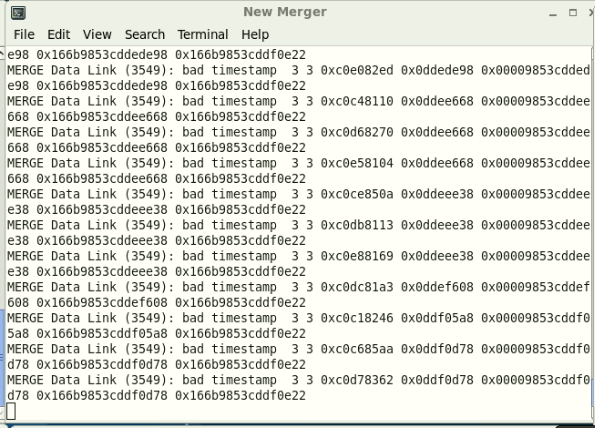
13.57 seen recent batch of bad timestamp errors in new merger terminal (attachment9) should be around R33_397
      Analysed R33_395, 396, 397, 398 no timewarps

14.29 beam back R33_415

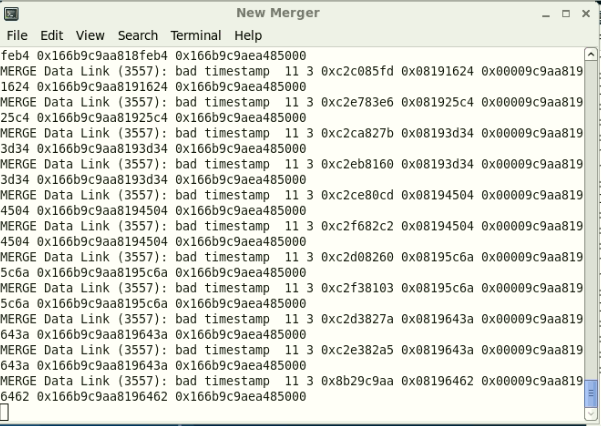
14.54 see more bad timestamps in new merger terminal (attachment10)

14.55 System wide checks okay except:

      FEE64 module aida09 global clocks failed, 6
      Clock status test result: Passed 11, Failed 1
      Understand status as follows
      Status bit 3 : firmware PLL that creates clocks from external clock not locked
      Status bit 2 : always logic '1'
      Status bit 1 : LMK3200(2) PLL and clock distribution chip not locked to external clock
      Status bit 0 : LMK3200(1) PLL and clock distribution chip not locked to external clock
      If all these bits are not set then the operation of the firmware is unreliable

      FEE64 module aida07 failed
      FEE64 module aida09 failed
      Calibration test result: Passed 10, Failed 2
      If any modules fail calibration , check the clock status and open the FADC Align and Control browser page to rerun
      calibration for that module

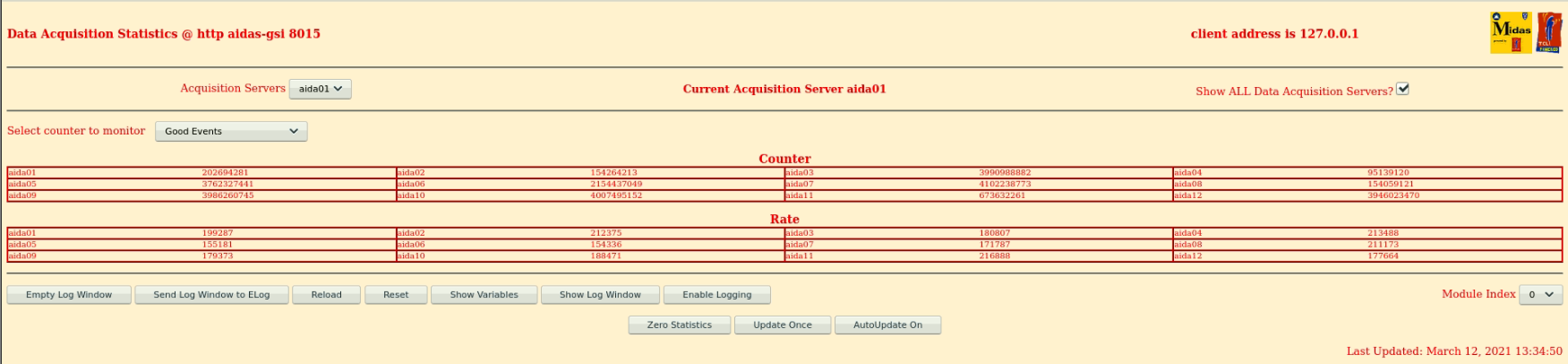
      Statistics (attachment11)
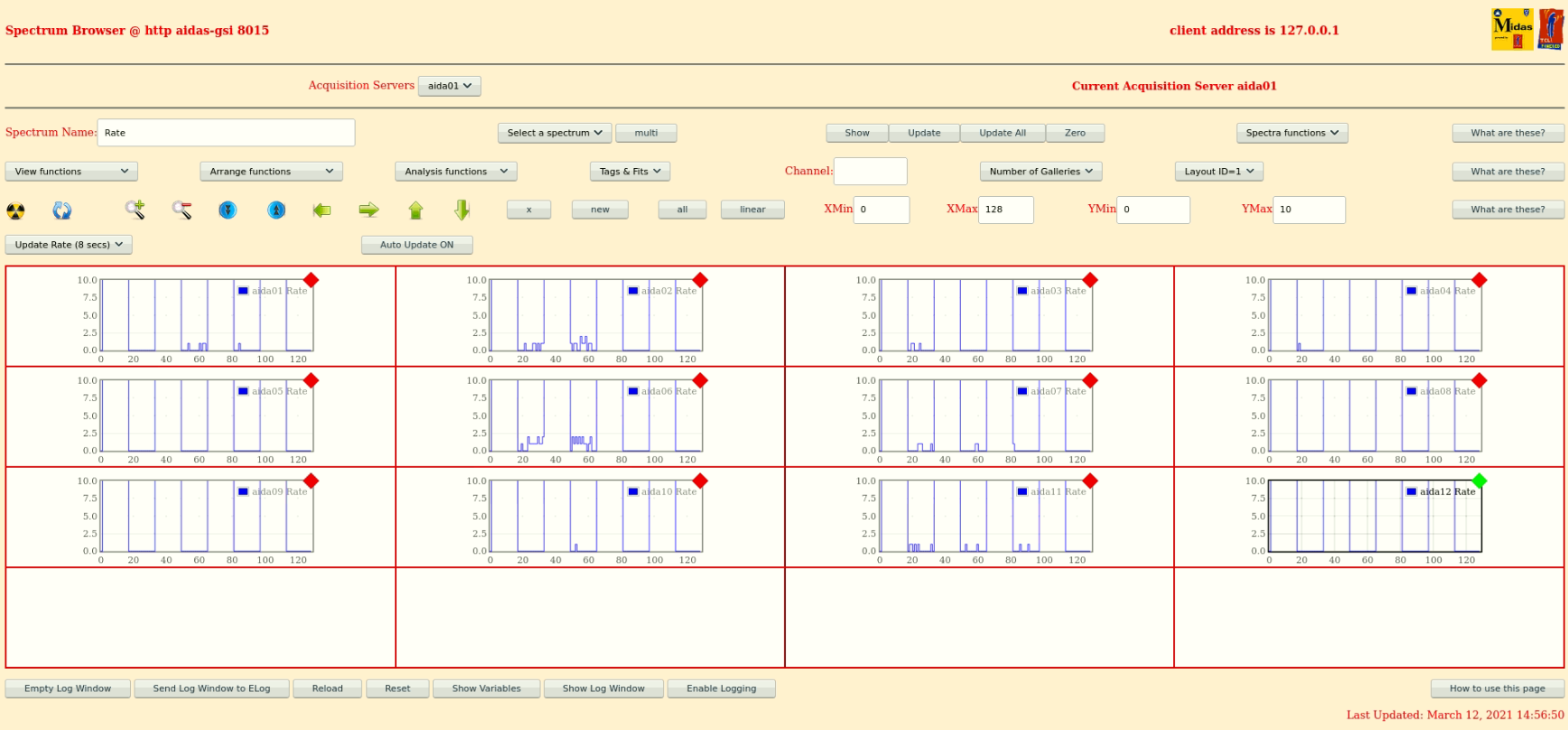
      Spectra rates (attachment12)
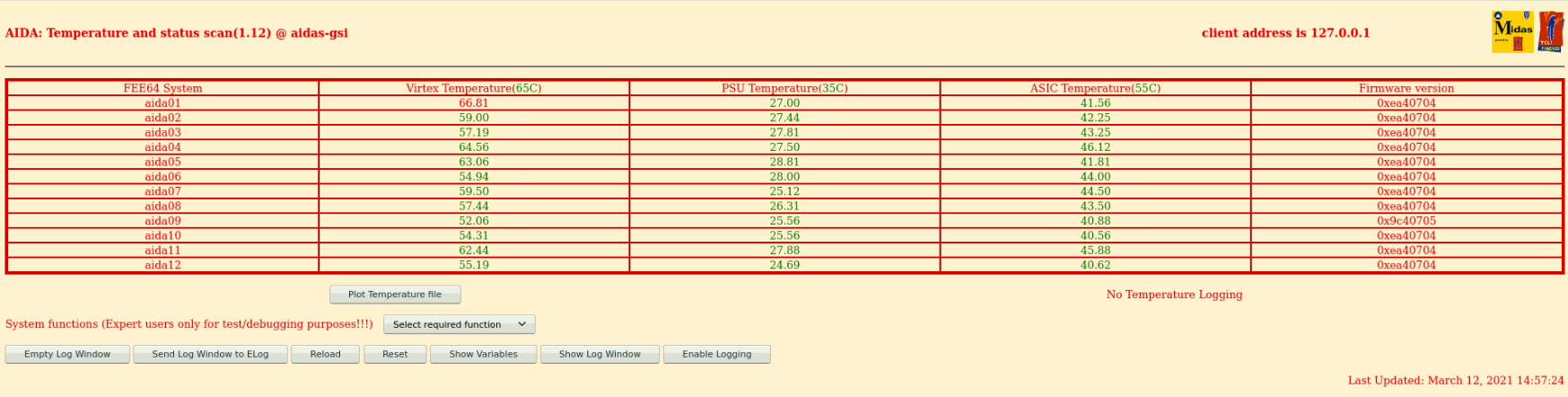
      FEE temps (attachment13)
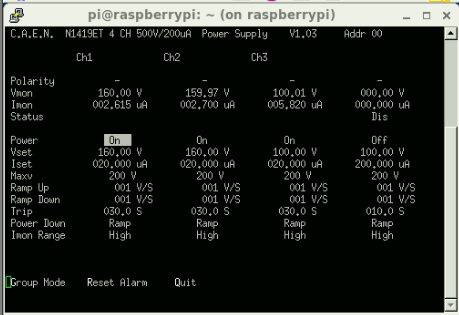
      Leakage currents, written to google sheet (attachment14)
      Merger~ 5.0M items/s
      Tapeserver ~17MB/s

16.05 AIDA included back into timesorter, AIDA scalers now seen in ucesb, file R33_463

16.15 CA takes over until 18:00

17:11 System wide checks:

      FEE64 module aida09 global clocks failed, 6
      Clock status test result: Passed 11, Failed 1
      Understand status as follows
      Status bit 3 : firmware PLL that creates clocks from external clock not locked
      Status bit 2 : always logic '1'
      Status bit 1 : LMK3200(2) PLL and clock distribution chip not locked to external clock
      Status bit 0 : LMK3200(1) PLL and clock distribution chip not locked to external clock
      If all these bits are not set then the operation of the firmware is unreliable

      FEE64 module aida07 failed
      FEE64 module aida09 failed
      Calibration test result: Passed 10, Failed 2
      If any modules fail calibration , check the clock status and open the FADC Align and Control browser page to rerun
      calibration for that module

		 Base 		Current 	Difference
aida07 fault 	 0xcdd6 : 	 0xcdd7 : 	 1
White Rabbit error counter test result: Passed 11, Failed 1

17:13 FEE64 temps ok - attachment 15
      Statistics ok - attachment 16
bias and leakage currents ok - attachment 17 |
| Attachment 1: 1100_Statistics.PNG
|
|
| Attachment 2: 1100_SpectraRate.PNG
|

|
| Attachment 3: 1100_FEETemps.PNG
|
|
| Attachment 4: 1100_LeakageCurrents.PNG
|
|
| Attachment 5: 1300_Statistics.PNG
|
|
| Attachment 6: 1300_SpectraRate.PNG
|
|
| Attachment 7: 1300_FEETemps.PNG
|
|
| Attachment 8: 1300_LeakageCurrents.PNG
|

|
| Attachment 9: 1358_NewMerger.PNG
|
|
| Attachment 10: 1454_NewMerger.PNG
|
|
| Attachment 11: 1500_Statistics.PNG
|
|
| Attachment 12: 1500_SpectraRate.PNG
|
|
| Attachment 13: 1500_FEETemps.PNG
|
|
| Attachment 14: 1500_LeakageCurrents.PNG
|
|
| Attachment 15: Screenshot_from_2021-03-12_16-18-13.png
|

|
| Attachment 16: Screenshot_from_2021-03-12_16-18-51.png
|

|
| Attachment 17: Screenshot_from_2021-03-12_16-21-21.png
|

|
|
191
|
Fri Mar 12 08:32:46 2021 |
TD | Friday 12 March 08.00- |
08.31 DAQ continues OK - file R33_263

      ASIC settings 2019Dec19-16.19.51
      DSSSD#1 slow comparator 0xa
      DSSSD#2 slow comparator 0xa
      DSSSD#3 slow comparator 0xd

      BNC PB-5 Pulser
      Amplitude1.0V
      Attenuation x1
      Frequency 2Hz
      tau_d 1ms
      - polarity
      Delay 250ns, tail pulse

08.32 No merger server error/warning messages since most recent restart c. 00.00 today


08.44 System wide checks

FEE64 module aida09 global clocks failed, 6
 Clock status test result: Passed 11, Failed 1

Understand status as follows
Status bit 3 : firmware PLL that creates clocks from external clock not locked
Status bit 2 : always logic '1'
Status bit 1 : LMK3200(2) PLL and clock distribution chip not locked to external clock
Status bit 0 : LMK3200(1) PLL and clock distribution chip not locked to external clock
If all these bits are not set then the operation of the firmware is unreliable

FEE64 module aida07 failed
FEE64 module aida10 failed
Calibration test result: Passed 10, Failed 2

If any modules fail calibration , check the clock status and open the FADC Align and Control browser page to rerun calibration for that module


		 Base 		Current 	Difference
aida05 fault 	 0x7a56 : 	 0x7a58 : 	 2
aida06 fault 	 0x65bb : 	 0x65bd : 	 2
aida07 fault 	 0xcdd1 : 	 0xcdd4 : 	 3
aida08 fault 	 0x2ab3 : 	 0x2ab5 : 	 2
White Rabbit error counter test result: Passed 8, Failed 4

Understand the status reports as follows:-
Status bit 3 : White Rabbit decoder detected an error in the received data
Status bit 2 : Firmware registered WR error, no reload of Timestamp
Status bit 0 : White Rabbit decoder reports uncertain of Timestamp information from WR


FPGA Timestamp error counter test result: Passed 12, Failed 0
If any of these counts are reported as in error
The ASIC readout system has detected a timeslip.
That is the timestamp read from the time FIFO is not younger than the last


Returned 0 0 0 0 0 0 0 0 0 0 0 0
Mem(KB) :	4	8	16	32	64	128	256	512	1k	2k	4k
aida01 :     14      6      3      2      1      2      2      3      3      4     11   : 58904
aida02 :      6      4      1      1      1      2      2      4      2      3      7   : 39848
aida03 :      5      6      4      2      1      3      1      3      2      3      7   : 39300
aida04 :      4      1      2      2      3      3      2      4      1      4     15   : 73912
aida05 :      1      5      2      2      2      4      2      3      2      3      7   : 39692
aida06 :      7      2      2      3      1      3      3      3      2      4      7   : 41836
aida07 :      6      3      1      2      3      2      2      3      3      3      7   : 40512
aida08 :      8      5      2      2      1      3      1      3      2      3      7   : 39272
aida09 :      1      2      3      1      1      3      2      3      1      4      7   : 40484
aida10 :      2      6      3      2      1      2      2      2      3      3      7   : 39912
aida11 :      2      3      1      0      2      4      1      3      2      3      7   : 39344
aida12 :      2      3      4      2      0      3      3      3      2      3      7   : 39712


      FEE64 Temperatures OK - attachment 1
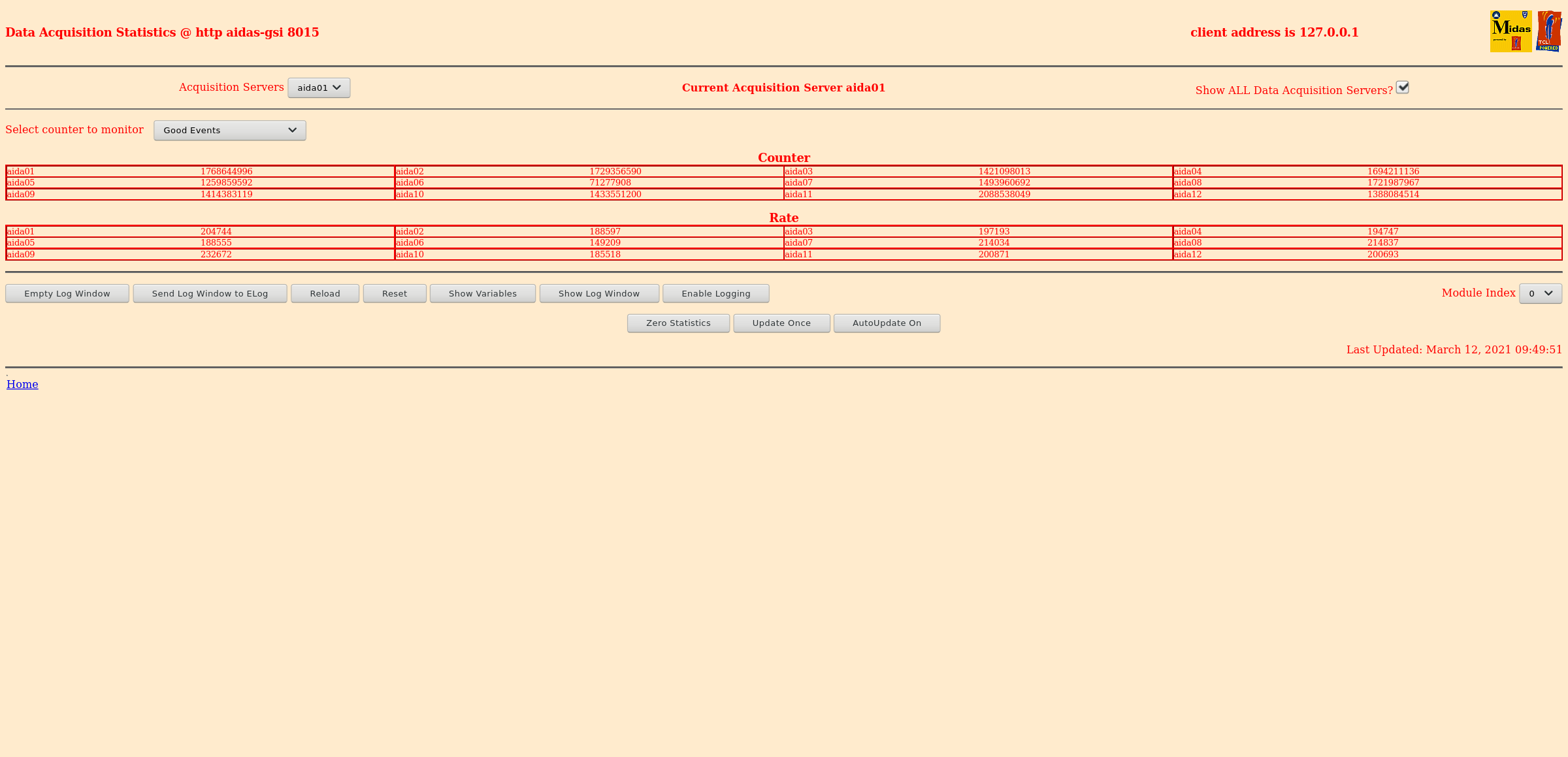
      Good event statistics OK - attachment 2
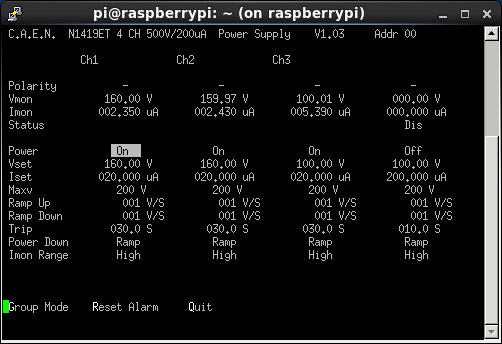
      Detector bias & leakage currents OK - attachment 3
      Merger OK - 5.1M data items/s
      TapeServer OK - 16Mb/s

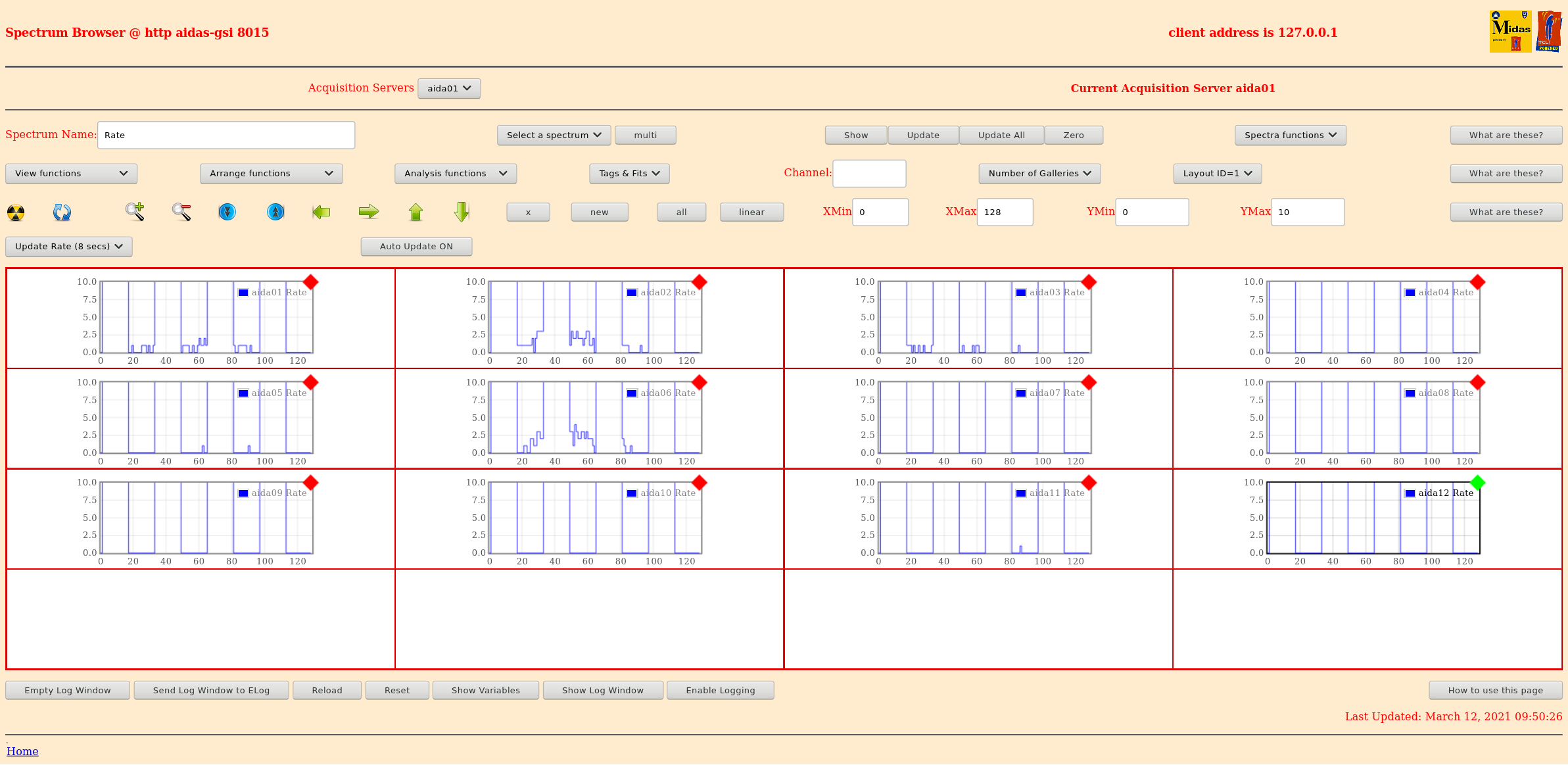
08.54 p+n junction strip HEC spectra - attachment 1
      Rate spectra - attachment 2

09.15 Burst of Merger server warning messages of type

MERGE Data Link (3547): bad timestamp  1 3 0x8128d6c8 0x05056328 0x00008d6c85056328 0x166b8d6c85056328 0x166b8d6d86da01ee

      also multiple

Warning: At least one MIDAS block missed in relayWarning: At least one MIDAS block missed in relayWarning: At least one MIDAS block missed in relayWarning: At least one
MIDAS block missed in relayWarning: At least one MIDAS block missed in relayWarning: At least one MIDAS block missed in relayWarning: At least one MIDAS block missed in
relayWarning: At least one MIDAS block missed in relayWarning: A

The latter may reflect downstream problems writing MBS data |
| Attachment 1: Screenshot_2021-03-12_Temperature_and_status_scan_aidas-gsi.png
|

|
| Attachment 2: Screenshot_2021-03-12_Statistics_aidas-gsi.png
|
|
| Attachment 3: 30.png
|
|
| Attachment 4: Screenshot_2021-03-12_Spectrum_Browser_aidas-gsi(1).png
|
.png.png "Screenshot_2021-03-12_Spectrum_Browser_aidas-gsi(1).png")
|
| Attachment 5: Screenshot_2021-03-12_Spectrum_Browser_aidas-gsi.png
|
|
|
193
|
Fri Mar 12 20:12:10 2021 |
TD | Friday 12 March |
21.12 DAQ continues OK - file R33_617

      ASIC settings 2019Dec19-16.19.51
      DSSSD#1 slow comparator 0xa
      DSSSD#2 slow comparator 0xa
      DSSSD#3 slow comparator 0xd

      BNC PB-5 Pulser
      Amplitude1.0V
      Attenuation x1
      Frequency 2Hz
      tau_d 1ms
      - polarity
      Delay 250ns, tail pulse

21.15 System wide checks


FEE64 module aida09 global clocks failed, 6
 Clock status test result: Passed 11, Failed 1

Understand status as follows
Status bit 3 : firmware PLL that creates clocks from external clock not locked
Status bit 2 : always logic '1'
Status bit 1 : LMK3200(2) PLL and clock distribution chip not locked to external clock
Status bit 0 : LMK3200(1) PLL and clock distribution chip not locked to external clock
If all these bits are not set then the operation of the firmware is unreliable


FEE64 module aida07 failed
FEE64 module aida09 failed
Calibration test result: Passed 10, Failed 2

If any modules fail calibration , check the clock status and open the FADC Align and Control browser page to rerun calibration for that module


		 Base 		Current 	Difference
aida05 fault 	 0x7a58 : 	 0x7a5a : 	 2
aida06 fault 	 0x65bd : 	 0x65bf : 	 2
aida07 fault 	 0xcdd6 : 	 0xcdda : 	 4
aida08 fault 	 0x2ab5 : 	 0x2ab7 : 	 2
White Rabbit error counter test result: Passed 8, Failed 4

Understand the status reports as follows:-
Status bit 3 : White Rabbit decoder detected an error in the received data
Status bit 2 : Firmware registered WR error, no reload of Timestamp
Status bit 0 : White Rabbit decoder reports uncertain of Timestamp information from WR


			 Base 		Current 		Difference
aida05 fault 	 0x0 : 	 0x1 : 	 1
FPGA Timestamp error counter test result: Passed 11, Failed 1
If any of these counts are reported as in error
The ASIC readout system has detected a timeslip.
That is the timestamp read from the time FIFO is not younger than the last


Returned 0 0 0 0 0 0 0 0 0 0 0 0
Mem(KB) :	4	8	16	32	64	128	256	512	1k	2k	4k
aida01 :      5      4      2      0      1      2      3      3      2      3     11   : 55956
aida02 :     21      4      1      2      2      4      2      2      1      4      7   : 40260
aida03 :     10      4      4      1      6      4      1      3      3      3      6   : 36648
aida04 :      7      2      4      0      2      3      2      4      1      4     15   : 73836
aida05 :      1      3      1      5      4      3      1      2      3      4      6   : 37964
aida06 :     12      3      5      2      1      3      3      3      2      4      7   : 41880
aida07 :      2      4      3      3      4      2      2      4      3      3      6   : 37048
aida08 :     17     13      2      3      2      3      2      3      2      3      7   : 39724
aida09 :      3      7      2      0      1      2      2      3      2      2      7   : 37284
aida10 :      2      5      3      2      2      3      1      3      2      3      7   : 39328
aida11 :     23     18      2      3      2      3      3      2      3      3      6   : 36460
aida12 :     18      7      3      1      1      4      2      2      2      3      7   : 39184

      FEE64 Temperatures OK - attachment 1
      Good event statistics OK - attachment 2
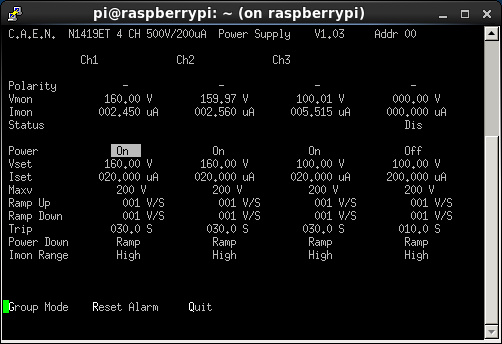
      Detector bias & leakage currents OK - attachment 3
      Merger OK - 4.9M data items/s
      TapeServer OK - 16Mb/s

      All histograms zero'd

21.50 At some point between R33_610 (20.59) and R33_625 (21.30) aida05 stopped producing data (zero good events - see attachment 2)

      able to telnet to aida05 - no warnings/error messages in /var/log/messages

      DAQ STOP (all except aida05 stopped OK, aida05 remained GOING)

      issued aida05 reboot command via telnet command line

      DAQ RESET/SETUP/GO (all FEE64s GOING OK except aida05 - zero good events)

21.15 All system wide checks OK *except*

FEE64 module aida09 global clocks failed, 6
 Clock status test result: Passed 11, Failed 1

Understand status as follows
Status bit 3 : firmware PLL that creates clocks from external clock not locked
Status bit 2 : always logic '1'
Status bit 1 : LMK3200(2) PLL and clock distribution chip not locked to external clock
Status bit 0 : LMK3200(1) PLL and clock distribution chip not locked to external clock
If all these bits are not set then the operation of the firmware is unreliable


FEE64 module aida07 failed
FEE64 module aida09 failed
Calibration test result: Passed 10, Failed 2

If any modules fail calibration , check the clock status and open the FADC Align and Control browser page to rerun calibration for that module


21.50 aida04 & aida05 statistics for comparison - see attachments 4 & 5 |
| Attachment 1: Screenshot_2021-03-12_Temperature_and_status_scan_aidas-gsi(1).png
|
.png.png "Screenshot_2021-03-12_Temperature_and_status_scan_aidas-gsi(1).png")
|
| Attachment 2: Screenshot_2021-03-12_Statistics_aidas-gsi(1).png
|
.png.png "Screenshot_2021-03-12_Statistics_aidas-gsi(1).png")
|
| Attachment 3: 31.png
|
|
| Attachment 4: Screenshot_2021-03-12_Statistics_aidas-gsi(2).png
|
.png.png "Screenshot_2021-03-12_Statistics_aidas-gsi(2).png")
|
| Attachment 5: Screenshot_2021-03-12_Statistics_aidas-gsi(3).png
|
.png.png "Screenshot_2021-03-12_Statistics_aidas-gsi(3).png")
|
|
395
|
Fri Feb 11 12:09:24 2022 |
NH | Fri 11 Feb AIDA Work |
Use beam break between FRS experiments to finalise getting AIDA testable for PJCS etc.
USB hubs reconnected - all 16 ttyUSBs seem to be visible now
New inverter installed (Ortec 533 Sum Invert, brand new) - Pulser T connected to input B1 and inverted out B sent to -ve FEEs
VME crate for VETAR2 is powered on so White Rabbit should be available
All grounds reconnected on FEEs
All FEEs connected to pulser chain again
-
Moved interlock to new Al shelf on AIDA rack so it's not kicked
Powered on OK, all 4 lights on in box but AIDA Relay had to water light
Investigation shows the cable between relay and interlock was broken, one wire had come loose from connector
Resoldered and now it works as usual
System powered up OK
All 16 FEEs respond to serial
All 16 FEEs have WR
All 16 FEEs show pulser ADC entries
Seems good! |
|
479
|
Fri Jun 10 10:32:46 2022 |
NH | Fri 10 Jun |
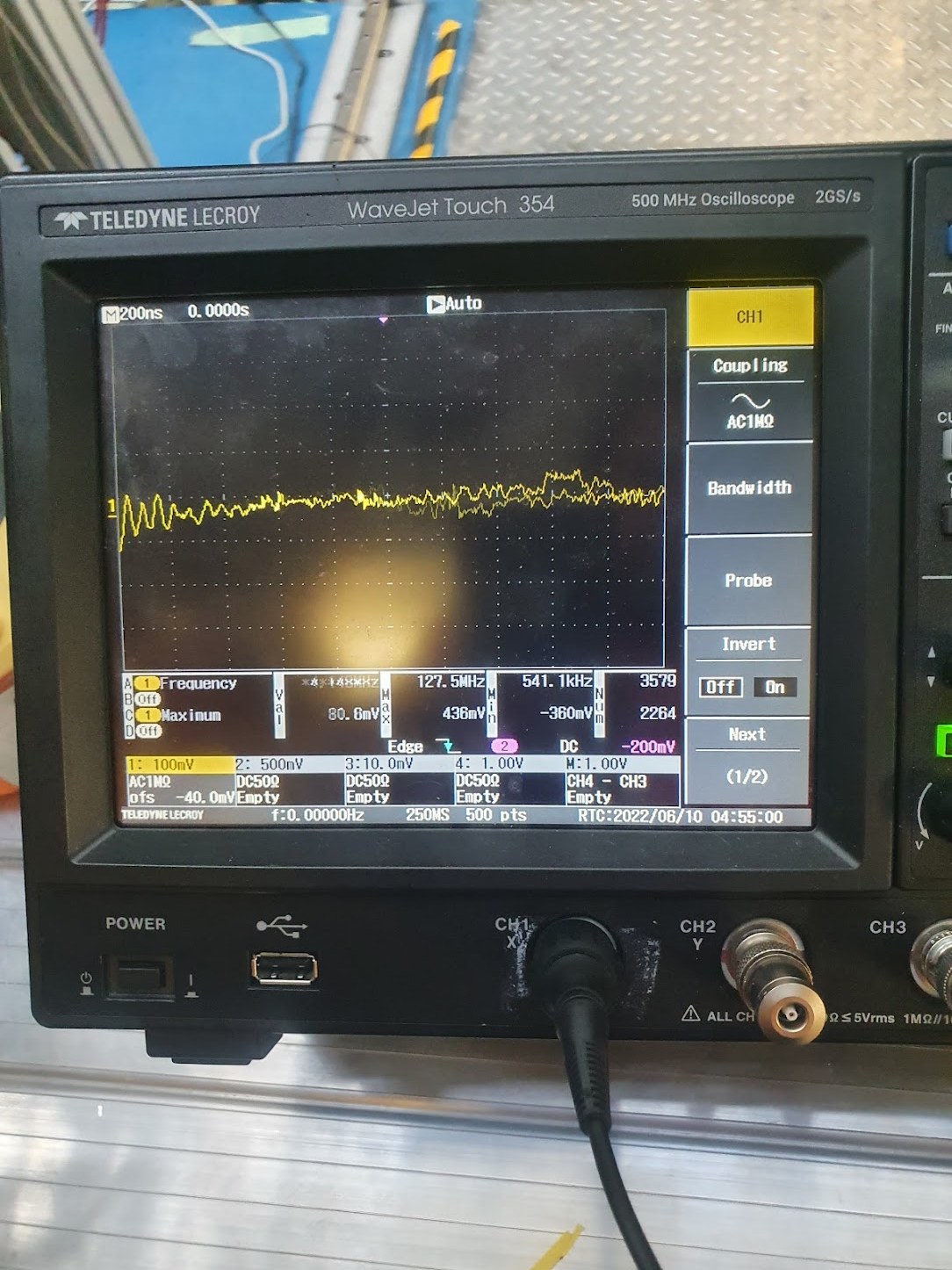
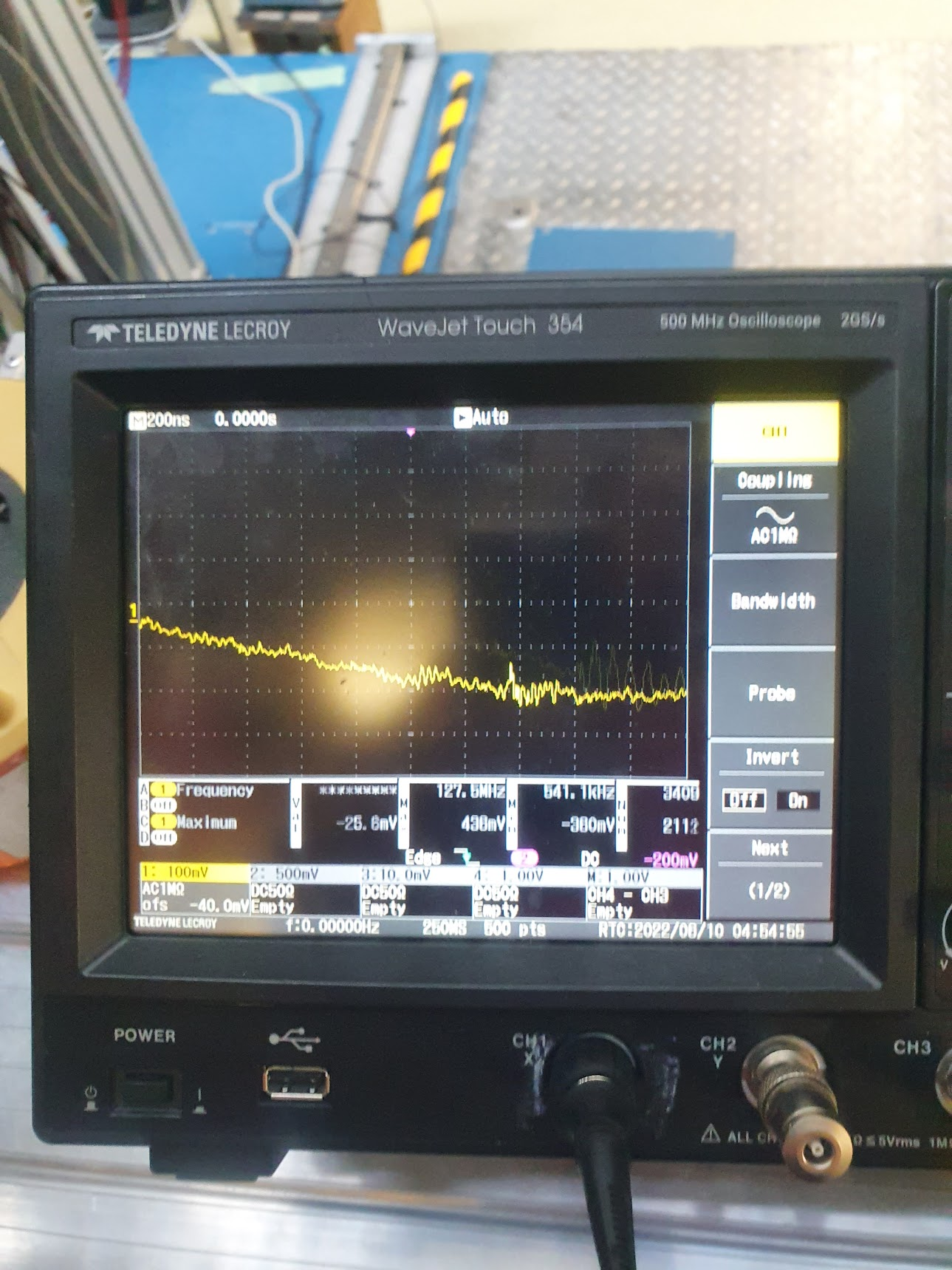
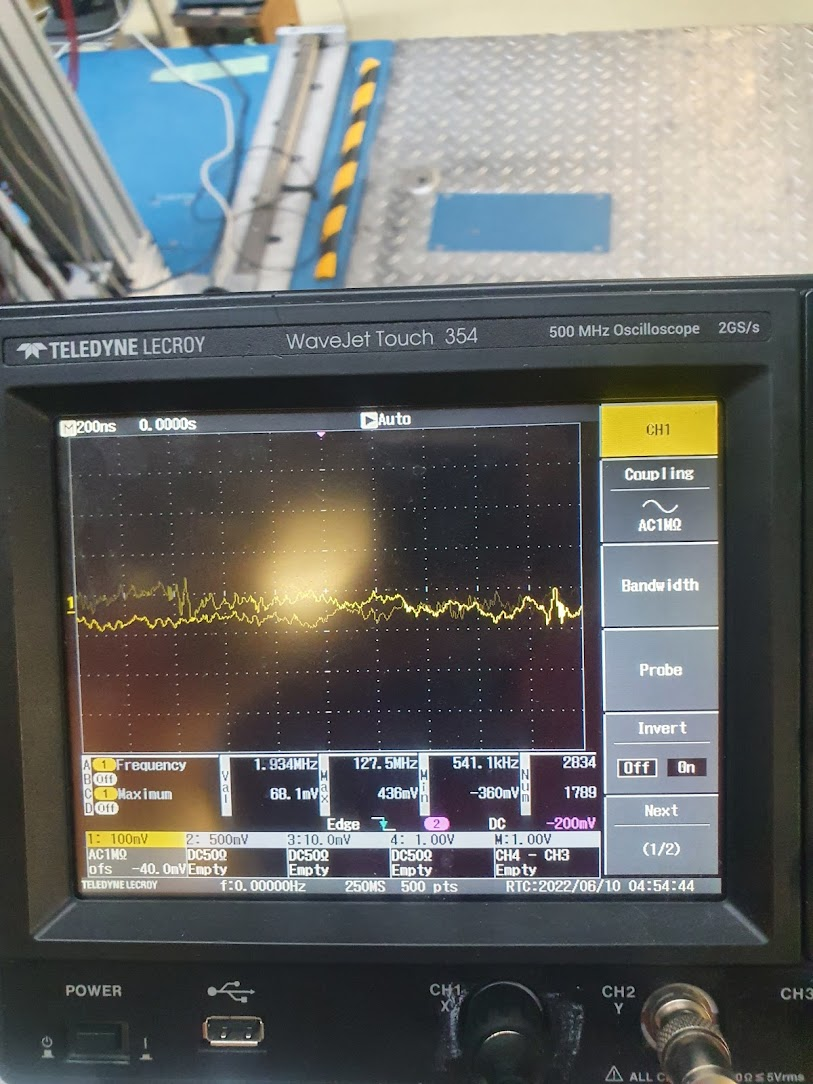
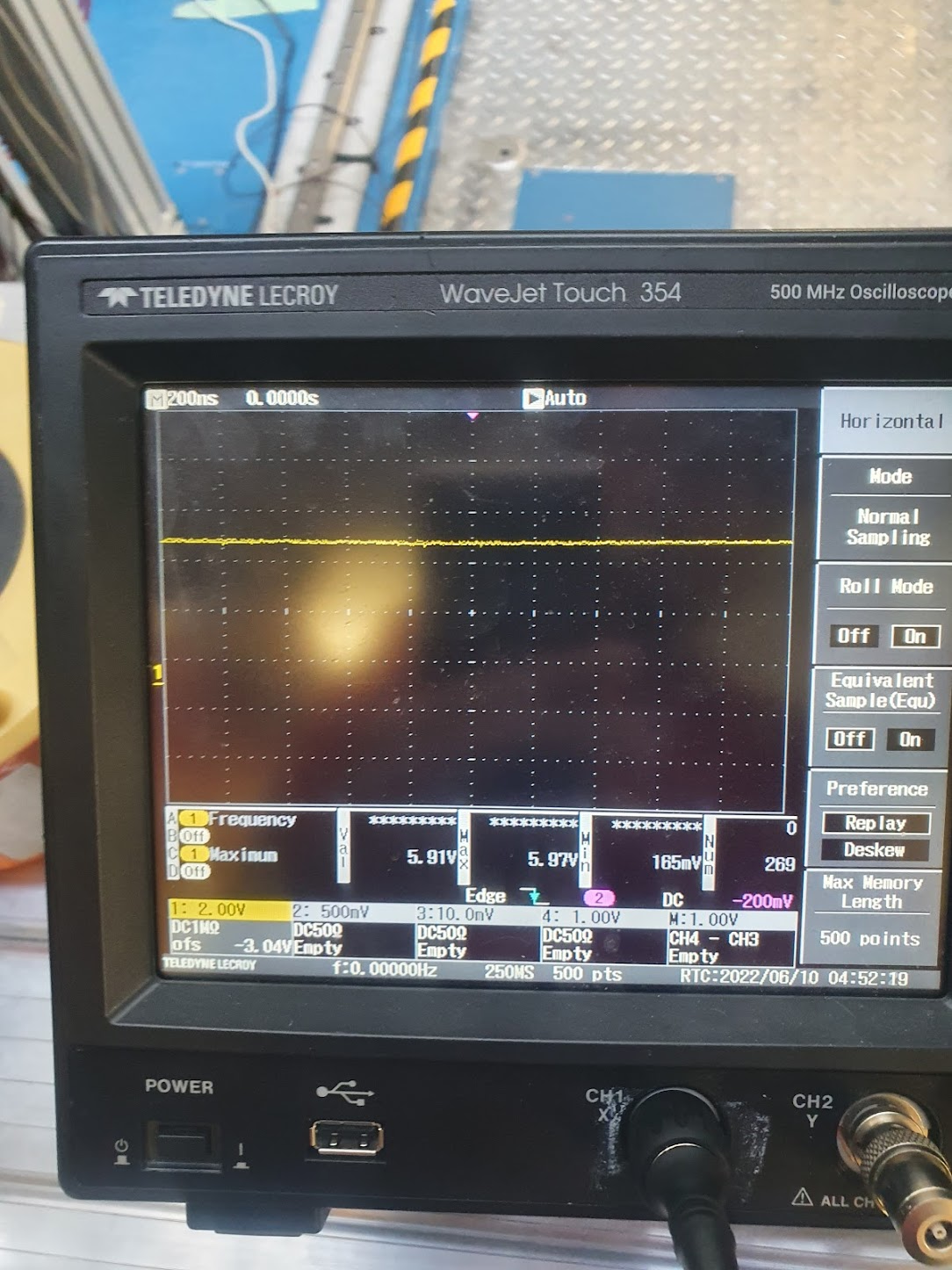
Probe PSU output with 'scope again and 10X probe

Use a AC mains scope as was available, means referenced to ground of AC, but should be ground of platform (and hence Fee64)

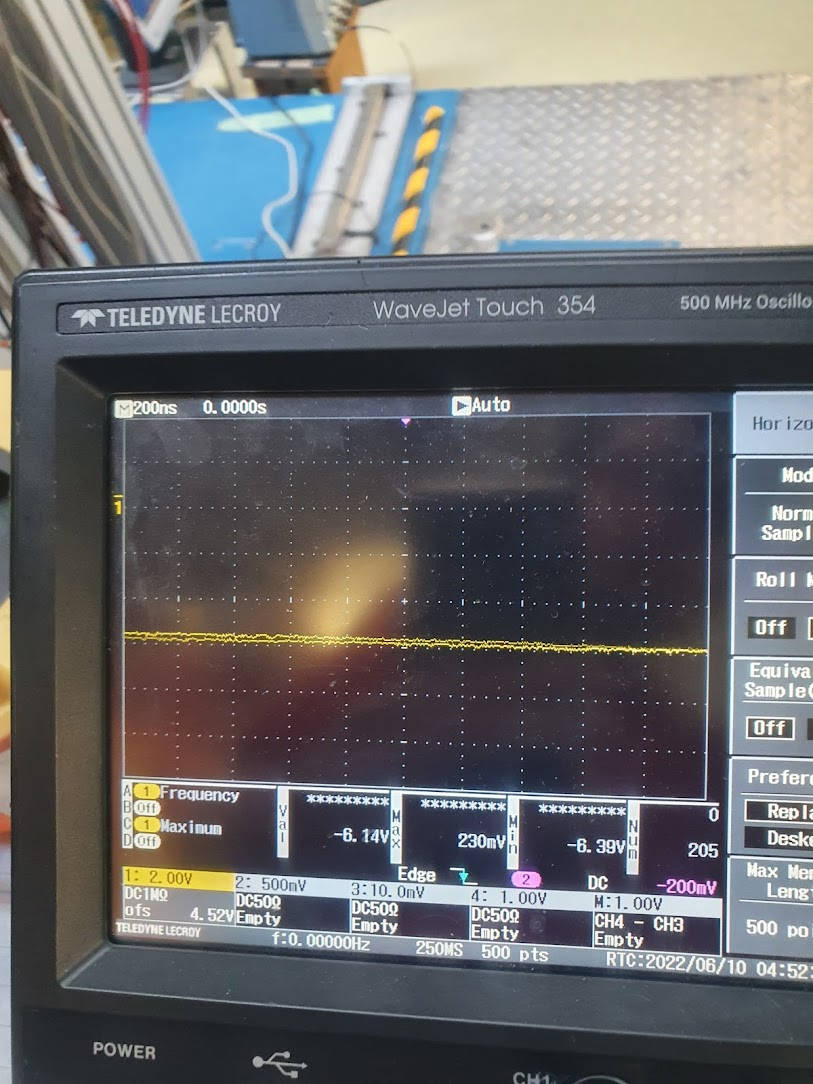
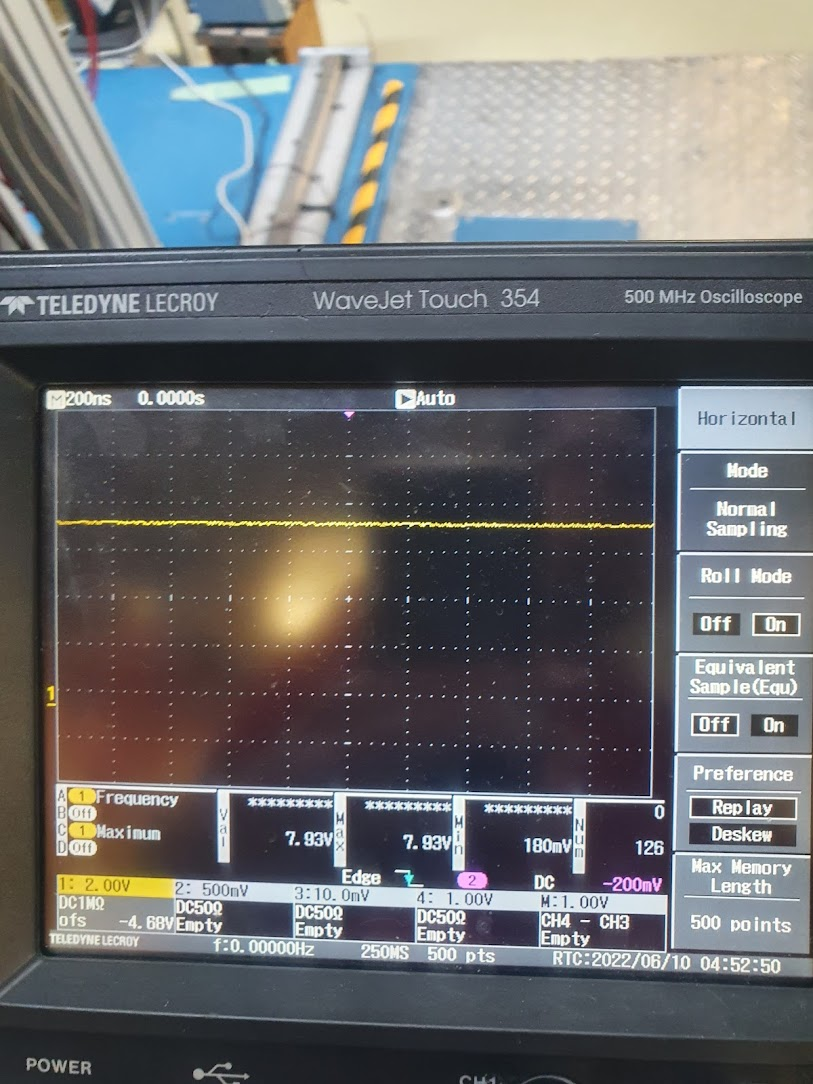
Figs 1-3: Traces of PSU outputs (5V, -6V, 5V Return) with 10X probe, 1 MOhm impedance AC coupled
          Lots of fluctuation and jitter

Figs 4-6: DC 1MOhm output from all 3 power rails

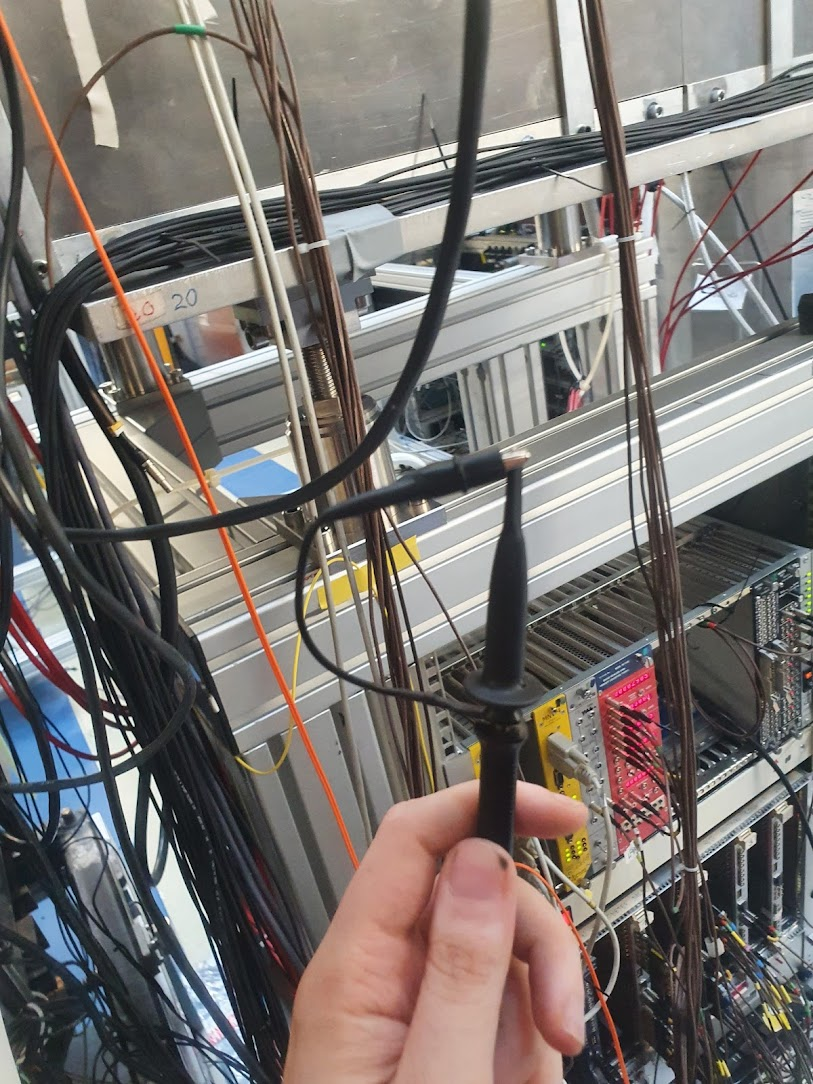
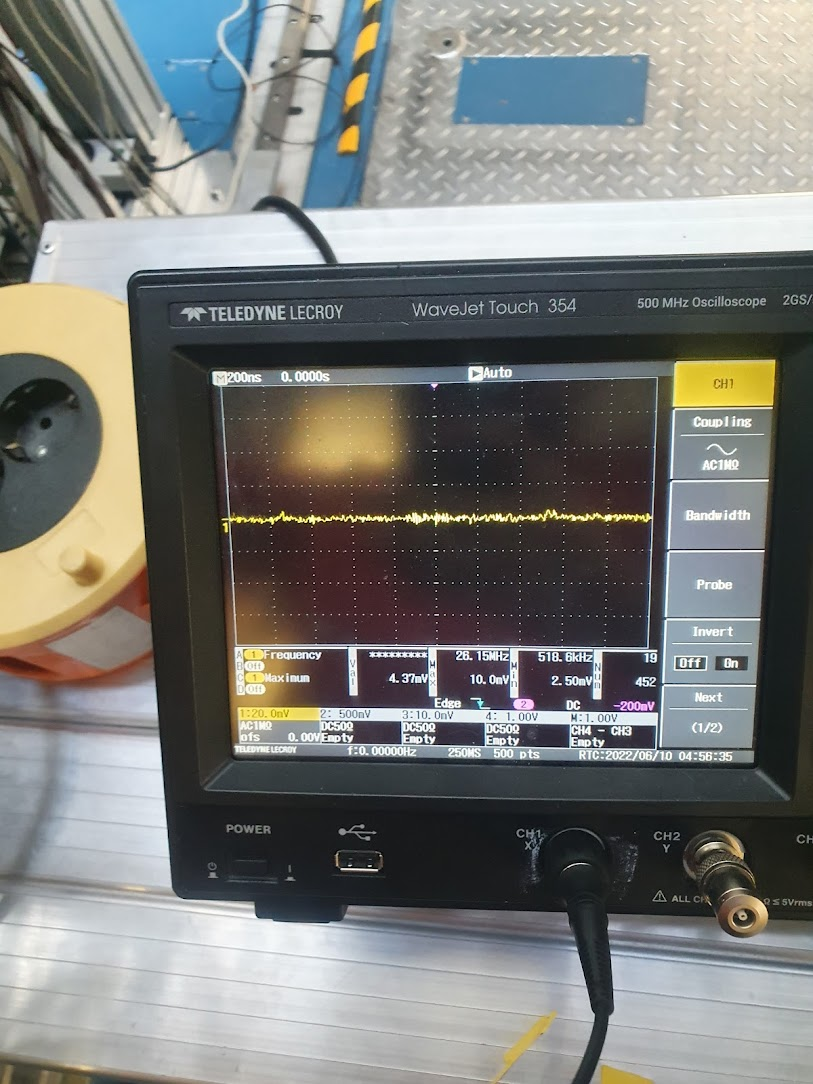
Fig 7-8: Small "loop" using probe and observed scope spectra.

After lunch ideas:

- Try again with 1X probe attenuation, maybe record output to USB

- Remove unconnected MACBs from master

- |
| Attachment 1: scopePSU1.jpg
|
|
| Attachment 2: scopePSU2.jpg
|
|
| Attachment 3: scoepPSU3.jpg
|
|
| Attachment 4: scope5V_DC.jpg
|
|
| Attachment 5: scopeN6V_DC.jpg
|
|
| Attachment 6: scope_7VDC.jpg
|
|
| Attachment 7: scope_RFAnt.jpg
|
|
| Attachment 8: scopeRF_pickup.jpg
|
|
|
518
|
Sun Jul 16 09:32:57 2023 |
TD | Firefox browser proxy setting change |
Firefox browser proxy setting changed to 'Auto-detect proxy settings for this network' ( Firefox -> Edit -> Settings -> Network Settings -> Settings ) |
|
397
|
Tue Mar 1 08:29:19 2022 |
OH, NH | Findings from the upgrade to centos7 from SL6 |
Required packages not included as default
- csh (For running MIDAS scripts)
- xinetd (Runs the rdate server for the FEEs)
- Telnet (Communication with the FEEs)
- dhcp
Configuration changes
Optional extras
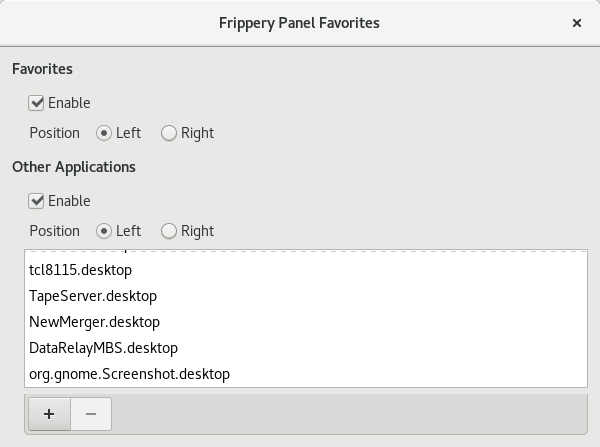
- For top bar icons similar to SL6 can use the gnome extension "Frippery panel favorites"
- Then just need to create desktop icons for each of the startup scripts within /usr/share/applications - Attachment 1
- Can also add screenshot to this - Attachment 2
- Gnome tweaks also allows the number of workspaces to be changed
- Also recommend setting workspaces to span displays
|
| Attachment 1: TapeServer.desktop
|
[Desktop Entry]
Name=TapeServer
Exec=/MIDAS/Linux/startup/TapeServer
Terminal=true
Icon=/home/npg/Downloads/midas100.gif
Type=Application
Comment=TapeServer for AIDA
|
| Attachment 2: Screenshot_from_2022-03-01_09-40-18.png
|
|
|
222
|
Thu Apr 15 12:23:22 2021 |
NH | Fast Discriminator Masks |
It is possible to get good rates with the fast discriminators with a few hot channels mask in aida03 and aida10
Threshold is 0x20 = 3.2 MeV

They can be tested in beam to see performance, especially note the first setting will involve alpha emitters to check in AIDA

All FEEs:
AS01 01, AS3 07 10 13 are masked

aida03:
AS0 12 and 14 are masked in addition

aida10:
AS1 10, 11 and AS2 05, 06 are masked in addiction |
| Attachment 1: Image_Pasted_at_2021-4-14_18-57.png
|

|
|
709
|
Tue Jul 22 18:00:45 2025 |
CC, NK, MP | FWHM aida FEE |
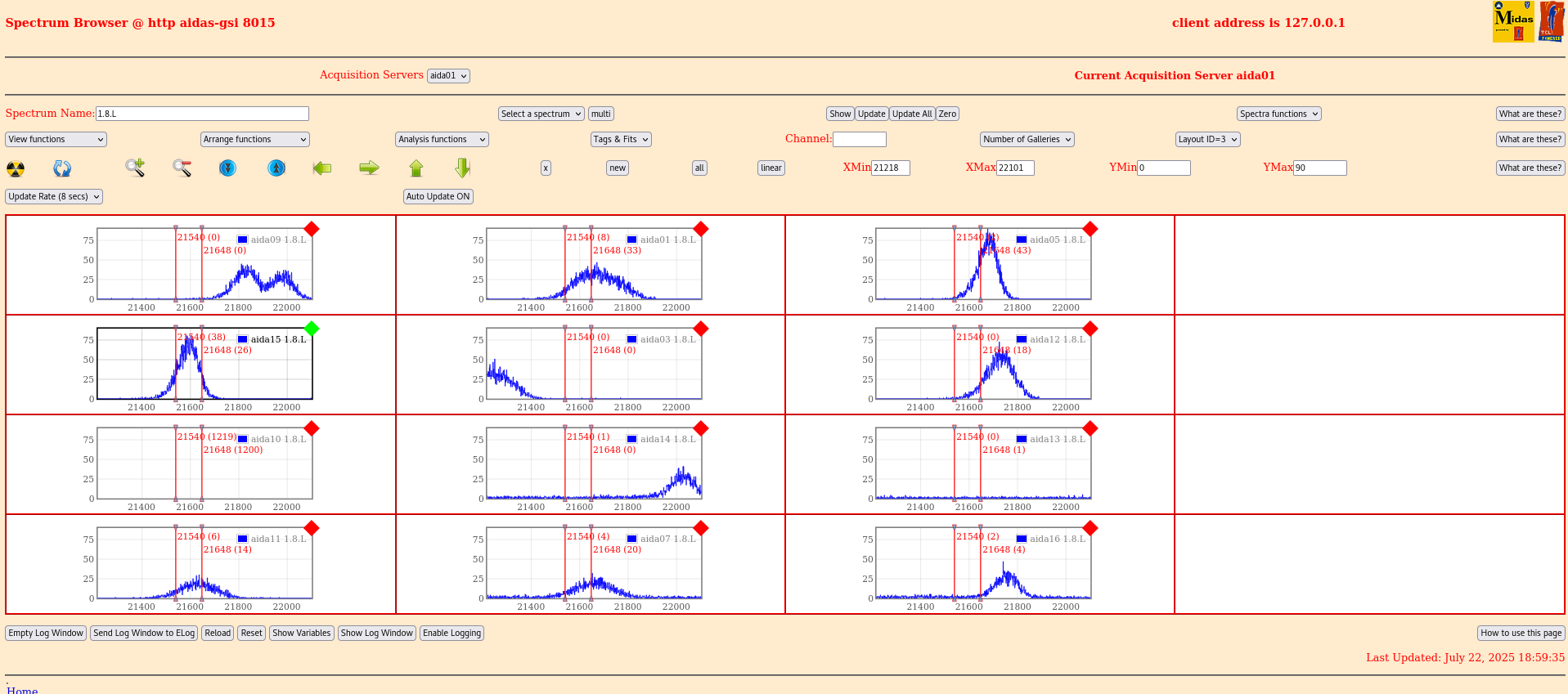
AIDA05 completely disconnected, all the others FEEs64 are fully connected
Attachment 1: aida05, FWHM= 95 ch, 63 keV
Attachment 2: aida15, FWHM= 108 ch, 74 keV |
| Attachment 1: Screenshot_from_2025-07-22_18-59-26.png
|

|
| Attachment 2: Screenshot_from_2025-07-22_18-59-45.png
|
|
|
362
|
Wed Jun 9 19:17:21 2021 |
TD | FEE64 system console logs |
|
| Attachment 1: logs-090621.tar.gz
|
|
3
|
Thu Sep 6 15:42:53 2018 |
OH, TD | FEE64 system console logs |
Kernel panics during boot cab be observed in files ttyUSB1 and ttyUSB5

In each case the FEE64 successfully completed reboot c. 5 minutes later |
| Attachment 1: logs.tar
|
|
562
|
Sun Apr 7 13:08:52 2024 |
TD | FEE64 configuration |
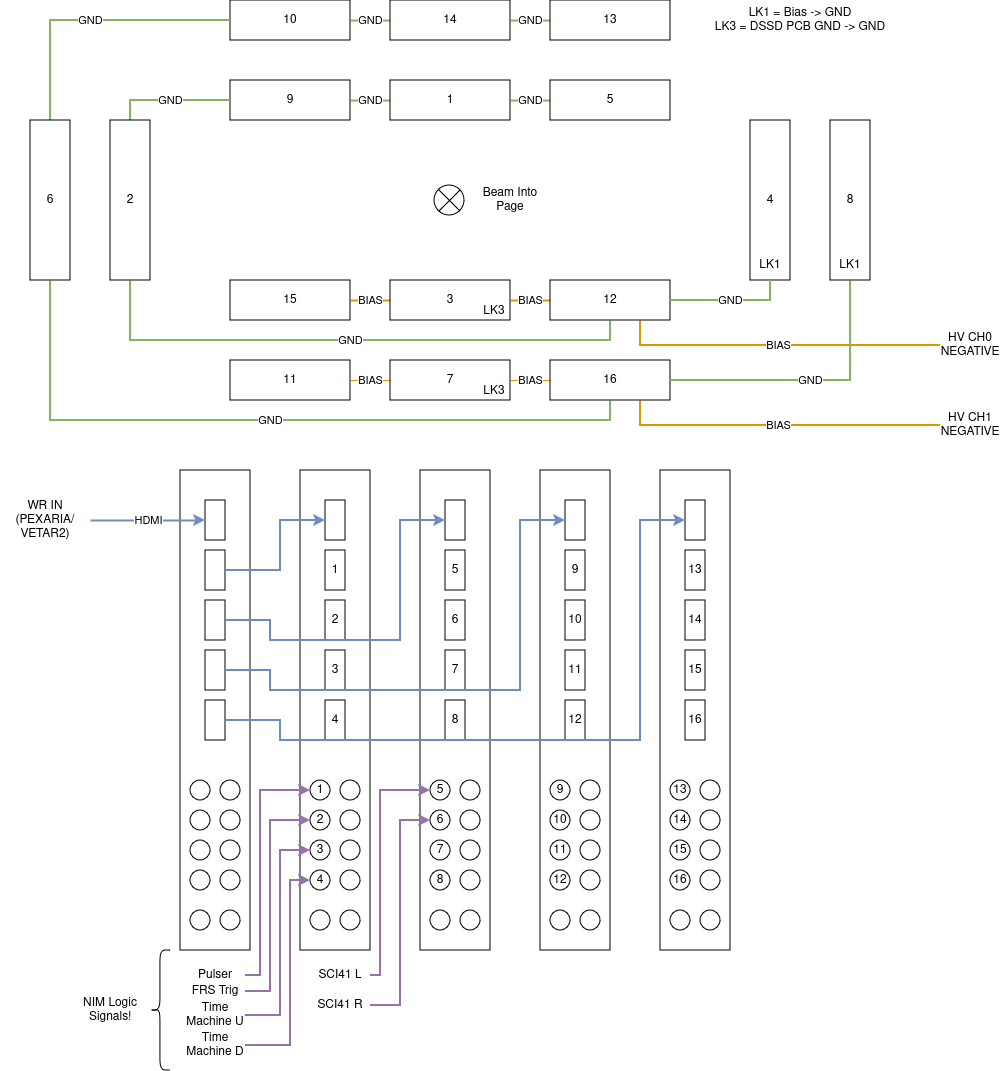
FEE64 configuration per https://elog.gsi.de/despec/S100/6

Configuration: Wide - 16 FEEs, 2 DSSD

DSSD 1:
 X 0-63    =  15
 X 63-127  =  9
 X 128-191 =  3
 X 192-255 =  1
 X 256-319 =  12
 X 320-385 =  5
 Y 0-63    =  4
 Y 63-127  =  2


DSSD 2:
 X 0-63    =  11
 X 63-127  =  10
 X 128-191 =  7
 X 192-255 =  14
 X 256-319 =  16
 X 320-385 =  13
 Y 0-63    =  8
 Y 63-127  =  6

Scalers:
1 - Pulser
2 - FRS Accepted
3 - Time Machine Undelayed
4 - Time Machine Delayed
5 - SC41 L
6 - SC41 R


Thresholds (Slow / Fast / Implant)
DSSD 1 p+n : 0xA (100 keV) / 0xFF (disabled) / 0x02 (200 MeV)
DSSD 1 n+n : 0xF (150 keV) / 0xFF (disabled) / 0x02 (200 MeV) |
| Attachment 1: AIDA_S100_WiringPlan.drawio.png
|
|
|
293
|
Tue May 4 14:26:50 2021 |
NH | FEE64 Adapter wiring diagram and layout |
A figure showing the FEE64 numbers (a previous diagram had 2/6 and 4/8 on the wrong side of the DSSD) and the wiring of pulser/HV
Also the jumpers connected to the boards

As always diagram is looking with direction of beam

Edit: Figure as signals (HV/Pulser) come from the beam right not beam left
Otherwise OK |
| Attachment 1: AIDA_Adapter_Configuration(1).png
|
.png.png "AIDA_Adapter_Configuration(1).png")
|
|
116
|
Thu Dec 19 14:45:42 2019 |
TD | FEE64 ASIC settings - different diode link settings |
[npg@aidas-gsi 2019Oct31-13.24.23]$ pwd
/MIDAS/DB/EXPERIMENTS/AIDA/2019Oct31-13.24.23
[npg@aidas-gsi 2019Oct31-13.24.23]$ /bin/csh
[npg@aidas-gsi 2019Oct31-13.24.23]$ foreach f (`ls`)
foreach? echo $f
foreach? cat "$f"/CONTENTS | grep .26
foreach? end
aida01
ASIC.2.26 string 0xbf
ASIC.3.26 string 0xbf
ASIC.1.26 string 0xbf
ASIC.4.26 string 0xbf
aida02
ASIC.2.26 string 0x11
ASIC.3.26 string 0x11
ASIC.1.26 string 0x11
ASIC.4.26 string 0x11
aida03
ASIC.2.26 string 0xca
ASIC.3.26 string 0xca
ASIC.1.26 string 0xca
ASIC.4.26 string 0xca
aida04
ASIC.2.26 string 0x23
ASIC.3.26 string 0x23
ASIC.1.26 string 0x23
ASIC.4.26 string 0x23
aida05
ASIC.2.26 string 0xbf
ASIC.3.26 string 0xbf
ASIC.1.26 string 0xbf
ASIC.4.26 string 0xbf
aida06
ASIC.2.26 string 0x11
ASIC.3.26 string 0x11
ASIC.1.26 string 0x11
ASIC.4.26 string 0x11
aida07
ASIC.2.26 string 0xca
ASIC.3.26 string 0xca
ASIC.1.26 string 0xca
ASIC.4.26 string 0xca
aida08
ASIC.2.26 string 0x23
ASIC.3.26 string 0x23
ASIC.1.26 string 0x23
ASIC.4.26 string 0x23
aida09
ASIC.2.26 string 0xbf
ASIC.3.26 string 0xbf
ASIC.1.26 string 0xbf
ASIC.4.26 string 0xbf
aida10
ASIC.2.26 string 0x11
ASIC.3.26 string 0x11
ASIC.1.26 string 0x11
ASIC.4.26 string 0x11
aida11
ASIC.2.26 string 0xca
ASIC.3.26 string 0xca
ASIC.1.26 string 0xca
ASIC.4.26 string 0xca
aida12
ASIC.2.26 string 0x11
ASIC.3.26 string 0x11
ASIC.1.26 string 0x11
ASIC.4.26 string 0x11

This variation appears to be true for previously saved ASIC settings too

2018Aug21-13.17.09
2018Sep06-14.38.28
2019Mar31-16.15.57
2019Oct31-13.24.23


Current ASIC settings for AIDA@RIKEN for nnaida1-nnaida4 use values 0x23 and 0xbf

aidas1> cd 2019Jun13-08.56.35
/MIDAS/DB/EXPERIMENTS/AIDA/2019Jun13-08.56.35
aidas1> ls
CONTENTS  nnaida10  nnaida12  nnaida14  nnaida16  nnaida18  nnaida2   nnaida21  nnaida23  nnaida3  nnaida5  nnaida7  nnaida9
nnaida1   nnaida11  nnaida13  nnaida15  nnaida17  nnaida19  nnaida20  nnaida22  nnaida24  nnaida4  nnaida6  nnaida8
aidas1> cat nnaida1/CONTENTS
ASIC.2.20 string 0x68
ASIC.1.3 string 0x02
ASIC.2.19 string 0x5c
ASIC.1.4 string 0x07
ASIC.2.21 string 0x0f
ASIC.2.22 string 0x5c
ASIC.1.5 string 0x08
ASIC.1.6 string 0x09
ASIC.2.23 string 0x08
ASIC.2.24 string 0x68
ASIC.1.7 string 0x05
ASIC.2.25 string 0x08
ASIC.1.8 string 0x00
ASIC.2.26 string 0xbf
ASIC.1.9 string 0x0f
ASIC.2.0 string 0x04
ASIC.2.1 string 0x05
ASIC.3.10 string 0x00
ASIC.2.2 string 0x06
ASIC.3.11 string 0x0d
ASIC.2.3 string 0x02
ASIC.3.12 string 0x0a
ASIC.2.4 string 0x07
ASIC.3.13 string 0x34
ASIC.2.5 string 0x08
ASIC.3.14 string 0x02
ASIC.2.6 string 0x09
ASIC.3.15 string 0x20
ASIC.2.7 string 0x05
ASIC.3.16 string 0xd2
ASIC.2.8 string 0x00
ASIC.3.17 string 0x80
ASIC.2.9 string 0x0f
ASIC.3.18 string 0xb2
ASIC.3.20 string 0x68
ASIC.3.19 string 0x5c
WAVE.0 string 0x00000000
ASIC.3.21 string 0x0f
WAVE.1 string 0x00000000
ASIC.3.22 string 0x5c
LED.0 string 0x00411ecc
WAVE.2 string 0x00000000
ASIC.3.23 string 0x08
LED.1 string 0x0000ffff
WAVE.3 string 0x00000000
ASIC.3.24 string 0x68
LED.2 string 0x00411ecc
ASIC.3.25 string 0x08
LED.3 string 0x00000000
ASIC.1.10 string 0x00
LED.4 string 0x00411ecc
ASIC.3.0 string 0x04
ASIC.1.11 string 0x0d
ASIC.3.26 string 0xbf
ASIC.1.12 string 0x0a
ASIC.3.1 string 0x05
LED.5 string 0x00000000
LED.6 string 0x00411ecc
ASIC.3.2 string 0x06
ASIC.1.13 string 0x34
LED.7 string 0x00000000
ASIC.3.3 string 0x02
ASIC.1.14 string 0x02
LED.8 string 0x000003fc
ASIC.1.15 string 0x20
ASIC.3.4 string 0x07
ASIC.3.5 string 0x08
LED.9 string 0x000000c8
ASIC.1.16 string 0xd2
ASIC.1.17 string 0x80
ASIC.3.6 string 0x09
ASIC.3.7 string 0x05
ASIC.1.18 string 0xb2
ASIC.1.19 string 0x5c
ASIC.1.20 string 0x68
ASIC.3.8 string 0x00
ASIC.3.9 string 0x0f
ASIC.1.21 string 0x0f
ASIC.1.22 string 0x5c
ASIC.4.10 string 0x00
ASIC.1.23 string 0x08
ASIC.4.11 string 0x0d
ASIC.4.12 string 0x0a
ASIC.1.24 string 0x68
ASIC.4.13 string 0x34
ASIC.1.25 string 0x08
ASIC.4.14 string 0x02
ASIC.1.26 string 0xbf
ASIC.4.15 string 0x20
DISC.6 string 0x00000002
ASIC.4.16 string 0xd2
ASIC.4.0 string 0x04
ASIC.4.17 string 0x80
DISC.7 string 0x24800000
ASIC.4.18 string 0xb2
ASIC.4.1 string 0x05
ASIC.4.2 string 0x06
ASIC.4.19 string 0x5c
ASIC.4.20 string 0x68
ASIC.4.21 string 0x0f
ASIC.4.3 string 0x02
ASIC.4.4 string 0x07
ASIC.4.22 string 0x5c
ASIC.4.23 string 0x08
ASIC.4.5 string 0x08
ASIC.4.6 string 0x09
ASIC.4.24 string 0x68
ASIC.2.10 string 0x00
ASIC.4.25 string 0x08
ASIC.4.7 string 0x05
ASIC.4.8 string 0x00
ASIC.4.26 string 0xbf
ASIC.2.11 string 0x0d
ASIC.2.12 string 0x0a
ASIC.4.9 string 0x0f
ASIC.2.13 string 0x34
ASIC.2.14 string 0x02
ASIC.2.15 string 0x20
ASIC.2.16 string 0xd2
ASIC.1.0 string 0x04
ASIC.1.1 string 0x05
ASIC.2.17 string 0x80
ASIC.2.18 string 0xb2
ASIC.1.2 string 0x06
aidas1> cat nnaida2/CONTENTS
ASIC.2.20 string 0x68
ASIC.1.3 string 0x02
ASIC.2.19 string 0x5c
ASIC.1.4 string 0x07
ASIC.2.21 string 0x0f
ASIC.2.22 string 0x5c
ASIC.1.5 string 0x08
ASIC.1.6 string 0x09
ASIC.2.23 string 0x08
ASIC.2.24 string 0x68
ASIC.1.7 string 0x05
ASIC.2.25 string 0x08
ASIC.1.8 string 0x00
ASIC.2.26 string 0xbf
ASIC.1.9 string 0x0f
ASIC.2.0 string 0x04
ASIC.2.1 string 0x05
ASIC.3.10 string 0x00
ASIC.2.2 string 0x06
ASIC.3.11 string 0x0d
ASIC.2.3 string 0x02
ASIC.3.12 string 0x0a
ASIC.2.4 string 0x07
ASIC.3.13 string 0x34
ASIC.2.5 string 0x08
ASIC.3.14 string 0x02
ASIC.2.6 string 0x09
ASIC.3.15 string 0x20
ASIC.2.7 string 0x05
ASIC.3.16 string 0xd2
ASIC.2.8 string 0x00
ASIC.3.17 string 0x80
ASIC.2.9 string 0x0f
ASIC.3.18 string 0xb2
ASIC.3.20 string 0x68
ASIC.3.19 string 0x5c
WAVE.0 string 0x00000008
ASIC.3.21 string 0x0f
WAVE.1 string 0x00000005
ASIC.3.22 string 0x5c
LED.0 string 0x00411ecc
WAVE.2 string 0x0000ff38
ASIC.3.23 string 0x08
WAVE.3 string 0x00000080
LED.1 string 0x0000ffff
ASIC.3.24 string 0x68
LED.2 string 0x00411ecc
ASIC.3.25 string 0x08
ASIC.1.10 string 0x00
LED.3 string 0x00000000
ASIC.1.11 string 0x0d
ASIC.3.0 string 0x04
LED.4 string 0x00411ecc
ASIC.3.26 string 0xbf
ASIC.1.12 string 0x0a
ASIC.3.1 string 0x05
LED.5 string 0x00000000
LED.6 string 0x00411ecc
ASIC.3.2 string 0x06
ASIC.1.13 string 0x34
ASIC.1.14 string 0x02
ASIC.3.3 string 0x02
LED.7 string 0x00000000
LED.8 string 0x000003fc
ASIC.1.15 string 0x20
ASIC.3.4 string 0x07
ASIC.3.5 string 0x08
ASIC.1.16 string 0xd2
LED.9 string 0x000000c8
ASIC.1.17 string 0x80
ASIC.3.6 string 0x09
ASIC.3.7 string 0x05
ASIC.1.18 string 0xb2
ASIC.1.20 string 0x68
ASIC.1.19 string 0x5c
ASIC.3.8 string 0x00
ASIC.3.9 string 0x0f
ASIC.1.21 string 0x0f
ASIC.4.10 string 0x00
ASIC.1.22 string 0x5c
ASIC.1.23 string 0x08
ASIC.4.11 string 0x0d
ASIC.4.12 string 0x0a
ASIC.1.24 string 0x68
ASIC.1.25 string 0x08
ASIC.4.13 string 0x34
ASIC.4.14 string 0x02
ASIC.1.26 string 0xbf
ASIC.4.15 string 0x20
ASIC.4.16 string 0xd2
DISC.6 string 0x00000002
ASIC.4.0 string 0x04
DISC.7 string 0x24800000
ASIC.4.17 string 0x80
ASIC.4.18 string 0xb2
ASIC.4.1 string 0x05
ASIC.4.20 string 0x68
ASIC.4.2 string 0x06
ASIC.4.19 string 0x5c
ASIC.4.3 string 0x02
ASIC.4.21 string 0x0f
ASIC.4.4 string 0x07
ASIC.4.22 string 0x5c
ASIC.4.23 string 0x08
ASIC.4.5 string 0x08
ASIC.4.6 string 0x09
ASIC.4.24 string 0x68
ASIC.2.10 string 0x00
ASIC.4.25 string 0x08
ASIC.4.7 string 0x05
ASIC.4.8 string 0x00
ASIC.4.26 string 0xbf
ASIC.2.11 string 0x0d
ASIC.2.12 string 0x0a
ASIC.4.9 string 0x0f
ASIC.2.13 string 0x34
ASIC.2.14 string 0x02
ASIC.2.15 string 0x20
ASIC.2.16 string 0xd2
ASIC.1.0 string 0x04
ASIC.1.1 string 0x05
ASIC.2.17 string 0x80
ASIC.2.18 string 0xb2
ASIC.1.2 string 0x06
aidas1> cat nnaida3/CONTENTS
ASIC.2.20 string 0x68
ASIC.1.3 string 0x02
ASIC.2.19 string 0x5c
ASIC.1.4 string 0x07
ASIC.2.21 string 0x0b
ASIC.2.22 string 0x5c
ASIC.1.5 string 0x08
ASIC.1.6 string 0x09
ASIC.2.23 string 0x08
ASIC.2.24 string 0x68
ASIC.1.7 string 0x05
ASIC.2.25 string 0x08
ASIC.1.8 string 0x01
ASIC.2.26 string 0x23
ASIC.1.9 string 0x0f
ASIC.2.0 string 0x04
ASIC.2.1 string 0x05
ASIC.3.10 string 0x00
ASIC.2.2 string 0x06
ASIC.3.11 string 0x02
ASIC.2.3 string 0x02
ASIC.3.12 string 0x0a
ASIC.2.4 string 0x07
ASIC.3.13 string 0xdb
ASIC.2.5 string 0x08
ASIC.3.14 string 0x02
ASIC.2.6 string 0x09
ASIC.3.15 string 0x20
ASIC.2.7 string 0x05
ASIC.3.16 string 0xd2
ASIC.2.8 string 0x01
ASIC.3.17 string 0x80
ASIC.2.9 string 0x0f
ASIC.3.18 string 0x30
ASIC.3.20 string 0x68
ASIC.3.19 string 0x5c
WAVE.0 string 0x00000008
ASIC.3.21 string 0x0b
WAVE.1 string 0x00000005
ASIC.3.22 string 0x5c
LED.0 string 0x004021fc
WAVE.2 string 0x0000ff38
ASIC.3.23 string 0x08
WAVE.3 string 0x00000080
LED.1 string 0x0000ffff
ASIC.3.24 string 0x68
LED.2 string 0x004021fc
ASIC.3.25 string 0x08
ASIC.1.10 string 0x00
LED.3 string 0x00000000
ASIC.1.11 string 0x02
ASIC.3.0 string 0x04
LED.4 string 0x004021fc
ASIC.3.26 string 0x23
ASIC.1.12 string 0x0a
ASIC.3.1 string 0x05
LED.5 string 0x00000000
LED.6 string 0x004021fc
ASIC.3.2 string 0x06
ASIC.1.13 string 0xdb
ASIC.1.14 string 0x02
ASIC.3.3 string 0x02
LED.7 string 0x00000000
LED.8 string 0x000003fc
ASIC.1.15 string 0x20
ASIC.3.4 string 0x07
ASIC.3.5 string 0x08
ASIC.1.16 string 0xd2
LED.9 string 0x000000c8
ASIC.1.17 string 0x80
ASIC.3.6 string 0x09
ASIC.3.7 string 0x05
ASIC.1.18 string 0x30
ASIC.1.20 string 0x68
ASIC.1.19 string 0x5c
ASIC.3.8 string 0x01
ASIC.3.9 string 0x0f
ASIC.1.21 string 0x0b
ASIC.4.10 string 0x00
ASIC.1.22 string 0x5c
ASIC.1.23 string 0x08
ASIC.4.11 string 0x02
ASIC.4.12 string 0x0a
ASIC.1.24 string 0x68
ASIC.1.25 string 0x08
ASIC.4.13 string 0xdb
ASIC.4.14 string 0x02
ASIC.1.26 string 0x23
ASIC.4.15 string 0x20
ASIC.4.16 string 0xd2
DISC.6 string 0x00000002
ASIC.4.0 string 0x04
DISC.7 string 0x24800000
ASIC.4.17 string 0x80
ASIC.4.18 string 0x30
ASIC.4.1 string 0x05
ASIC.4.20 string 0x68
ASIC.4.2 string 0x06
ASIC.4.19 string 0x5c
ASIC.4.3 string 0x02
ASIC.4.21 string 0x0b
ASIC.4.4 string 0x07
ASIC.4.22 string 0x5c
ASIC.4.23 string 0x08
ASIC.4.5 string 0x08
ASIC.4.6 string 0x09
ASIC.4.24 string 0x68
ASIC.2.10 string 0x00
ASIC.4.25 string 0x08
ASIC.4.7 string 0x05
ASIC.4.8 string 0x01
ASIC.4.26 string 0x23
ASIC.2.11 string 0x02
ASIC.2.12 string 0x0a
ASIC.4.9 string 0x0f
ASIC.2.13 string 0xdb
ASIC.2.14 string 0x02
ASIC.2.15 string 0x20
ASIC.2.16 string 0xd2
ASIC.1.0 string 0x04
ASIC.1.1 string 0x05
ASIC.2.17 string 0x80
ASIC.2.18 string 0x30
ASIC.1.2 string 0x06
aidas1> cat nnaida4/CONTENTS
ASIC.2.20 string 0x68
ASIC.1.3 string 0x02
ASIC.2.19 string 0x5c
ASIC.1.4 string 0x07
ASIC.2.21 string 0x0b
ASIC.2.22 string 0x5c
ASIC.1.5 string 0x08
ASIC.1.6 string 0x09
ASIC.2.23 string 0x08
ASIC.2.24 string 0x68
ASIC.1.7 string 0x05
ASIC.2.25 string 0x08
ASIC.1.8 string 0x01
ASIC.2.26 string 0x23
ASIC.1.9 string 0x0f
ASIC.2.0 string 0x04
ASIC.2.1 string 0x05
ASIC.3.10 string 0x00
ASIC.2.2 string 0x06
ASIC.3.11 string 0x02
ASIC.2.3 string 0x02
ASIC.3.12 string 0x0a
ASIC.2.4 string 0x07
ASIC.3.13 string 0xdb
ASIC.2.5 string 0x08
ASIC.3.14 string 0x02
ASIC.2.6 string 0x09
ASIC.3.15 string 0x20
ASIC.2.7 string 0x05
ASIC.3.16 string 0xd2
ASIC.2.8 string 0x01
ASIC.3.17 string 0x80
ASIC.2.9 string 0x0f
ASIC.3.18 string 0x30
ASIC.3.20 string 0x68
ASIC.3.19 string 0x5c
WAVE.0 string 0x00000008
ASIC.3.21 string 0x0b
WAVE.1 string 0x00000005
ASIC.3.22 string 0x5c
LED.0 string 0x00402134
WAVE.2 string 0x0000ff38
ASIC.3.23 string 0x08
LED.1 string 0x0000ffff
WAVE.3 string 0x00000080
ASIC.3.24 string 0x68
LED.2 string 0x00402134
ASIC.3.25 string 0x08
LED.3 string 0x00000000
ASIC.1.10 string 0x00
LED.4 string 0x00402134
ASIC.3.0 string 0x04
ASIC.1.11 string 0x02
ASIC.3.26 string 0x23
ASIC.1.12 string 0x0a
ASIC.3.1 string 0x05
LED.5 string 0x00000000
LED.6 string 0x00402134
ASIC.3.2 string 0x06
ASIC.1.13 string 0xdb
LED.7 string 0x00000000
ASIC.3.3 string 0x02
ASIC.1.14 string 0x02
ASIC.1.15 string 0x20
LED.8 string 0x000003fc
ASIC.3.4 string 0x07
ASIC.3.5 string 0x08
LED.9 string 0x000000c8
ASIC.1.16 string 0xd2
ASIC.1.17 string 0x80
ASIC.3.6 string 0x09
ASIC.3.7 string 0x05
ASIC.1.18 string 0x30
ASIC.1.19 string 0x5c
ASIC.1.20 string 0x68
ASIC.3.8 string 0x01
ASIC.3.9 string 0x0f
ASIC.1.21 string 0x0b
ASIC.4.10 string 0x00
ASIC.1.22 string 0x5c
ASIC.1.23 string 0x08
ASIC.4.11 string 0x02
ASIC.4.12 string 0x0a
ASIC.1.24 string 0x68
ASIC.1.25 string 0x08
ASIC.4.13 string 0xdb
ASIC.4.14 string 0x02
ASIC.1.26 string 0x23
ASIC.4.15 string 0x20
ASIC.4.16 string 0xd2
DISC.6 string 0x00000002
ASIC.4.0 string 0x04
DISC.7 string 0x24800000
ASIC.4.17 string 0x80
ASIC.4.18 string 0x30
ASIC.4.1 string 0x05
ASIC.4.2 string 0x06
ASIC.4.20 string 0x68
ASIC.4.19 string 0x5c
ASIC.4.21 string 0x0b
ASIC.4.3 string 0x02
ASIC.4.4 string 0x07
ASIC.4.22 string 0x5c
ASIC.4.23 string 0x08
ASIC.4.5 string 0x08
ASIC.4.6 string 0x09
ASIC.4.24 string 0x68
ASIC.2.10 string 0x00
ASIC.4.25 string 0x08
ASIC.4.7 string 0x05
ASIC.4.8 string 0x01
ASIC.4.26 string 0x23
ASIC.2.11 string 0x02
ASIC.2.12 string 0x0a
ASIC.4.9 string 0x0f
ASIC.2.13 string 0xdb
ASIC.2.14 string 0x02
ASIC.2.15 string 0x20
ASIC.2.16 string 0xd2
ASIC.1.0 string 0x04
ASIC.1.1 string 0x05
ASIC.2.17 string 0x80
ASIC.2.18 string 0x30
ASIC.1.2 string 0x06

Have modifuied AIDA@DESPEC ASIC seetings and saved using DB key 2019Dec19-16.19.51 |
|
388
|
Thu Oct 21 16:18:51 2021 |
OH | FEE and Adaptor board groundings |
During investigations into the noise today by NH and OH a couple of findings were made on the grounding of the FEEs and Adaptor boards.

- The adaptor boards have no connection to the FEE ground over the ERNI connector
   - Currently we are providing one via a ground cable between the FEE Al cooling and the Lemo ground on the adaptor board
- The Al cooling plate is not electrically isolated from the copper plate on the ASIC and both are connected to the electrical ground on the FEE
    - Verified with 0 resistance between plate and HDMI ground shield
- The FEE is electrically isolated from the frame but when cabling is connected they show 0 resistance
    - With electrics disconnected but water still connected they show 200kOhm
- With the bias core going to FEE14 and the braid going to FEE8 better performance in FEE14 is obtained by disconnecting FEE8 adaptor board from the ground
    - The cost of this is the rate of FEE8 goes up to 300k
    - It is essential to have the adaptor board ground on the FEE ground but unsure why having both adaptor boards connected to their respective grounds makes one worse
- The resistance between all FEEs is not zero. Some show a 5Ohm and some show a 35Ohm resistance between each other
|
|
389
|
Tue Oct 26 16:08:46 2021 |
NH | FEE and Adaptor board groundings |
> During investigations into the noise today by NH and OH a couple of findings were made on the grounding of the FEEs and Adaptor boards.
>
> - The adaptor boards have no connection to the FEE ground over the ERNI connector
>    - Currently we are providing one via a ground cable between the FEE Al cooling and the Lemo ground on the adaptor board
> - The Al cooling plate is not electrically isolated from the copper plate on the ASIC and both are connected to the electrical ground on the FEE
>     - Verified with 0 resistance between plate and HDMI ground shield
> - The FEE is electrically isolated from the frame but when cabling is connected they show 0 resistance
>     - With electrics disconnected but water still connected they show 200kOhm
> - With the bias core going to FEE14 and the braid going to FEE8 better performance in FEE14 is obtained by disconnecting FEE8 adaptor board from the ground
>     - The cost of this is the rate of FEE8 goes up to 300k
>     - It is essential to have the adaptor board ground on the FEE ground but unsure why having both adaptor boards connected to their respective grounds makes one worse
> - The resistance between all FEEs is not zero. Some show a 5Ohm and some show a 35Ohm resistance between each other
>

The adapter boards have ERNI ground pins, and the FEE64 has a grounded plane on its ERNI connector, unfortunately the orientation means the ground pins do not touch the plane on the FEE64 and hence no contact is made
Would require installing board "upside down" but then the ASIC connections would be wrong. A new adapter board layout would be necessary to correct this

Tomorrow will investigate direct connection of all FEE64s to mechanical ground via dedicated copper cable.
Currently FEE64s get ground via Pulser(->NIM) ((weak ground)), HDMI(->NIM) ((possibly?)) and Power(->PSU) (primary grounding)
HV Bias is floating at NIM side and so does not provide ground path (intentional)
TD may have ideas to isolate pulser from AIDA FEE ground
Unsure if HDMI ground is a problem

The ground quality via the power may not be ideal over long cables of relatively thin wire. (5 * 20 AWG) and then unsure how ground of PSU connects to mechanical ground
Explicit grounding may help keep resistance between FEEs < 1 Ohm.

Will also mount a DSSD and see situation without pulser, with/without mechanical grounding and maybe with various LK jumpers. |
|
29
|
Thu Mar 21 14:10:10 2019 |
NH | FEE Temperatures |
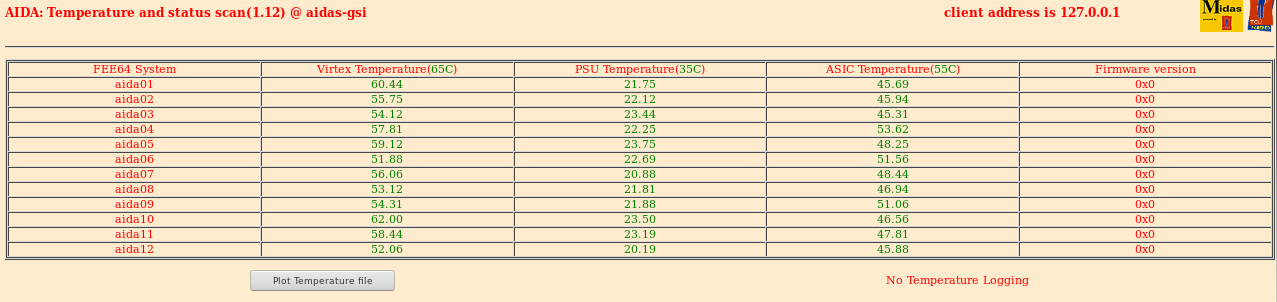
All 12 FEEs powered up, and temperatures are OK.
Passed ASIC checks and system wide checks - now checking cabling and to mount snout. |
| Attachment 1: FEETemps.png
|
|
|
275
|
Sat Apr 24 05:17:51 2021 |
ML | End of beam |
Beam has now stopped (end of expriment) and background measurements starts. |
|
156
|
Mon Mar 16 07:25:24 2020 |
NH | End of Experiment |
08:25 Beam Stopped, end of S480
Tape Server stopped at R12_2097
Started again in no storage mode
Will leave compressing runs |
|
34
|
Fri Mar 22 15:44:20 2019 |
NH | End of 22.03.2019 |
End of the day - Detector unbiased and FEE64s turned off for the weekend as they won't be monitored.
Water will remain on. |